

Your browser shows “Not Secure” next to your clinic’s address. Or your host sent a notice that the certificate is expiring. Or your developer said, “I will just flip the SSL switch,” and you wondered what that touches.
It touches more than you expect. An HTTPS move changes every URL on your site, and every tool that talks to your pages: the booking widget, the intake form, the patient portal link, the chat tool, analytics. If one of those loads the old way, it silently breaks. The padlock looks fine. Patients just cannot book.
I run HTTPS migrations on healthcare sites, and the pattern that works is an order of operations, not a toggle. In the next ten minutes you will learn the seven steps in the right sequence, the exact commands to test each one, and how to turn on HSTS without locking yourself out.
Why Does Moving a Clinic Website to HTTPS Break the Online Booking Widget?
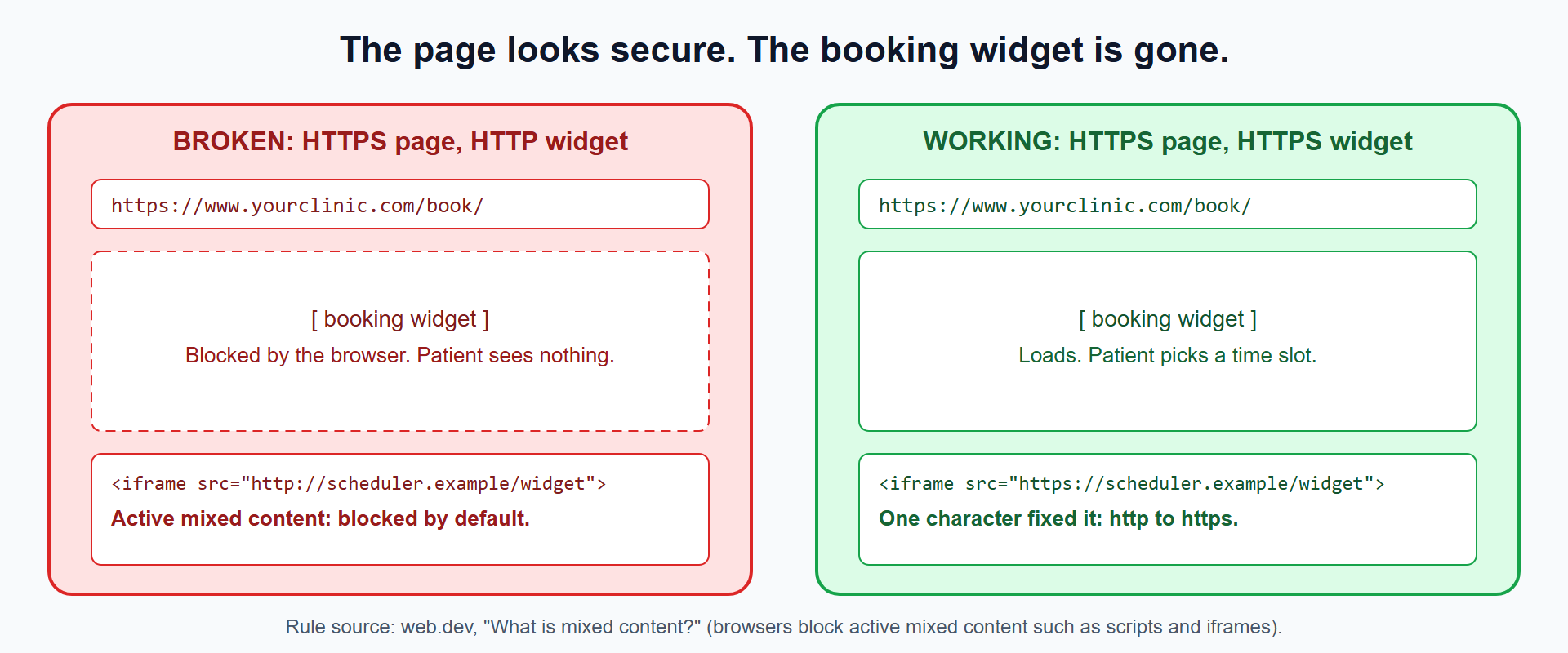
An HTTPS page that embeds an HTTP booking widget triggers mixed content, and browsers block that widget by default.
The web.dev guide What is mixed content? draws the line. Passive content, such as images, risks tampering and tracking, and modern browsers block or upgrade it. Active content, such as scripts, stylesheets and iframes, can take control of the page, and browsers block it outright. A booking widget is an iframe or script. It is active.
How Do I Find Mixed Content Before Patients Do?
Scan the rendered page for http:// references, then confirm in the browser console.
curl -s https://www.yourclinic.com/book/ | grep -oE '(src|href|action)="http://[^"]+"'
Every line returned is a mixed-content candidate. Then open the page in Chrome, press F12 and read the Console tab. Blocked resources appear there with the exact URL. The MDN mixed content guide explains each message you will see.
Scan your forms and your portal link pages too. A login form that posts to http:// is the most serious failure on the site.
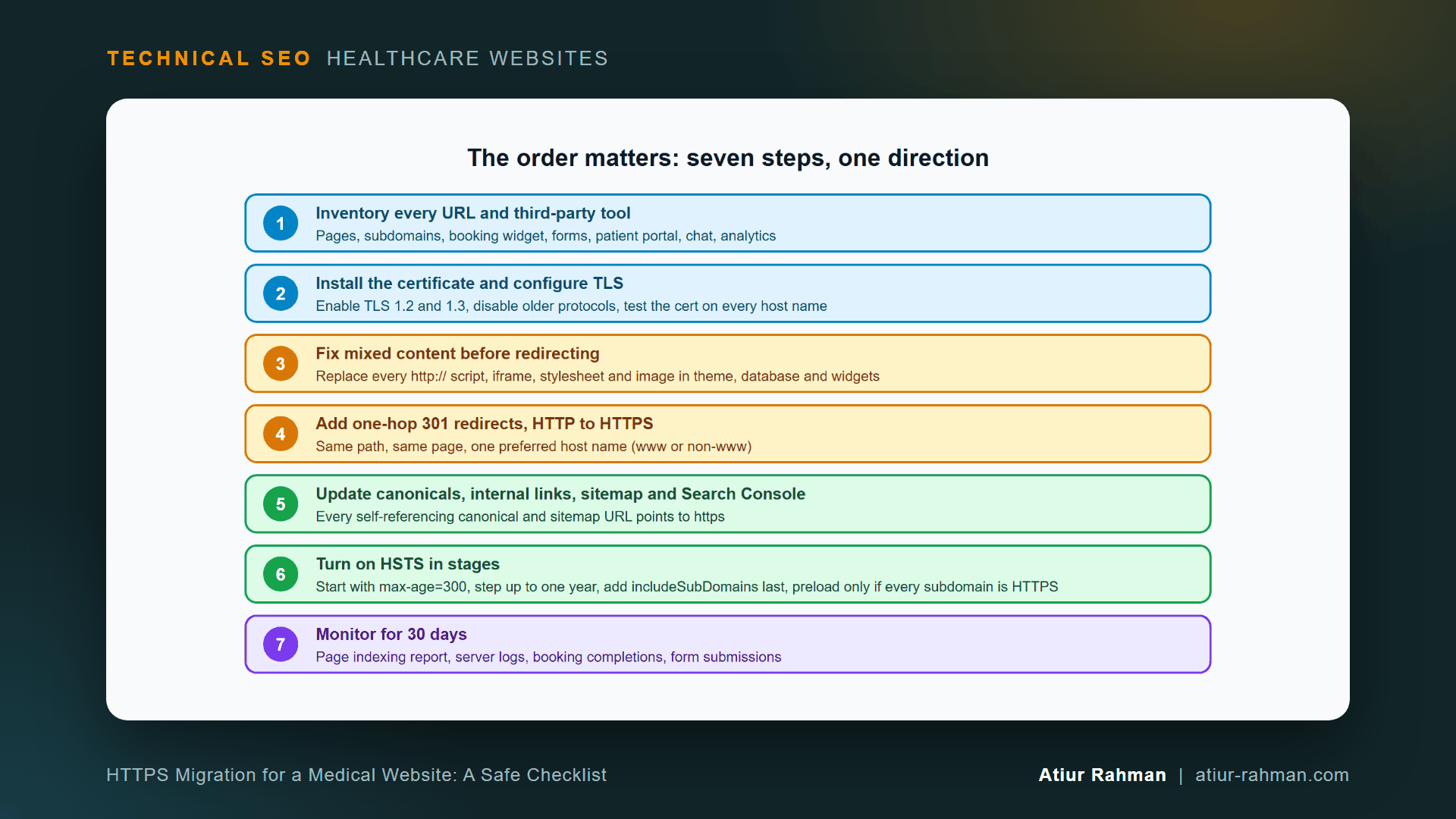
What Is the Correct Order for an HTTPS Migration on a Medical Website?
The correct order is inventory, certificate, mixed content, redirects, canonicals and sitemap, HSTS, then monitoring. Reordering these steps causes the failures below.
Redirecting before you fix mixed content sends patients to broken pages. Enabling HSTS before redirects work locks browsers into a half-finished site. The sequence protects you from both.
Step 1: What Do I Inventory Before Touching the Certificate?
List every URL and every third-party tool that touches your pages. Include subdomains.
- Main site and the
wwwand non-wwwversions - Booking or scheduling widget and its host name
- Patient portal or EHR subdomain
- Contact, intake and newsletter forms
- Chat, call-tracking and review widgets
- Analytics and tag manager
- Your Google Business Profile website link, ad landing URLs and email signatures
Each item is a place where http:// can hide. The inventory also tells you which subdomains need a certificate, which decides your HSTS plan later.
Step 2: How Do I Set Up the Certificate and TLS?
Install a certificate that covers every host name, enable TLS 1.2 and 1.3, and turn off older protocols. Hosts usually issue the certificate for you. Confirm it covers www, the bare domain and any subdomain you inventoried.
curl -vI https://www.yourclinic.com/ 2>&1 | grep -E "SSL connection|subject|expire"
The output names the protocol and the certificate’s expiry date. Set a calendar reminder 30 days before expiry. An expired certificate on a booking page stops bookings the same minute.
Step 3: How Do I Fix Mixed Content Everywhere?
Replace http:// with https:// in the theme files, the database and every widget embed. On WordPress, that means three places: the theme, the content stored in the database, and plugin settings.
For a third-party widget, log into the vendor and copy the updated HTTPS embed code. Many vendors offer a “use HTTPS” option. Replace the old snippet and test the page again with the commands above. Ask the vendor in writing whether their endpoint serves HTTPS before you move.
Step 4: How Do I Redirect HTTP to HTTPS Without Creating Chains?
Use one server-side 301 from each HTTP URL to the same path on the single preferred HTTPS host. Google recommends permanent redirects such as 301 and 308 for moves, in its Redirects guidance.
Apache .htaccess:
RewriteEngine On
RewriteCond %{HTTPS} off [OR]
RewriteCond %{HTTP_HOST} !^www. [NC]
RewriteRule ^ https://www.yourclinic.com%{REQUEST_URI} [L,R=301]
Nginx:
server {
    listen 80;
    server_name yourclinic.com www.yourclinic.com;
    return 301 https://www.yourclinic.com$request_uri;
}
Test for chains. A chain is http://yourclinic.com to http://www.yourclinic.com to https://www.yourclinic.com, two hops where one belongs.
curl -sIL -o /dev/null -w "hops: %{num_redirects} final: %{url_effective}n" http://yourclinic.com/services/
The goal is hops: 1. Google advises keeping redirects in place for as long as possible, generally at least one year, in its site move guide.
Step 5: What Do I Update After the Redirects Work?
Update every self-referencing canonical tag, internal link, XML sitemap entry and structured data URL to HTTPS. Redirects handle visitors. These updates tell Google which URL you prefer.
# Spot-check a canonical
curl -s https://www.yourclinic.com/services/ | grep -i 'rel="canonical"'
Then handle Search Console. HTTP to HTTPS moves do not use the Change of Address tool. Google’s site move guide says so directly. Add the domain as a Domain property, which covers every protocol and subdomain, and submit the new sitemap.
Step 6: What Is HSTS and How Do I Turn It On Without Locking Myself Out?
HSTS is a response header that tells browsers to use only HTTPS for your domain. Roll it out in stages, because browsers remember the instruction for the full max-age duration. MDN’s HSTS reference documents each directive.
Start with five minutes:
# Apache
Header always set Strict-Transport-Security "max-age=300"
# Nginx
add_header Strict-Transport-Security "max-age=300" always;
Test every page, widget and subdomain for a week. Raise to one day, then one week, then one year (max-age=31536000). Add includeSubDomains only after every subdomain, including the portal and the booking host, serves valid HTTPS. Add preload last. The HSTS preload site lists the requirements, and removal from the preload list takes a long time, so treat it as permanent.
Step 7: How Do I Monitor the Migration for 30 Days?
Watch four sources daily in week one, then weekly: the Page indexing report, your server logs, booking completions and form submissions.
In Search Console, the Page indexing report shows how many HTTPS URLs Google indexes and how many HTTP URLs remain. In your server log, Googlebot’s requests to HTTP URLs fall while 301 responses spike, then settle. I show the log commands in How Do I Read My Medical Practice’s Server Log File to See What Googlebot Is Doing?.
Compare booking completions and form submissions with the same weeks before the move. A drop there, with traffic flat, points straight at a broken widget or form.
How Do I Confirm the HTTPS Migration Worked?
Run four tests and keep the output.
# 1. HTTP redirects to HTTPS in one hop
curl -sIL -o /dev/null -w "%{num_redirects} %{url_effective}n" http://www.yourclinic.com/

# 2. HTTPS returns 200
curl -sI https://www.yourclinic.com/ | head -1

# 3. HSTS header present
curl -sI https://www.yourclinic.com/ | grep -i strict-transport

# 4. No http:// resources on key pages
curl -s https://www.yourclinic.com/book/ | grep -oE '(src|href|action)="http://[^"]+"' | wc -l
You want one hop, a 200, a Strict-Transport-Security line and a count of zero.
What Pushback Do I Get From Developers and Marketing, and How Do I Answer It?
Expect two objections, and both come from reasonable concerns.
Developer: “The host already redirects to HTTPS, so we are done.” A host-level redirect covers the front door. It does not fix an http:// iframe inside a page. Answer with the console screenshot of the blocked widget. One screenshot ends the debate.
Marketing: “We will lose tracking and our review links.” Update your analytics property, ad URLs, Google Business Profile website link and email signatures the same day as the redirect, and 301s carry the old links forward in the meantime. Share the inventory from Step 1 so nobody is surprised.
Which Mistakes Break Clinic HTTPS Migrations Most Often?
Redirecting before fixing mixed content, setting a one-year HSTS on day one, forgetting a subdomain, and leaving the sitemap on HTTP cause most failures.
| Mistake | What breaks | Prevention |
|---|---|---|
| Redirect before mixed-content fix | Booking widget blocked on HTTPS | Step 3 before Step 4 |
max-age=31536000 on day one | Browsers refuse HTTP for a year if a subdomain breaks | Start at max-age=300 |
| Missing subdomain certificate | Portal or booking host shows a browser warning | Inventory in Step 1 |
| Redirect chain (two hops) | Slower fetch and diluted signals | Test with num_redirects |
| Sitemap still lists HTTP URLs | Mixed signals to Google | Update and resubmit in Step 5 |
| Canonicals still point to HTTP | Google picks the wrong URL | Update in Step 5 |
Reusable asset: the seven steps and test commands above make a complete migration checklist. Copy them into your project plan.
Related reads in this hub:
- robots.txt vs. noindex vs. Canonical: The Decision Tree I Actually Use
- What Does Technical SEO Control on a Medical Website (and What Can’t It Fix)?
Frequently Asked Questions
Does Moving to HTTPS Improve My Clinic’s Google Rankings?
Not directly. Google lists secure serving as a page experience aspect, and says that beyond Core Web Vitals, the other page experience aspects do not directly help a site rank higher, per its page experience documentation. HTTPS protects patients and keeps browsers from warning them away.
Does HTTPS Make My Medical Website HIPAA Compliant?
No. HTTPS encrypts data in transit between the patient’s browser and your server. Compliance covers far more: where data is stored, who accesses it, vendor agreements and risk analysis. Take that question to your compliance officer or counsel.
Do I Need Google’s Change of Address Tool for an HTTPS Move?
No. Google’s site move guide states the tool does not apply to HTTP to HTTPS moves. Use 301 redirects, update your sitemap and add a Domain property in Search Console.
How Long Do I Keep the HTTP to HTTPS Redirects?
Keep them as long as possible, and for at least one year. Google gives that figure in the same site move guide. Redirects cost almost nothing to keep, and old links, bookmarks and citations keep arriving for years.
Will My Traffic Drop Temporarily After the Move?
Rankings can shift for a short period while Google re-processes every URL. A clean migration keeps the dip small and brief. Watch the Page indexing report and your booking numbers. A drop that lasts beyond a few weeks points to a technical fault, so check redirects, canonicals and mixed content first.
Do I Need HSTS, or Is a 301 Redirect Enough?
A 301 is enough for search. HSTS adds browser-level protection against downgrade attacks, and it removes the first insecure request on return visits. Roll it out in stages as described in Step 6, and skip preload unless you control every subdomain.
Facing unexplained indexation drops or broken booking funnels on your clinic website? Book a 30-minute technical consultation with Atiur.
Part of the Technical SEO for Healthcare Websites series. More guides are on the blog. Related case study: Multi-specialty dental group: +24% traffic growth through complex rebrand.
References
- web.dev, What is mixed content?
- MDN Web Docs, Mixed content
- MDN Web Docs, Strict-Transport-Security
- HSTS Preload, hstspreload.org
- Google Search Central, Redirects and Google Search
- Google Search Central, Site moves with URL changes
- Google Search Central, Understanding page experience