

You blocked a page in robots.txt, and Google still lists it. Your developer says the block is correct. Search Console says the page is indexed. Both of them are telling the truth, and that is exactly what makes this so maddening.
If you run a clinic, a surgical center or a multi-location practice, the pages that slip through are the ones you least want public: a staging copy of the site, a patient-portal login, a booking confirmation page. Each stray URL clutters your search presence, burns developer hours, and in the worst case sends a patient to a page that was never meant for them.
I audit healthcare websites for this exact mix-up, and the cause is almost always the same. Crawling vs indexing vs ranking is not a vocabulary quiz. They are three separate stages with three separate controls. In the next ten minutes you will learn which stage is failing on your site, which single line to change, and which line to leave alone.
Why Does Google Still Show a Page I Blocked in robots.txt?
Google shows a blocked page because robots.txt controls crawling, and crawling is not indexing. Google’s own documentation says it plainly: a page disallowed in robots.txtcan still be indexed if other sites link to it.
Search Console gives this problem its own label. Open the Page indexing report and you will find the status “Indexed, though blocked by robots.txt,” listed in Google’s Page indexing report help. Practice owners see that line, assume the block failed, and ask a developer to “fix robots.txt.” The block did not fail. It did exactly what it is built to do.
Crawling vs Indexing vs Ranking: What Are the Three Stages Google Uses to Show a Clinic Page?
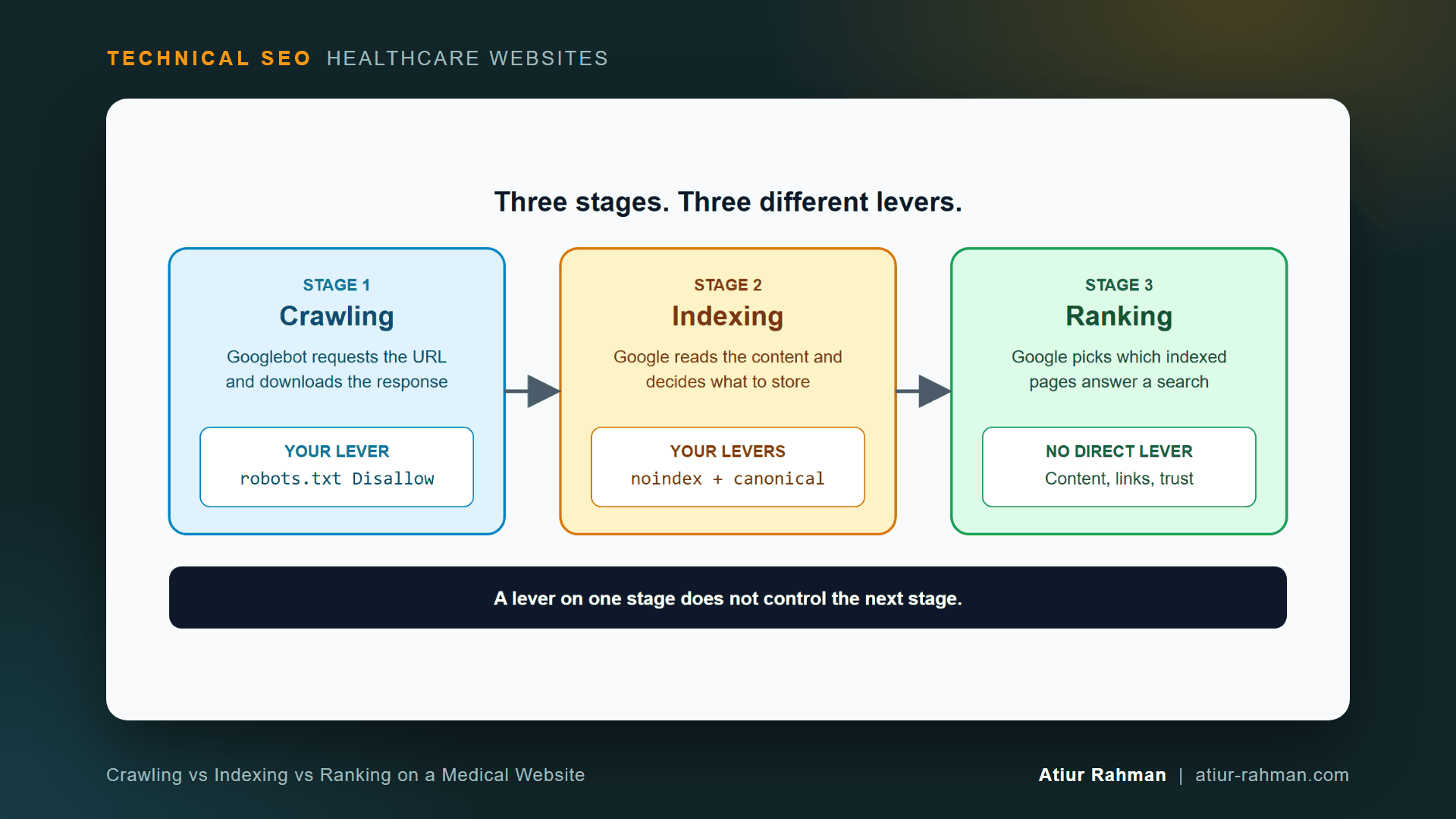
Google moves every URL through three stages: crawling, indexing and ranking. Each stage answers one question and responds to a different control.
Doctors already think this way. A blood panel does not diagnose a patient. It isolates one system so you know where to treat. The same logic applies here: you test one stage at a time.
| Stage | The question it answers | What you control | What you do not control |
|---|---|---|---|
| Crawling | Can Googlebot fetch this URL? | robots.txt, server access, firewall rules | Whether the URL is stored |
| Indexing | Does Google store this page? | noindex, canonical tags, redirects, content quality | Where the page appears |
| Ranking | Which stored pages answer this search? | Indirectly: content, links, trust | Nothing direct |
The How Search Works documentation from Google Search Central describes the same pipeline: crawling and indexing come first, and serving results comes last.
What Happens During Crawling on a Medical Website?
During crawling, Googlebot requests a URL and receives a server response. The status code, response time and robots.txt rules decide whether the fetch succeeds. Google lists its crawler types in the Googlebot overview, and every one of them reads your robots.txt before requesting a page.
A Disallow rule here stops the request. It says nothing about the page’s presence in search.
What Happens During Indexing?
During indexing, Google processes the fetched page, picks a canonical version and decides whether to store it. This is where noindex and canonical tags act. Duplicate location pages, thin provider bios and parameter URLs all get sorted at this stage. I cover that duplicate sorting in Why Did Google Pick the Wrong Canonical URL for My Clinic Locations?.
What Happens During Ranking?
During ranking, Google chooses which indexed pages answer a specific search and orders them. You have no setting for this stage. Content quality, intent match and links influence it, and I separate those from technical work in What Does Technical SEO Actually Control on a Healthcare Website?.
How Does robots.txt Block Crawling but Keep a URL in Search Results?
A blocked URL stays visible because Google learns it exists from links and sitemaps, then lists the address without ever reading the page.
Picture a hospital directory with a locked door on room 214. A visitor cannot enter. The directory still lists “Room 214,” because other departments refer patients to it. Googlebot is the visitor. Links from other pages are the referrals. The locked door stops entry, not mention.
Here is the sequence on a clinic site:
- A developer adds
Disallow: /staging/torobots.txt. - Googlebot obeys and never fetches
/staging/pages. - An old blog post, a social profile or an XML sitemap still points to a
/staging/URL. - Google records the URL from that link and indexes the bare address, often with a generic title built from the link text.
Because Google never fetched the page, it has no content to show. The search result looks hollow: a URL, no description, sometimes a note that no information is available. Google addresses that gap in its help page, No page information in search results.
Why Does Adding noindex to a Blocked Page Not Work?
Adding noindex to a page that robots.txt blocks does nothing, because Googlebot never fetches the page and never reads the tag.
Google states the rule directly in Block Search indexing with noindex: for the noindex rule to take effect, the page must not be blocked by a robots.txt file. The tag is a message. A blocked page never delivers it.
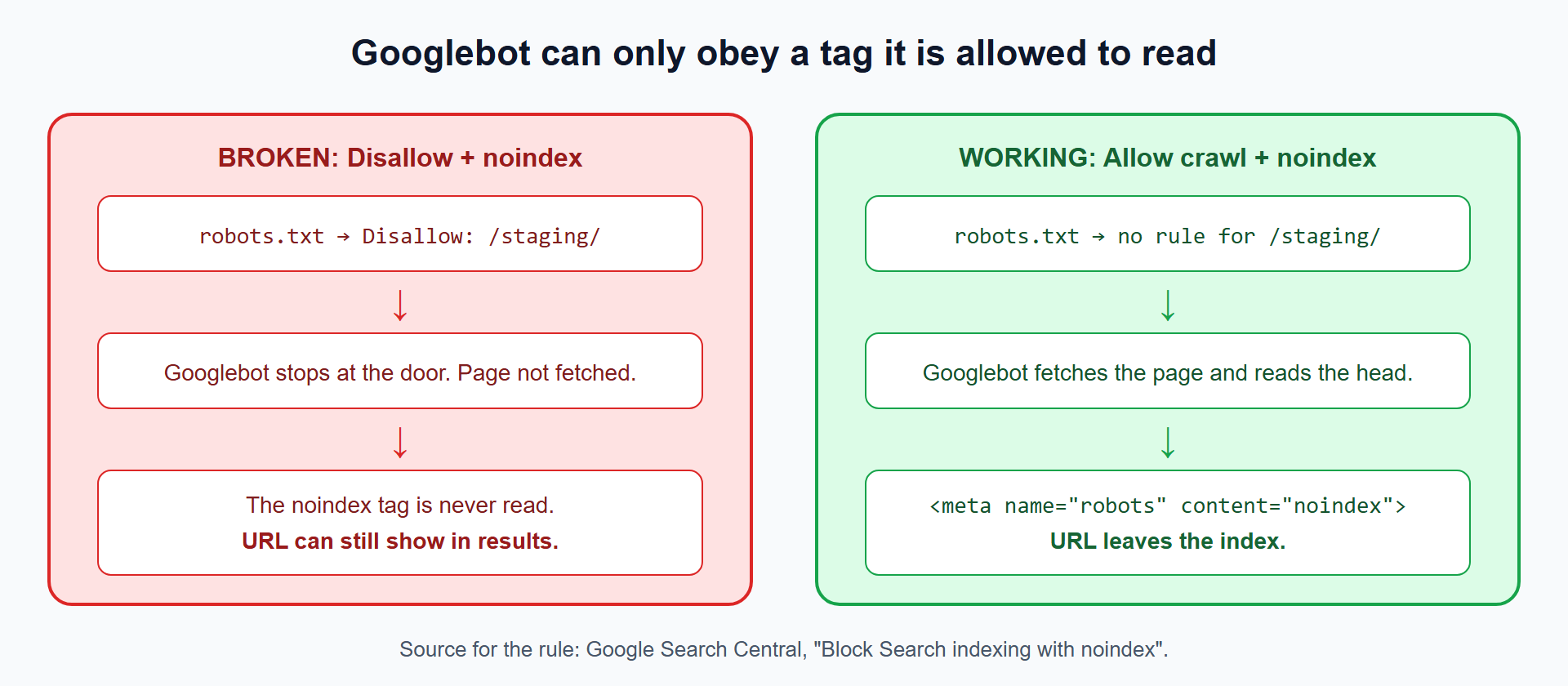
I call this the locked-door conflict. It appears whenever one team adds the Disallow and another team adds the noindex months later, each unaware of the other.
How Do I Check Which Stage Is Failing on My Clinic Website?
Test the stages in order: crawl access first, then the index directive, then the live index status. Three checks take about ten minutes.
How Do I Check Whether robots.txt Blocks a URL?
Fetch your robots.txt and read it, then test the exact URL in Search Console.
curl -s https://www.yourclinic.com/robots.txt
Look for any Disallow line whose path matches the URL. Google’s robots.txt specification defines exactly how paths and wildcards match, so test the real URL rather than guessing.
How Do I Check Whether a Page Carries a noindex Directive?
Request the page headers and the HTML head, because noindex arrives in two places: the X-Robots-Tag HTTP header and the robots meta tag.
# 1. HTTP header check
curl -I https://www.yourclinic.com/thank-you/

# 2. Meta tag check
curl -s https://www.yourclinic.com/thank-you/ | grep -i "robots"
Example output from a page that is correctly set up to leave the index:
HTTP/2 200
content-type: text/html; charset=UTF-8
x-robots-tag: noindex, follow
Read the status line first. A 200 plus a noindex signal means Google can fetch the page and remove it. A 403 for the Googlebot user-agent means a firewall blocks the fetch and the tag stays hidden. Google documents both delivery methods in its robots meta tag specification.
How Do I Confirm What Google Actually Sees?
Use the URL Inspection tool in Search Console. It reports three facts for any URL: whether Google can crawl it, whether robots.txt blocks it, and whether it is indexed. If it says “Blocked by robots.txt” and “Indexed” together, you have found the locked-door conflict.
Which Directive Do I Use: Disallow, noindex or Canonical?
Use noindex to remove a page from search, Disallow to stop crawling of low-value URLs, and a canonical tag to consolidate near-duplicates onto one preferred URL. Never stack Disallow on top of noindex for the same page.
| Your goal | Directive | Stage it acts on | Crawling allowed? |
|---|---|---|---|
| Remove a page from Google Search | noindex (meta tag or header) | Indexing | Yes, required |
| Stop Googlebot wasting requests on endless filter URLs | Disallow in robots.txt | Crawling | No |
| Merge duplicate clinic location pages into one | rel="canonical" | Indexing | Yes, required |
| Protect patient information | Login and server authentication | Access, not search | Not applicable |
The canonical row follows Google’s Consolidate duplicate URLs guidance. I expand the full decision logic in robots.txt vs. noindex vs. Canonical: The Decision Tree I Actually Use.
Does robots.txt Protect Private Patient Information?
No. A robots.txt file is a public text file anyone can read, and it carries no security. Google says to keep a page out of search by using noindex or password protection, per its robots.txt introduction.
For a patient portal or any page with protected health information, put authentication on the server. Never list a sensitive path in robots.txt and call it protected. The file advertises the very path you want hidden.
How Do I Fix a Clinic Page That Is Blocked but Still Indexed?
Remove the Disallow rule, add noindex, wait for Google to re-crawl, and only then consider blocking again. The order matters.
- Add
noindexfirst. Place<meta name="robots" content="noindex">in the page head, or send anX-Robots-Tag: noindexheader from the server. - Remove the
Disallowrule for that path inrobots.txt, so Googlebot reaches the page. - Request a re-crawl through URL Inspection. Googlebot fetches the page, reads
noindexand drops the URL. - Confirm removal in the Page indexing report once the status changes to “Excluded by ‘noindex’ tag.”
- Decide on the block afterward. Many pages do not need a
Disallowat all.noindexdoes the whole job.
What Do Developers Say When You Ask Them to Remove the Disallow?
Developers push back, and the objection is reasonable: “We blocked it so the staging site stays private. Removing the block exposes it.” They are right about the risk and wrong about the tool.
I answer with one question: “Is this page private, or is it only unwanted in search?” If it is private, authentication is the fix and robots.txt was never the right control. If it is only unwanted in search, noindex is the fix. Either way the Disallow rule contributes nothing. Framed that way, the change costs the developer one line of config and one header, and nobody has to defend the old rule.
What Is the Quick Checklist for Crawl, Index and Rank Problems?
Print this and run it before opening any ticket about a missing or unwanted page.
- ☐ Does the URL return
200to a Googlebot user-agent request? (curl -I) - ☐ Does
robots.txtcontain aDisallowrule matching the path? - ☐ Does the page carry
noindexin a meta tag orX-Robots-Tagheader? - ☐ Do both of the above exist on the same URL? If yes, remove the
Disallowfirst. - ☐ Does the sitemap list a URL that you also marked
noindexor blocked? Remove it from the sitemap. - ☐ Does URL Inspection report the canonical Google chose? Compare with the one you declared.
- ☐ Is the page protecting patient data? Move the protection to authentication.
Reusable asset: the directives table above works as a printable cheat sheet. Copy it into your team’s runbook.
Frequently Asked Questions
How Long Does It Take Google to Remove a Page After I Add noindex?
Google removes the page the next time Googlebot re-crawls it. Frequently crawled pages drop within days, and rarely visited pages take weeks. Use URL Inspection and Google’s recrawl request process to speed up the visit. Your own noindex tag decides the outcome, not a timer.
Can I Use the Search Console Removals Tool Instead of noindex?
The Removals tool hides a URL temporarily, not permanently. Google’s Removals tool help describes it as a short-term block. Use it for an urgent exposure, then add noindex or authentication so the URL stays gone after the hiding period ends.
Do noindex Pages Belong in My XML Sitemap?
No. A sitemap tells Google which URLs you want indexed, and noindex says the opposite. Mixed signals waste crawl attention. Keep only indexable, canonical URLs in the file, as Google’s sitemap overview describes.
Does Adding noindex to One Page Hurt the Rest of My Clinic Website?
No. A noindex directive applies to the single URL that carries it. Your provider pages, service pages and location pages keep their own indexing status. Adding it to a booking confirmation page protects the rest of the site by keeping low-value URLs out of results.
Is Disallow Ever the Right Choice on a Medical Website?
Yes. Disallow fits URLs you never want Googlebot to request, such as endless filter or internal search URLs that waste requests on a large catalog. Google’s crawl budget guide covers that use. Reserve it for crawl control and pair it with noindex only on separate URLs.
Does a robots.txt Block Make a Patient Page Private?
No. Anyone can read robots.txt, and it lists the paths you tried to hide. Protect patient information with server-side authentication, and use noindex to keep any public-facing leftovers out of search.
Facing unexplained indexation drops or broken booking funnels on your clinic website? Book a 30-minute technical consultation with Atiur.
Part of the Technical SEO for Healthcare Websites series. More guides are on the blog. Related case study: Fixing the Faceted Navigation That Was Eating a Pharmacy Catalog’s Crawl Budget.
References
- Google Search Central, How Search Works
- Google Search Central, Introduction to robots.txt
- Google Search Central, Robots.txt specification
- Google Search Central, Block Search indexing with noindex
- Google Search Central, Robots meta tag specification
- Google Search Central, Consolidate duplicate URLs
- Google Search Central, Googlebot and crawlers overview
- Google Search Console Help, Page indexing report
- Google Search Console Help, URL Inspection tool
- Google Search Console Help, No page information in search results