

You have a page you do not want in Google, and three tools that all sound like the answer. A developer says “just block it in robots.txt.” An SEO plugin offers a noindex checkbox. Someone else mentions a canonical tag. You pick one, and a month later the page is still showing up.
You are not missing a setting. These three tools solve three different problems, and using the wrong one for the job does nothing or makes things worse. Clinics hit this constantly because a medical site carries every awkward page type at once: booking confirmations, provider PDFs, location duplicates, directory filters and a portal login.
I use one robots.txt vs noindex vs canonical decision tree on every healthcare audit. In the next ten minutes you will learn which directive fits which clinic page, which combinations cancel each other out, and how to check your own site for conflicts with a script you can run today.
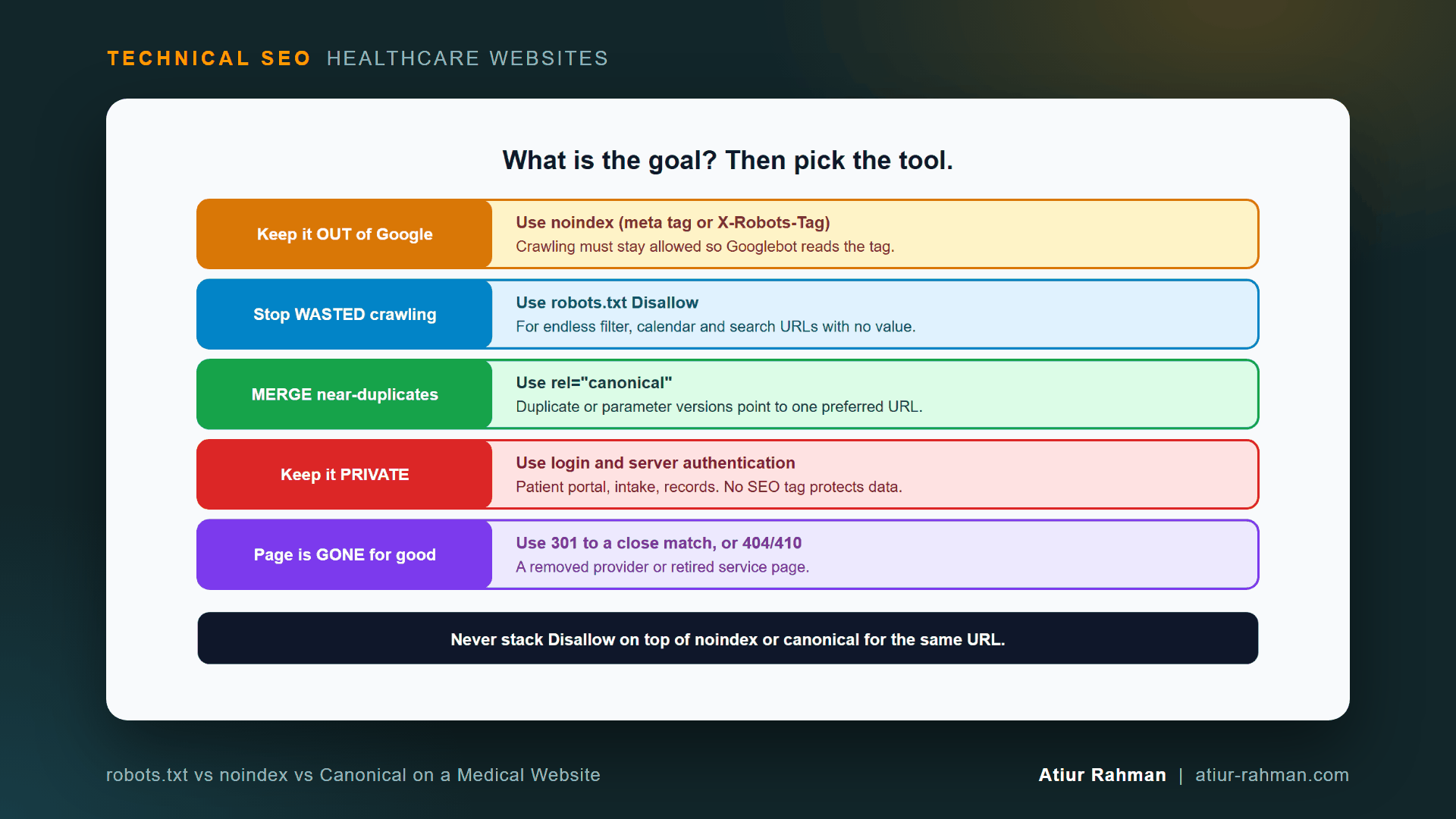
robots.txt vs noindex vs Canonical: Which Directive Do I Use?
Use noindex to remove a page from Google, robots.txt Disallow to stop wasted crawling, and rel="canonical" to merge duplicates. Use authentication for anything private.
Google confirms the first rule in its documentation. For noindex to work, the page must not be blocked by robots.txt, as the Block Search indexing with noindex guide states. I explain the mechanism behind that in Crawling vs. Indexing vs. Ranking: Why a Blocked Clinic Page Still Shows in Google.
What Does Each Directive Actually Do?
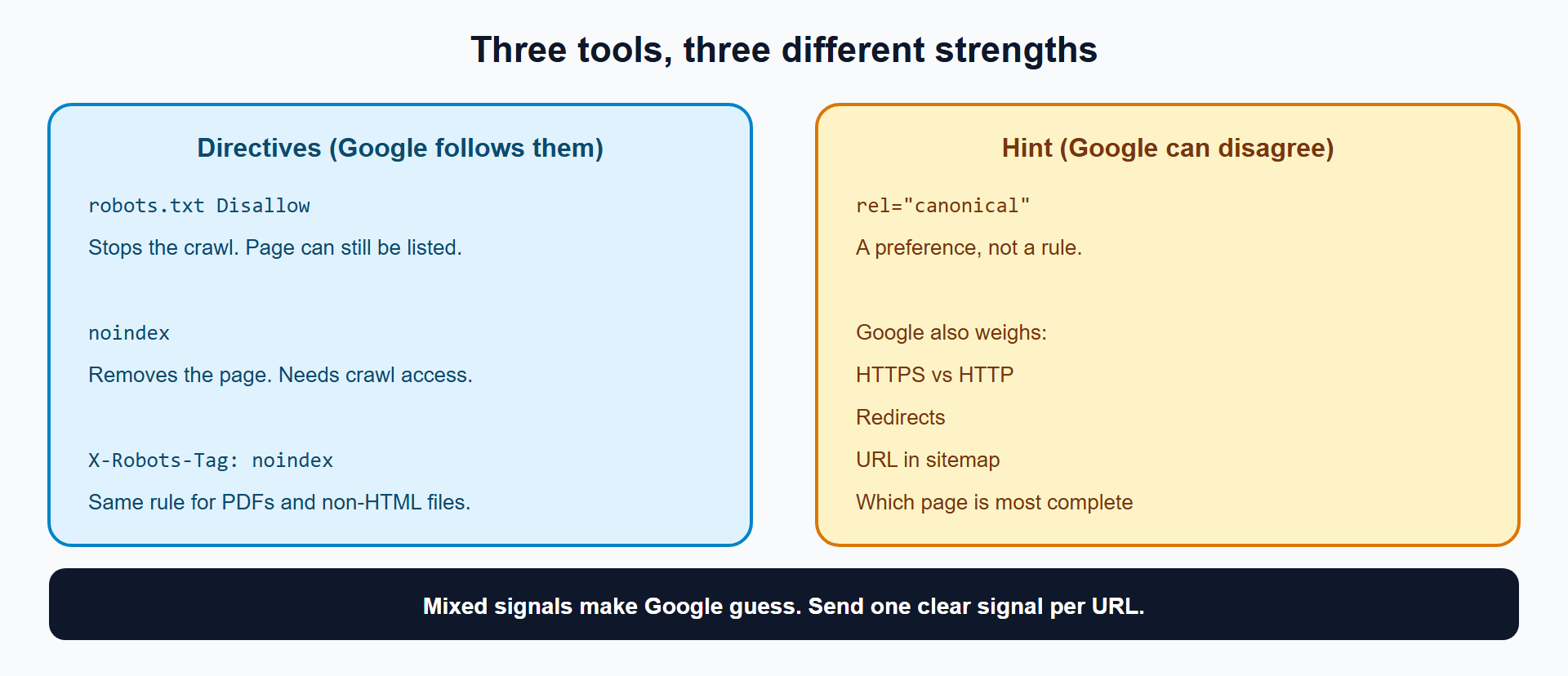
Each directive acts on a different stage and carries a different strength. robots.txt and noindex are rules Google follows. rel="canonical" is a hint Google can override.
| Tool | Stage it acts on | Strength | What it cannot do |
|---|---|---|---|
robots.txt Disallow | Crawling | Rule | Remove a URL from Google |
noindex (meta tag or X-Robots-Tag) | Indexing | Rule | Work on a page Googlebot cannot fetch |
rel="canonical" | Indexing (duplicate sorting) | Hint | Force Google to pick your URL |
| Authentication | Access | Rule | Nothing SEO-related, and that is the point |
Is a Canonical Tag a Command?
No. Google’s canonicalization guide calls a canonical preference “a hint, not a rule.” Google weighs your tag against other signals: HTTPS versus HTTP, redirects, whether the URL sits in your sitemap, and which page is the most complete and useful. When your tag disagrees with those signals, Google picks its own canonical, and Search Console reports the mismatch. I cover that diagnosis in Why Did Google Pick the Wrong Canonical URL for My Clinic Locations?.
How Long Does Google Take to See a robots.txt Change?
Up to 24 hours, usually. Google’s robots.txt documentation says it generally caches the file for up to 24 hours, and longer when it cannot refresh the copy. A rule you add at 9 a.m. does not act at 9:01.
Which Directive Fits Each Page on a Clinic Website?
Match the page type to the goal, then use the matching tool. This table covers the ten page types I see on medical sites.
| Clinic page | Goal | Tool | Notes |
|---|---|---|---|
| Appointment “thank you” page | Keep out of search | noindex | Page stays crawlable |
| Staging or test copy of the site | Keep out of search and private | Authentication, plus noindex | Disallow alone leaves URLs listable |
| Patient portal login | Private | Authentication | A public login page can carry noindex |
| Provider bio PDF or patient form PDF | Keep out of search | X-Robots-Tag: noindex | PDFs have no HTML head |
| Two near-identical location pages | Merge | rel="canonical" | Better: write unique content per location |
?utm_source= tracking URLs | Merge | rel="canonical" | Points to the clean URL |
| Directory filter combinations | Stop crawl waste | Disallow plus a curated set of indexable pages | Covered in article #7 |
Internal site search results (/?s=) | Stop crawl waste | Disallow | Low value, endless variations |
Appointment calendar ?date= URLs | Stop crawl waste | Disallow | Endless date trail |
| Retired provider or service page | Page is gone | 301 to a close match, or 404/410 | None of the three tools applies |
How Do I Write Each Directive?
The syntax for each tool is short. Copy the pattern that matches your goal.
noindex in the page head:
<meta name="robots" content="noindex">
noindex for a PDF, through the server (Apache):
<FilesMatch ".pdf$">
  Header set X-Robots-Tag "noindex"
</FilesMatch>
noindex for a PDF (Nginx):
location ~* .pdf$ {
    add_header X-Robots-Tag "noindex";
}
Canonical on a parameter or duplicate page:
<link rel="canonical" href="https://www.yourclinic.com/locations/downtown/">
Crawl control in robots.txt:
User-agent: *
Disallow: /?s=
Disallow: /book/*?date=
Google documents the * wildcard and the $ end-of-URL marker in the robots.txt specification. The same page explains that on conflicting rules Google applies the least restrictive one, so test every pattern before you ship it. Google’s robots meta tag specification covers X-Robots-Tag for non-HTML files.
Which Directive Combinations Cancel Each Other Out?
Four combinations cause most of the conflicts I find. Each sends Google two answers to one question.
| Combination | What happens | Fix |
|---|---|---|
Disallow + noindex on one URL | Googlebot never fetches the page, never reads noindex, URL can stay listed | Remove the Disallow, keep noindex |
noindex + canonical to a different URL | Two opposite instructions: remove me, and treat that other URL as the main one | Choose one: noindex to remove, or canonical to merge |
Canonical pointing at a noindex page | You nominate a page that you then ask Google to drop | Point canonicals only at indexable URLs |
noindex URL listed in the XML sitemap | The sitemap says “index this,” the tag says “do not” | Remove it from the sitemap |
I consider the first one the most expensive because it looks fixed. Someone adds noindex to the page, the team marks the ticket done, and nothing changes for months.
How Do I Find These Conflicts on My Own Site?
Run a script that checks each URL against robots.txt and reads its noindex signal. This version needs only Python 3 and no extra libraries.
import re, sys, urllib.request, urllib.robotparser
from urllib.parse import urlsplit

def check(url):
    parts = urlsplit(url)
    rp = urllib.robotparser.RobotFileParser()
    rp.set_url(f"{parts.scheme}://{parts.netloc}/robots.txt")
    rp.read()
    blocked = not rp.can_fetch("Googlebot", url)
    noindex = False
    try:
        with urllib.request.urlopen(urllib.request.Request(url, headers={"User-Agent": "Mozilla/5.0"})) as r:
            header = r.headers.get("X-Robots-Tag", "") or ""
            html = r.read(200000).decode("utf-8", "ignore")
        meta = re.search(r'<meta[^>]+name=["']robots["'][^>]*content=["']([^"']+)', html, re.I)
        noindex = "noindex" in header.lower() or bool(meta and "noindex" in meta.group(1).lower())
    except Exception as e:
        print("ERROR", url, e)
        return
    verdict = ("CONFLICT: blocked AND noindex (Google never reads the tag)" if blocked and noindex
               else "blocked from crawling" if blocked
               else "noindex (working)" if noindex else "indexable")
    print(f"{verdict:62} {url}")

for line in open(sys.argv[1], encoding="utf-8"):
    if line.strip():
        check(line.strip())
Save it as directive_conflicts.py, list your URLs one per line in urls.txt, then run:
python directive_conflicts.py urls.txt
Example output (format only):
CONFLICT: blocked AND noindex (Google never reads the tag)     https://www.yourclinic.com/staging/home/
noindex (working)                                              https://www.yourclinic.com/thank-you/
indexable                                                      https://www.yourclinic.com/providers/dr-lee/
Python’s built-in parser follows the basic robots.txt rules and ignores Google’s wildcard patterns. Treat a clean result on a wildcard rule as unconfirmed, and verify those URLs in Search Console’s URL Inspection tool.
What Pushback Do I Get When I Fix These, and How Do I Answer It?
Two objections come up in nearly every clinic engagement.
Developer: “Block everything in robots.txt to be safe.” The instinct is protective, and I respect it. The answer is that Disallow protects nothing from search results, and it hides noindex tags. Offer the alternative that does what they want: authentication for private pages, noindex for pages that are public but unwanted.
Marketing: “Noindex the duplicate location pages so we avoid duplicate content.” Here the answer is that noindex deletes the page from search, including the patients who would find that location. Write unique content for each location first. Use a canonical only when two URLs show one page.
What Do I Do This Week?
- ☐ List every page you want out of Google, and write down its goal: remove, stop crawl waste, merge or private.
- ☐ Pick the matching tool from the table.
- ☐ Run the conflict checker against that list.
- ☐ Remove every
Disallowrule that covers anoindexpage. - ☐ Remove
noindexURLs from the XML sitemap. - ☐ Confirm each fix in URL Inspection after Google re-crawls.
Reusable asset: the decision tree in Figure 1 works as a printable one-pager. Pin it where your developers and marketers both see it.
Related reads in this hub:
- Crawling vs. Indexing vs. Ranking: Why a Blocked Clinic Page Still Shows in Google
- How Do I Move a Medical Practice Website to HTTPS Without Losing Traffic or Patient Bookings?
Frequently Asked Questions
Can I Use noindex and a Canonical Tag on the Same Page?
Technically yes, and it gains you nothing. The two tags give opposite instructions: noindex says remove this page, and a canonical to another URL says treat that URL as the main one. Pick the tag that matches your goal and use only that one.
Does a robots.txt Disallow Pass Authority to Other Pages?
No. Googlebot cannot read a disallowed page, so it cannot follow the links on it. Use noindex instead when you want the page out of results while keeping its links readable.
How Do I Noindex a PDF Such as a Patient Intake Form?
Send an X-Robots-Tag: noindex HTTP header from the server. A PDF has no HTML head for a meta tag. The Apache and Nginx snippets above set the header for every PDF, and Google’s robots meta tag specification documents it.
How Do I Remove a Page From Google Fast?
Add noindex, keep the page crawlable and request a re-crawl in URL Inspection. For an urgent exposure, use the Removals tool for a temporary hide while the noindex takes effect. I cover the Removals tool in Crawling vs. Indexing vs. Ranking.
Is nofollow the Same as noindex?
No. noindex removes a page from search results. nofollow tells crawlers not to follow the links on a page or a single link. They solve different problems and do not substitute for each other.
Does a Canonical Tag Stop Google From Crawling Duplicate URLs?
No, and it reduces crawling only slowly. Google’s faceted navigation guidance says canonicals decrease crawl volume of non-canonical versions only over time. For fast crawl control, use robots.txt.
Facing unexplained indexation drops or broken booking funnels on your clinic website? Book a 30-minute technical consultation with Atiur.
Part of the Technical SEO for Healthcare Websites series. More guides are on the blog. Related case study: Multi-specialty dental group: +24% traffic growth through complex rebrand.
References
- Google Search Central, Block Search indexing with noindex
- Google Search Central, Consolidate duplicate URLs
- Google Search Central, Robots.txt specification
- Google Search Central, Robots meta tag specification
- Google Search Central, Faceted navigation best practices
- Google Search Console Help, URL Inspection tool