

You added canonical tags to every location page on your clinic website. You checked the source code, and the tags are there. Then Search Console reports “Duplicate, Google chose different canonical than user,” and the page you wanted in search results is missing.
It feels like Google ignored you. It did not. A canonical tag is one vote among several, and on multi-location medical sites the other votes often point somewhere else: internal links to a different URL, a sitemap that lists a different version, or location pages so similar that Google merges them on its own.
I trace these mismatches for healthcare groups, and the cause is almost always one of seven patterns. In the next ten minutes you will learn what the status means, which pattern matches your site, and how to align the signals so Google agrees with you.
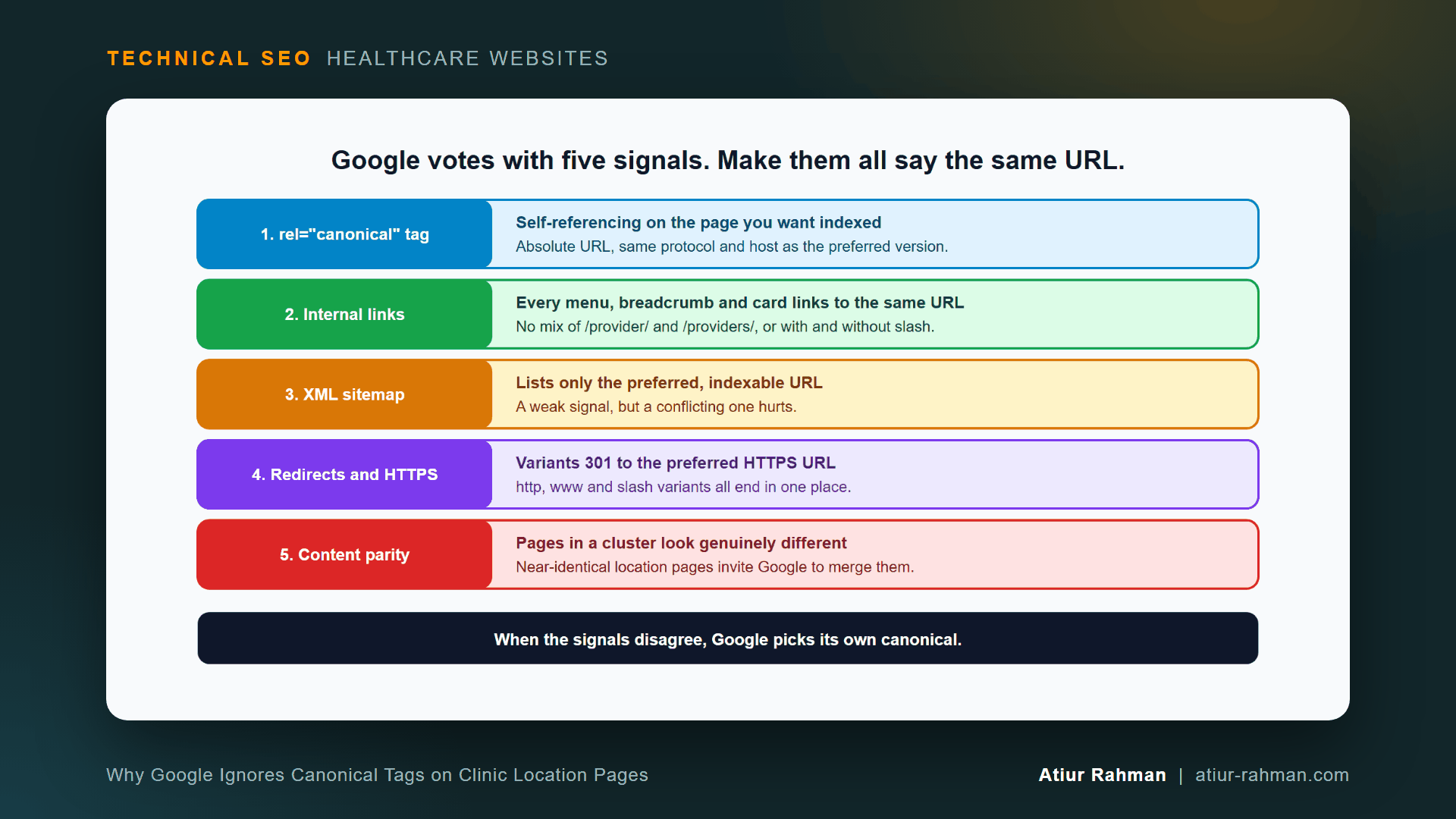
What Does “Duplicate, Google Chose Different Canonical Than User” Mean?
It means you declared a canonical URL for a page, and Google picked another URL as the better version. Google indexes its choice and leaves yours out.
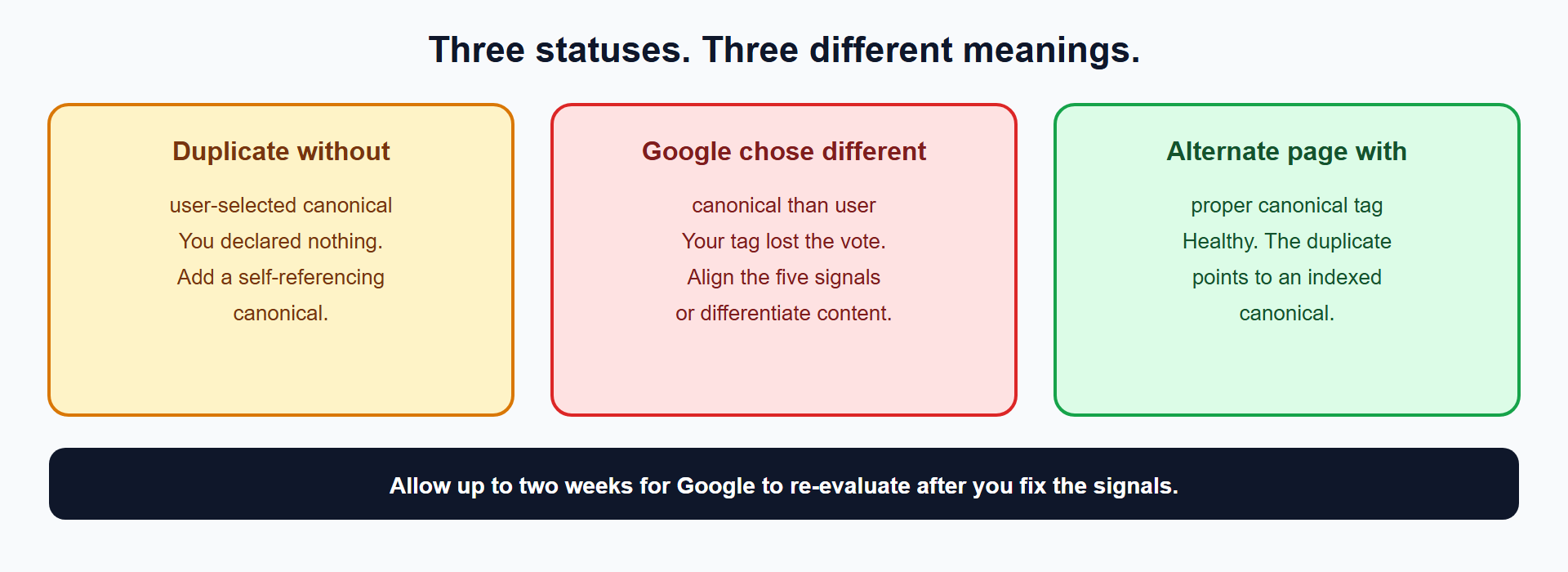
Google lists the status in its Page indexing report help, next to two related ones:
| Status | What it means | Action |
|---|---|---|
| Duplicate without user-selected canonical | The page duplicates another and declares no preference | Add a self-referencing canonical |
| Duplicate, Google chose different canonical than user | You declared a URL and Google disagreed | Align the signals or differentiate the content |
| Alternate page with proper canonical tag | The page correctly points to an indexed canonical | Healthy. No action |
Google’s canonicalization guide calls a canonical preference “a hint, not a rule.” Its duplicate URL guide ranks the methods: redirects and rel="canonical" annotations are strong signals, and sitemap inclusion is a weak one.
Why Does Google Override the Canonical on Multi-Location Clinic Sites?
Seven patterns cause nearly every override I find on healthcare sites.
- Near-identical location pages. Ten pages titled “Primary Care in {City}” with the same paragraph and a swapped city name look like one page to Google. Google’s troubleshooting guide says to ensure clustered pages have sufficiently different content.
- The canonical points at a redirect, an error or a
noindexpage. A tag that nominates a URL Google cannot index loses by default. - Internal links disagree with the tag. The menu links to
/location/downtownwhile the tag names/locations/downtown/. Google counts the links. - The sitemap lists a different variant. The tag says HTTPS with
www, and the sitemap says HTTP without it. - Old and new provider or location URLs coexist after a redesign. The old URL still holds the backlinks and has no redirect, so it wins.
- A CMS or SEO plugin writes its own canonical. Google’s guide names CMS plugins that use canonicalization techniques incorrectly as a known cause.
- Spanish or other language pages lack
hreflang. Google’s guide lists missing or incorrecthreflangannotations as a cause for localized sites.
Which Canonical Signals Does Google Weigh?
Google lists HTTPS versus HTTP, redirects, sitemap presence and rel="canonical" annotations, and it also weighs which page is the most complete and useful for searchers. Every signal that disagrees with your tag lowers its odds. The goal is agreement, not a louder tag.
How Do I Find Out Which Canonical Google Chose?
Inspect the URL in Search Console, then audit the whole cluster with a script. The URL Inspection tool shows “User-declared canonical” and “Google-selected canonical” side by side. The second line names the URL Google prefers.
For a list of URLs, this Python 3 script fetches each page, reads its canonical tag and checks the target’s status and noindex signal. It follows no redirects, so a redirecting canonical target shows up as a problem.
import re, sys, urllib.request, urllib.error
from urllib.parse import urljoin

class NoRedirect(urllib.request.HTTPRedirectHandler):
    def redirect_request(self, *a, **k):
        return None

opener = urllib.request.build_opener(NoRedirect)

def fetch(url):
    req = urllib.request.Request(url, headers={"User-Agent": "Mozilla/5.0"})
    try:
        with opener.open(req, timeout=15) as r:
            return r.status, r.read(300000).decode("utf-8", "ignore"), r.headers
    except urllib.error.HTTPError as e:
        return e.code, "", e.headers

def canonical_of(html, base):
    for tag in re.findall(r"<link[^>]+>", html, re.I):
        if re.search(r'rel=["']canonical["']', tag, re.I):
            m = re.search(r'href=["']([^"']+)', tag, re.I)
            if m:
                return urljoin(base, m.group(1))
    return None

def noindex(html, headers):
    meta = re.search(r'<meta[^>]+name=["']robots["'][^>]*content=["']([^"']+)', html, re.I)
    return "noindex" in ((headers.get("X-Robots-Tag") or "") + (meta.group(1) if meta else "")).lower()

for line in open(sys.argv[1], encoding="utf-8"):
    url = line.strip()
    if not url:
        continue
    status, html, headers = fetch(url)
    if status != 200:
        print(f"PAGE {status:<4} {url}")
        continue
    canon = canonical_of(html, url)
    if canon is None:
        print(f"NO CANONICAL           {url}")
    elif canon == url:
        print(f"OK self-canonical      {url}")
    else:
        cstatus, chtml, cheaders = fetch(canon)
        problem = ""
        if cstatus != 200:
            problem = f"TARGET RETURNS {cstatus}"
        elif noindex(chtml, cheaders):
            problem = "TARGET IS NOINDEX"
        print(f"CANONICAL -> {canon}  {problem or 'target ok'}  (page: {url})")
Save it as canonical_audit.py, list your location URLs in urls.txt and run python canonical_audit.py urls.txt. Example output (format only):
OK self-canonical      https://www.yourclinic.com/locations/downtown/
CANONICAL -> https://www.yourclinic.com/locations/main/  target ok  (page: https://www.yourclinic.com/locations/uptown/)
CANONICAL -> https://www.yourclinic.com/locations/old/  TARGET RETURNS 404  (page: https://www.yourclinic.com/locations/east/)
NO CANONICAL           https://www.yourclinic.com/locations/west/
Read each line against what you intend. A location page that canonicals to a different location, a target that returns 404 or noindex, and a missing tag are the three failures. I cover why noindex on a canonical target conflicts in How Do I Choose Between robots.txt, noindex and Canonical Tags on a Medical Website?.
How Do I Fix a Canonical Mismatch on My Clinic Pages?
Pick the preferred URL for each page, make all five signals point to it, differentiate the content and ask Google to re-evaluate. Google says to allow up to two weeks for re-evaluation after a fix.
- Decide the preferred URL. One protocol (HTTPS), one host (
wwwor not), one slash style, one path for each page. - Put a self-referencing canonical on the preferred page. Google’s guide says to include a
rel="canonical"link on the canonical page itself, as an absolute URL.
<link rel="canonical" href="https://www.yourclinic.com/locations/downtown/">
- Redirect every variant.
http, non-preferred host and missing or extra slashes all301to the preferred URL. The method appears in How Do I Move a Medical Practice Website to HTTPS Without Losing Traffic or Patient Bookings?. - Update internal links. Crawl your site and change every link, menu item, breadcrumb and card that points to a non-preferred variant.
- Clean the sitemap. List only preferred, indexable URLs. Google’s guide treats sitemap inclusion as a weak signal, and a wrong entry still conflicts.
- Do not use
robots.txtfor canonicalization. Google’s guide says not to. - Request indexing for the priority pages in URL Inspection and wait up to two weeks.
How Do I Make Location Pages Different Enough?
Give each location page facts that exist only for that location. A location page that Google merges lacks them. Add:
- The street address, a map, parking and transit directions
- The providers who practice there, with links to their profiles
- The services and specialties offered at that site
- The hours, the phone number and the insurance accepted at that site
- Local patient information, such as nearby hospital affiliations
Mark up each location with MedicalClinic and its own address. Structured data supports the page and does not replace unique visible content.
Do I Canonicalize All Location Pages to One Main Page?
No. Each location is a separate place patients search for by city or neighborhood. A canonical to the main page tells Google to drop the location from results, and patients in that city lose a way to find you. Use a canonical between two URLs that show the same page, such as a parameter version and its clean version.
What Pushback Do I Get When I Fix Canonicals?
Both teams have a reasonable position.
Marketing: “Point all location pages to the main page to avoid duplicate content.” The duplicate content comes from thin templated pages, so write real content for each location. A canonical to the main page removes the location from search.
Developer: “The SEO plugin handles canonicals automatically.” Plugins write one canonical per template, and a template that builds the wrong URL repeats the mistake on every page. Run the audit script against a sample from each template. One failing template explains hundreds of mismatched URLs.
What Do I Do This Week?
- ☐ Export the “Duplicate, Google chose different canonical than user” URLs from Search Console.
- ☐ Run URL Inspection on five of them and note the Google-selected canonical.
- ☐ Run the audit script across the full cluster.
- ☐ Fix canonical targets that redirect, return errors or carry
noindex. - ☐ Align internal links, the sitemap and redirects to one preferred URL.
- ☐ Add unique content to every near-identical location page.
- ☐ Request re-indexing and re-check the report after two weeks.
Reusable asset: the five-signal figure and the audit script above work as a canonical signal checklist. Run the script against each template.
Related reads in this hub:
- How Do I Choose Between robots.txt, noindex and Canonical Tags on a Medical Website?
- How Do I Build a Redirect Map Before a Medical Website Redesign or CMS Migration?
Frequently Asked Questions
Is a Canonical Tag a Directive or a Suggestion?
A suggestion. Google’s guidance calls it “a hint, not a rule,” and also lists rel="canonical" among its strong signals. Google follows your tag when the other signals agree with it and overrides it when they do not.
How Long Does Google Take to Respect a Fixed Canonical?
Allow up to two weeks, per Google’s troubleshooting guide. Request indexing in URL Inspection for priority pages to speed up the re-crawl, and re-check the Page indexing report once that window passes.
Do I Need a Self-Referencing Canonical on Every Page?
Yes. Google’s guide says to include a rel="canonical" link on the canonical page itself. It removes ambiguity when parameters, tracking codes or slash variants reach the page.
Can I Use the Canonical Tag Across Two Different Domains?
Rarely, and never for location or provider pages. Use a cross-domain canonical only when the same content lives on two domains, such as a syndicated article. Location and provider pages belong on one domain with their own self-referencing canonicals.
What Is the Difference Between a Canonical and a 301 Redirect?
A redirect moves every visitor and crawler to the new URL. A canonical leaves both URLs reachable and tells Google which to index. Use a 301 when the old URL has no reason to exist, and a canonical when both must stay live.
Do Canonical Tags Affect My Local Map Pack Rankings?
They decide which URL Google indexes for organic results. They are not a map pack lever, because your Google Business Profile drives that listing. A clean canonical setup keeps the right location page as the landing page that profile links to.
Facing unexplained indexation drops or broken booking funnels on your clinic website? Book a 30-minute technical consultation with Atiur.
Part of the Technical SEO for Healthcare Websites series. More guides are on the blog. Related case study: Multi-location orthopedic practice: 3.8x patient bookings via Map Pack.
References
- Google Search Central, What is URL canonicalization
- Google Search Central, How to specify a canonical URL
- Google Search Central, Fix canonicalization issues
- Google Search Console Help, Page indexing report
- Google Search Console Help, URL Inspection tool
- Schema.org, MedicalClinic