

Your clinic is getting a new website. The designer shared the mockups, the developer has a launch date and the old site goes away on that day. Nobody has mentioned redirects.
That silence is the risk. A traffic drop right after launch is the classic redesign failure: the new site goes live, organic visits fall off, and the phone stops ringing. The usual cause is not the design. It is that thousands of old URLs, including every provider bio, service page and patient-form PDF, now lead to a “page not found” screen.
I build the redirect map before any healthcare redesign goes live, because it is the one deliverable that decides how much of your search visibility survives the move. In the next ten minutes you will learn how to collect every old URL, how to map them, how to remove chains with a script you can run for free and how to test the whole map before launch day.
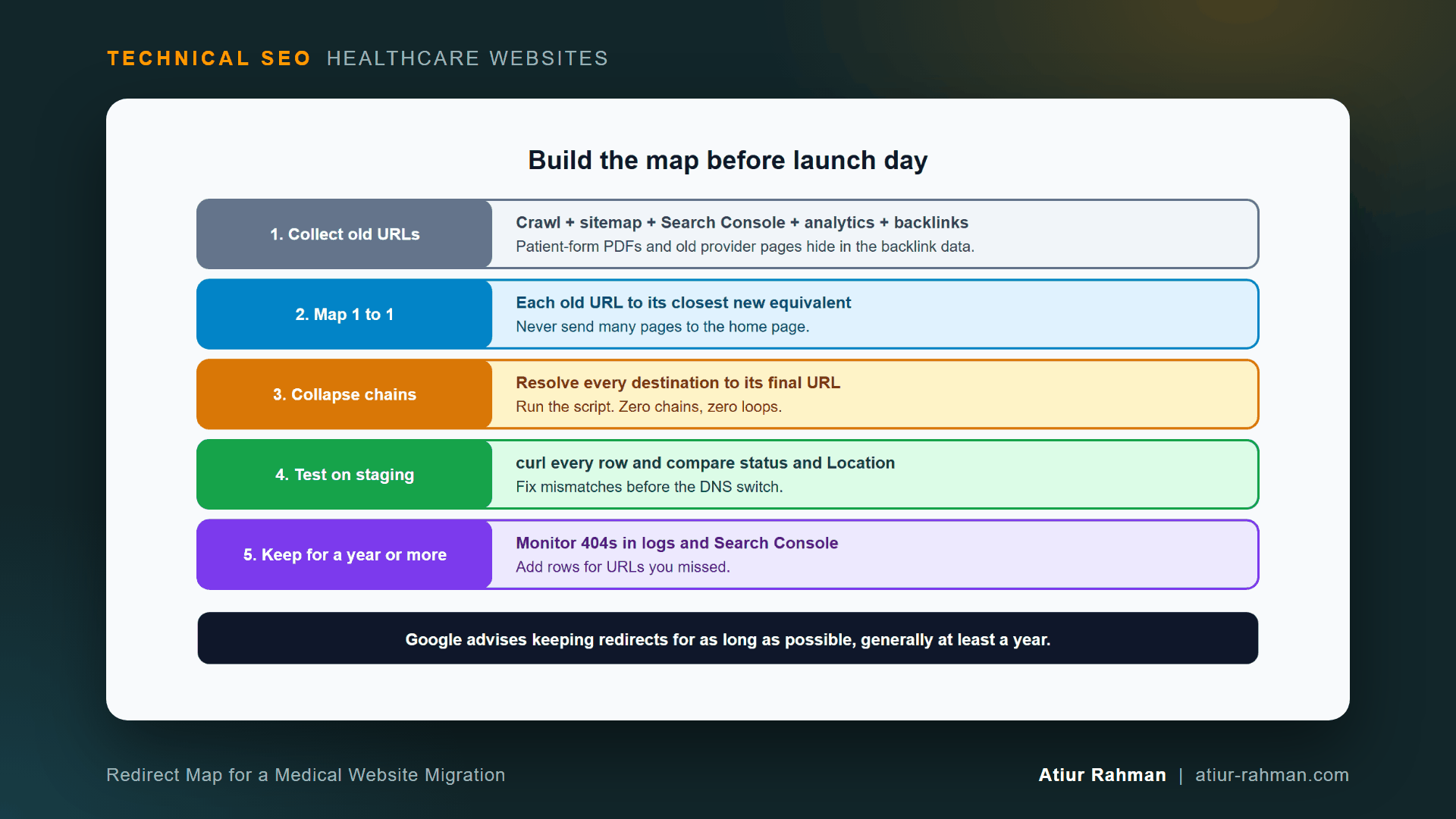
What Is a Redirect Map and Why Does a Clinic Website Need One?
A redirect map is a spreadsheet that pairs every old URL with the new URL that replaces it. It tells the server where to send each visitor and each crawler after a redesign or CMS change.
Google tells site owners to plan this, in its site move guidance: once you have the listing of old URLs, decide where each one redirects to. It also explains that a 301 is a strong signal to process the redirect target, in its HTTP status code documentation.
How Do I Collect Every Old URL on My Clinic Website?
Combine five sources, because no single list is complete. A crawl misses pages with no internal links, and a sitemap misses pages that never entered it.
- A full site crawl with a crawler such as Screaming Frog. Export every
200URL. - The XML sitemap. List every URL it contains.
- Search Console. Export pages with impressions from the Performance report. These pages earn visibility today.
- Analytics. Export landing pages from the last 12 months.
- Backlinks. Export linked URLs from a backlink tool. Old provider pages and patient-form PDFs often carry links from hospitals, directories and local news.
Merge the five lists, remove duplicates and normalize the format: one protocol, one host name, consistent trailing slashes and lowercase paths. Save as old in column A of a spreadsheet.
What Medical Pages Do Teams Forget to Redirect?
Teams forget the pages that never appeared in the menu:
- Individual provider profiles from the previous directory
- Patient forms and brochures (PDFs) linked from referral partners
- Condition and procedure pages that earn long-tail searches
- Insurance and billing pages that patients bookmark
- Old blog posts with backlinks
- Location pages for clinics that moved or closed
Each of these earns visits today. A missing redirect on any of them is a lost patient inquiry.
How Do I Map Old URLs to New Ones?
Map each old URL to the closest new page by content and intent, one to one. Add a column new next to old.
Use this order of preference:
| Situation | Redirect target |
|---|---|
| Same page exists on the new site | That exact new URL |
| Page merged into a broader page | The merged page |
| Provider left the practice | Their specialty or location page |
| Service discontinued | The closest service category page |
| No relevant page exists | Leave unmapped, and let it return 404 |
Google warns against redirecting many old URLs to one irrelevant destination, such as the home page of the new site. That pattern confuses patients and can be treated as a soft 404. A 404 for a page with no replacement is the honest answer. I explain how Google treats those pages in Why Does Search Console Flag My Doctor Bio Pages as Soft 404, and How Do I Fix Them?.
Can I Use Pattern Rules Instead of Mapping Every URL?
Yes for URLs that follow a clean pattern, and no for everything else. If /our-doctors/dr-lee/ becomes /providers/dr-lee/ for every provider, one rule covers them all. If slugs change unpredictably, map each row by hand. Test every pattern rule against real URLs, because one greedy rule can send the wrong pages to the wrong place.
How Do I Remove Redirect Chains From the Map?
Resolve every destination to its final URL, so each old URL redirects once. A chain happens when a destination is itself an old URL: /old goes to /middle, which goes to /new.
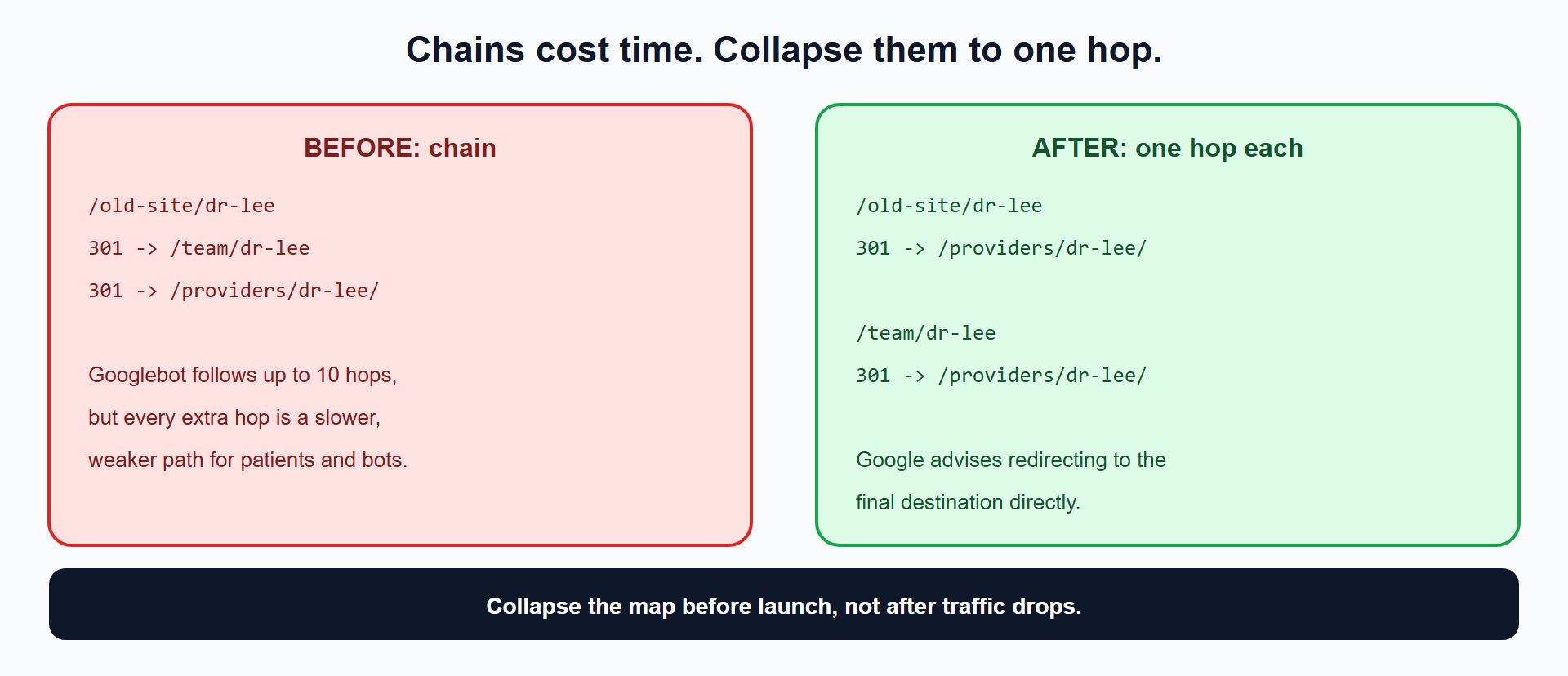
Google’s crawlers follow up to 10 redirect hops, per its status code documentation. Its site move guidance advises redirecting to the final destination directly, and if that is impossible, keeping the chain low, ideally no more than 3 and fewer than 5. I collapse every chain to a single hop. Fewer hops load faster for patients and leave no room for a broken link in the middle.
Which Script Finds and Collapses Chains and Loops?
Save your map as a two-column CSV with the headers old and new, then run this Python 3 script. It uses no extra libraries.
import csv, sys

def load(path):
    with open(path, newline="", encoding="utf-8") as f:
        return {r["old"].strip(): r["new"].strip() for r in csv.DictReader(f)}

def final_target(url, rules):
    seen = [url]
    while rules.get(url):
        url = rules[url]
        if url in seen:
            return None, seen + [url]      # loop
        seen.append(url)
    return url, seen

rules = load(sys.argv[1])
fixed, problems = [], []
for old in rules:
    dest, path = final_target(old, rules)
    if dest is None:
        problems.append((old, "LOOP: " + " -> ".join(path)))
    else:
        if len(path) > 2:
            problems.append((old, "CHAIN of %d hops: %s" % (len(path) - 1, " -> ".join(path))))
        fixed.append((old, dest))

with open(sys.argv[2], "w", newline="", encoding="utf-8") as f:
    w = csv.writer(f); w.writerow(["old", "new"]); w.writerows(fixed)
for old, msg in problems:
    print(msg)
print("rows in: %d, rows out: %d, problems: %d" % (len(rules), len(fixed), len(problems)))
Run it:
python collapse_redirects.py map.csv map_clean.csv
Example run with five sample rows:
CHAIN of 2 hops: /old-site/dr-lee -> /team/dr-lee -> /providers/dr-lee/
LOOP: /a -> /b -> /a
LOOP: /b -> /a -> /b
rows in: 5, rows out: 3, problems: 3
The cleaned file map_clean.csv holds one hop per row. Loops are dropped from the output and listed on screen. Fix each loop by hand, because a loop means two pages send visitors to each other forever.
How Do I Turn the Clean Map Into Server Rules?
Convert each row to one rule line. Apache .htaccess:
Redirect 301 /old-site/dr-lee /providers/dr-lee/
Redirect 301 /team/dr-lee /providers/dr-lee/
Nginx:
location = /old-site/dr-lee { return 301 /providers/dr-lee/; }
location = /team/dr-lee     { return 301 /providers/dr-lee/; }
Thousands of exact rules slow some servers. For large maps, use a map block in Nginx or your host’s redirect manager, and ask your developer which method suits your stack.
How Do I Test the Redirect Map Before Launch?
Request every old URL on the staging server and compare the response against the map. Google’s site move guide recommends command-line tools or scripts to test large numbers of URLs.
while IFS=, read -r old new; do
  [ "$old" = "old" ] && continue
  result=$(curl -s -o /dev/null -w "%{http_code} %{redirect_url}" "https://staging.yourclinic.com$old")
  echo "$old -> $result"
done < map_clean.csv
Every row must return 301 and a Location equal to the new value. Rows returning 404, 302 or a different destination fail. Fix them, then re-run until the failure list is empty.
On launch day, run the loop against production. For critical URLs, such as your top 20 provider pages, confirm in the URL Inspection tool as well.
How Do I Monitor Redirects After Launch?
Watch your server log and Search Console for the first 30 days. In the log, filter Googlebot hits that return 404:
awk '$9 == 404 {print $7}' googlebot.log | sort | uniq -c | sort -rn | head -20
Each frequent 404 is an old URL you missed. Add it to the map and deploy the rule. The log commands appear in full in How Do I Read My Medical Practice’s Server Log File to See What Googlebot Is Doing?. In Search Console, the Page indexing report shows “Not found (404)” growth.
Keep every redirect live for as long as possible. Google advises generally at least one year.
What Pushback Do I Get From the Development and Design Teams?
Expect two honest concerns.
Developer: “We will redirect the top pages and let the rest 404.” The top pages are the ones you can see. The long tail, such as old provider bios and PDFs with backlinks, holds a large share of total visibility. The map costs a few days of spreadsheet work. A missing redirect costs ongoing patient inquiries. Offer a trade: the developer builds pattern rules, and I handle the exceptions.
Designer: “The new URL structure is cleaner. We want to change everything.” Clean structure is a fine goal. Every changed URL needs a row in the map, so each rename carries a cost. Change URLs where the benefit is clear, and keep the rest.
What Do I Do This Week?
- ☐ Collect old URLs from the crawl, sitemap, Search Console, analytics and backlinks.
- ☐ Normalize and de-duplicate them in one spreadsheet.
- ☐ Map each URL to its closest new page, or mark it for a
404. - ☐ Run the chain and loop script and fix every problem it lists.
- ☐ Generate server rules from the clean file.
- ☐ Test every row on staging with the
curlloop. - ☐ Re-test on production at launch and watch 404s in the log for 30 days.
Reusable asset: the map layout, the collapse script and the test loop above make a complete redirect workbook. Save them with your migration plan.
Related reads in this hub:
- How Do I Move a Medical Practice Website to HTTPS Without Losing Traffic or Patient Bookings?
- How Do I Choose Between robots.txt, noindex and Canonical Tags on a Medical Website?
Frequently Asked Questions
Do I Use 301 or 302 Redirects for a Website Migration?
Use 301 for a permanent move. Google’s documentation describes a 301 as a strong signal to process the redirect target and a 302 as a weak signal. A redesign is permanent, so 301 is the correct code.
How Long Do I Keep Redirects After a Redesign?
As long as possible, and generally at least one year. Google gives that figure in its site move guidance. Old links, bookmarks and citations keep arriving long after launch, so I keep provider and PDF redirects indefinitely.
Will My Rankings Drop After a Clinic Website Redesign?
A short dip is normal while Google re-processes the new URLs. A clean map keeps it small. A drop that lasts beyond a few weeks points to missing redirects, chains, blocked pages or changed content. Check the log and Search Console first.
Can I Redirect Every Old URL to the Home Page?
No. Google warns that redirecting many old URLs to one irrelevant destination, such as the home page, can confuse users and be treated as a soft 404. Redirect each page to its closest equivalent, and return 404 when none exists.
What Happens to Redirects When I Switch to HTTPS in the Same Launch?
Combine them into one hop. The old HTTP URL redirects straight to the final HTTPS URL, not to the HTTP version of the new page first. The HTTPS order of operations appears in How Do I Move a Medical Practice Website to HTTPS Without Losing Traffic or Patient Bookings?.
How Do I Redirect a Patient-Form PDF?
Map the old PDF URL to the new PDF URL with a 301, the same as any page. If the form moved into an online portal, redirect to the page that explains how to complete it, and keep the PDF itself out of the index with an X-Robots-Tag header when you do not want it in search.
Facing unexplained indexation drops or broken booking funnels on your clinic website? Book a 30-minute technical consultation with Atiur.
Part of the Technical SEO for Healthcare Websites series. More guides are on the blog. Related case study: Multi-specialty dental group: +24% traffic growth through complex rebrand.
References
- Google Search Central, Site moves with URL changes
- Google Search Central, Redirects and Google Search
- Google Search Central, HTTP status codes, and network and DNS errors