

Which report in Search Console tells you what your redesign broke? Three of them do, and they answer in a fixed order.
Your web agency probably told you Google needs time. Google’s own guidance on site moves says to expect temporary fluctuation in rankings, and that medium-sized sites take a few weeks or more to settle. It doesn’t say to wait and do nothing. Waiting is the right answer only when the move was clean, and a clean move leaves no evidence in Search Console. A messy one leaves labels, and the labels name the cause.
This guide reads that evidence in order: the shape of the drop, the labels in the Pages report, the redirects, the content that disappeared and the parts of a medical site that generic recovery guides skip. I run technical and local audits for medical practices, and I open these reports in this order after every launch that goes wrong.
What Shape Is Your Traffic Drop, and What Does That Shape Say?
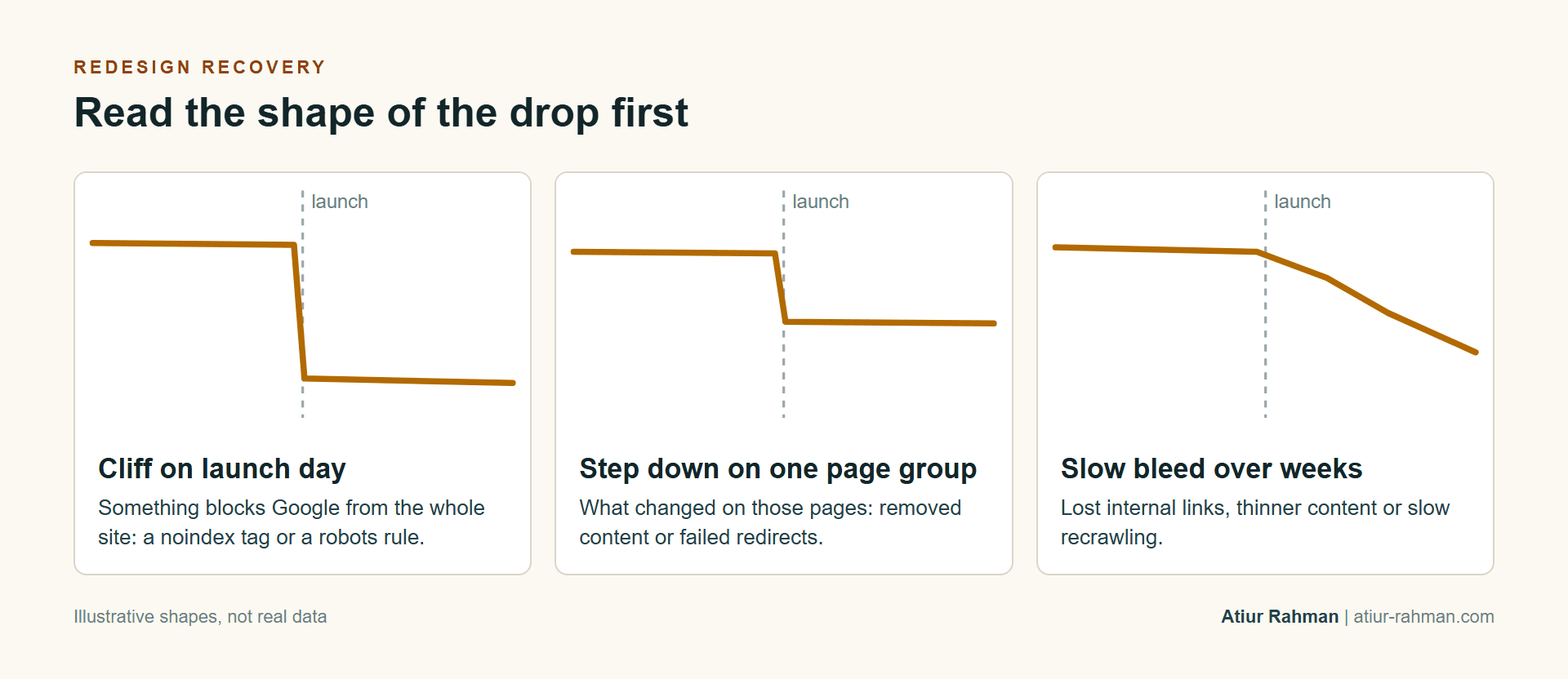
The shape names the likely cause before you open a single report. A cliff on launch day points to something blocking Google from the whole site. A step down on one group of pages points to what changed on those pages. A slow bleed over weeks points to lost internal links, thinner content or slow recrawling. Read the shape first, because it decides which report to open next.
To see the shape, I open the Performance report in Search Console, compare the weeks before and after launch and filter by page type: service pages, doctor pages, location pages, blog. A drop confined to one type is a content or redirect problem on that type. A drop across every type is a site-wide block. Google’s site move guide says to expect temporary fluctuation after a move, and it says Googlebot crawls the new site more heavily afterward. A small, short dip fits that description. A cliff, or a decline that continues after the second week, doesn’t.
Which Search Console Label Names the Problem?
Each label in the Page indexing report maps to a specific redesign mistake. I open the report, find the rows that grew since launch and read them against this table.
| Label in the report | What it usually means after a redesign | Where the cause sits |
|---|---|---|
| Not found (404) | Old URLs with no redirect | The redirect map |
| Page with redirect | Expected for old URLs, a problem if the target is irrelevant or the chain is long | Redirect rules |
| Excluded by ‘noindex’ tag | A staging directive or a CMS setting carried to production | Page templates and the CMS visibility setting |
| Blocked by robots.txt | A blanket Disallow copied from staging | The robots.txt file |
| Soft 404 | Thin pages, or many old URLs sent to one irrelevant page | Content and redirects |
| Crawled – currently not indexed | New pages Google fetched and judged not worth indexing | Page depth and duplication |
| Discovered – currently not indexed | New pages Google knows about and hasn’t fetched | Internal links and sitemap |
Google’s help page on the Page indexing report defines each status. The pattern matters more than any one row. A single label that jumped on launch day is almost always the cause, and one fix often clears it.
How Do You Prove the Redirects Work?
You prove it with a test, not a spot check. Google’s rules are specific: permanent server-side redirects, 301 or 308, each old URL pointing directly at its final destination, with no chains longer than a few hops. Googlebot follows up to 10 hops, and Google advises keeping chains ideally to three or fewer.
Google also says not to send many old URLs to one irrelevant page, such as the new home page, and to return a 404 or 410 for content that isn’t moving. It advises keeping redirects for at least a year. JavaScript redirects are a last resort, because Google may never see them if rendering fails, as its redirect documentation explains.
The old-URL list comes from four places: the old sitemap, 12 months of landing pages in GA4, the Search Console pages report and a backlink export. The Wayback Machine fills gaps. Then I run the list through a loop like this:
while read url; do
  curl -s -o /dev/null -L --max-redirs 5
    -w "%{http_code} hops=%{num_redirects} %{url_effective}n" "$url"
done < old-urls.txt
A healthy row shows 200, one hop and a destination that matches the old page’s topic. A 404 is a missing redirect. Two or more hops is a chain. A destination that is the home page is the shortcut Google warns about.
What Did the Redesign Remove That the Rankings Depended On?
It removed content, headings, internal links or markup from the specific pages that fell, and the way to find out is to compare the losers with the winners. I pick two pages that held and two that dropped, then open each page’s old version in the Wayback Machine next to the live one.
Four things change most in a redesign. Body depth: a detailed procedure page becomes three bullets and an animation. Headings: the question a heading answered is gone or reworded. Internal links: navigation was rebuilt and a page lost its links. Markup: a custom template carried Physician and MedicalClinic schema, and the new theme carries none. The structured data guide lists what to restore. Restoring the content comes before any other optimization on that page.
What Do Medical Sites Break That Generic Recovery Guides Miss?
Medical sites break the parts that connect the site to patients: scheduling widgets, location and provider pages, the profile’s website link and the tracking behind them. Generic guides cover redirects and noindex tags and stop there.
- Scheduling and portals. An embedded booking widget or portal link can load inside a frame that Google can’t read, or sit behind a noindex setting. Patients see it. Google doesn’t.
- Location and provider pages. A redesign often merges several location pages into one or drops provider bios. Each removed page needs its own redirect to its closest equivalent.
- The Business Profile link. The website link on your profile points at an old URL that now redirects or 404s, and the practice name or phone format changed on the new site, so the name, address and phone no longer match the profile. This is why map rankings sometimes drop with the organic ones.
- Tracking. New forms ship without the events behind your appointment reporting. The numbers look like a traffic drop when part of it is a measurement drop. The website traffic guide shows which events to rebuild.
When Do You Roll Back to the Old Site?
You roll back when the problem is site-wide and the fix isn’t quick: a rendering failure across every template, or a platform that can’t carry the redirect map. For anything narrower, fixing the live site is faster and less disruptive than reverting a launch.
The rule I apply: if the cliff traces to one setting, such as a noindex flag or a robots rule, I fix the setting and watch recovery. If the cause is architectural, I decide within days whether the new build can be repaired, because every week the old URLs return errors, Google drops more of them. Google gives no recovery date for a clean fix, and I don’t invent one either.
Frequently Asked Questions
Is a temporary dip normal after a redesign?
Yes. Google says to expect temporary fluctuation after a site move. A sharp drop, or a decline that continues after you’ve fixed the labels in the Pages report, is a fault to repair.
Can I redirect every old URL to the home page to save time?
No. Google says not to send many old URLs to an irrelevant page, and the pattern can read as soft 404s. Each old URL goes to its closest equivalent, and content you’ve removed returns a 404 or 410.
How long do I keep the redirects?
At least a year, according to Google, and indefinitely if the old URLs still earn links or visits. Removing them early returns the 404s.
Why did my map rankings drop with the redesign?
Usually because the name, address or phone changed on the site, or the profile’s website link now points at a dead URL. The profile and the site have to say the same thing.
Do I need the Change of Address tool?
Only when the domain or subdomain changes. Google reserves it for that. It does nothing for path changes or a move from HTTP to HTTPS.
Rankings fell after your launch? Book a strategy call.
References
- Google Search Central, Site moves guide
- Google Search Central, Redirects and Google Search
- Google Search Console Help, Page indexing report
- Internet Archive, Wayback Machine
- Schema.org, MedicalClinic and Physician