

An agency delivered 2,000 lines of schema markup for your clinic website. The invoice called it “advanced SEO.” Nothing changed in search results, and nobody on your team can say what any of it does.
You are not wrong to be skeptical. Much healthcare schema is long, invisible and aimed at features Google does not offer. A small, accurate set of markup does real work: it tells search engines which clinic is which, who practices where and how to reach them. The rest is decoration, and some of it is a risk.
I implement structured data for medical practices with one filter: describe what the page visibly shows, and use types that clarify an entity or earn a feature Google still displays. In the next ten minutes you will see which types to implement, which to skip and why, and get JSON-LD templates for a clinic location and a provider you can adapt and test.
What Does Structured Data Do for a Medical Website?
Structured data labels the facts on a page so search engines read them without guessing. It makes a page eligible for certain rich results. It does not promise a higher ranking.
Three rules from Google’s documentation frame everything below:
- Format: Google recommends JSON-LD, per its structured data introduction.
- Visibility: Google’s general guidelines say not to mark up content that is not visible to readers, and that markup must be a true representation of the page.
- Penalty: a structured data issue can lead to a manual action, and the page loses eligibility for rich results.
For a medical site, accuracy carries extra weight. A wrong specialty, a stale “accepting new patients” flag or an invented credential misleads patients, and Google’s guidelines say not to mark up misleading content.
Which Schema Types Do I Implement on a Clinic Website?
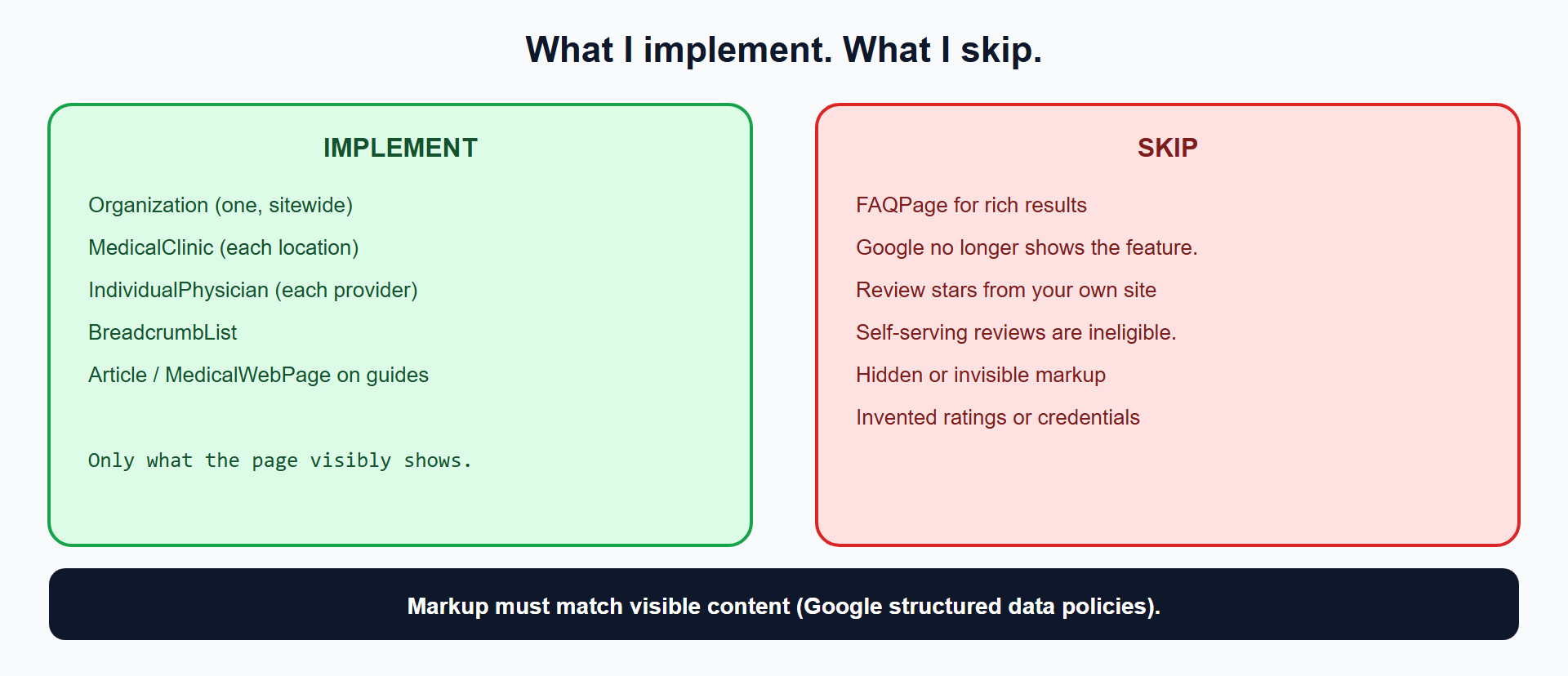
Implement five: Organization, MedicalClinic, IndividualPhysician, BreadcrumbList and an article type on your guides. Each describes something the page already shows.
| Type | Where | What it does |
|---|---|---|
Organization | Home or About page, once | Names the practice, logo, contact and official profiles (sameAs) |
MedicalClinic | Each location page | Address, phone, hours, specialties, new-patient status |
IndividualPhysician | Each provider page | Specialty, practice location, affiliations, NPI |
BreadcrumbList | Every inner page | Shows the page’s place in the site |
Article or MedicalWebPage | Condition and guide pages | Author, dates, reviewer via reviewedBy and lastReviewed |
Google’s local business documentation says to use the most specific LocalBusiness subtype possible, and MedicalClinic is one. It requires name and address and recommends geo, openingHoursSpecification, telephone and url.
Do I Use Physician or IndividualPhysician for a Doctor’s Page?
Use IndividualPhysician for a single provider’s page. Schema.org defines Physician as an individual physician or a physician’s office, and lists IndividualPhysician and PhysiciansOffice as the more specific subtypes. The specific type removes the ambiguity. Physician remains valid, and both inherit the same medical properties.
How Do the Entities Connect to Each Other?
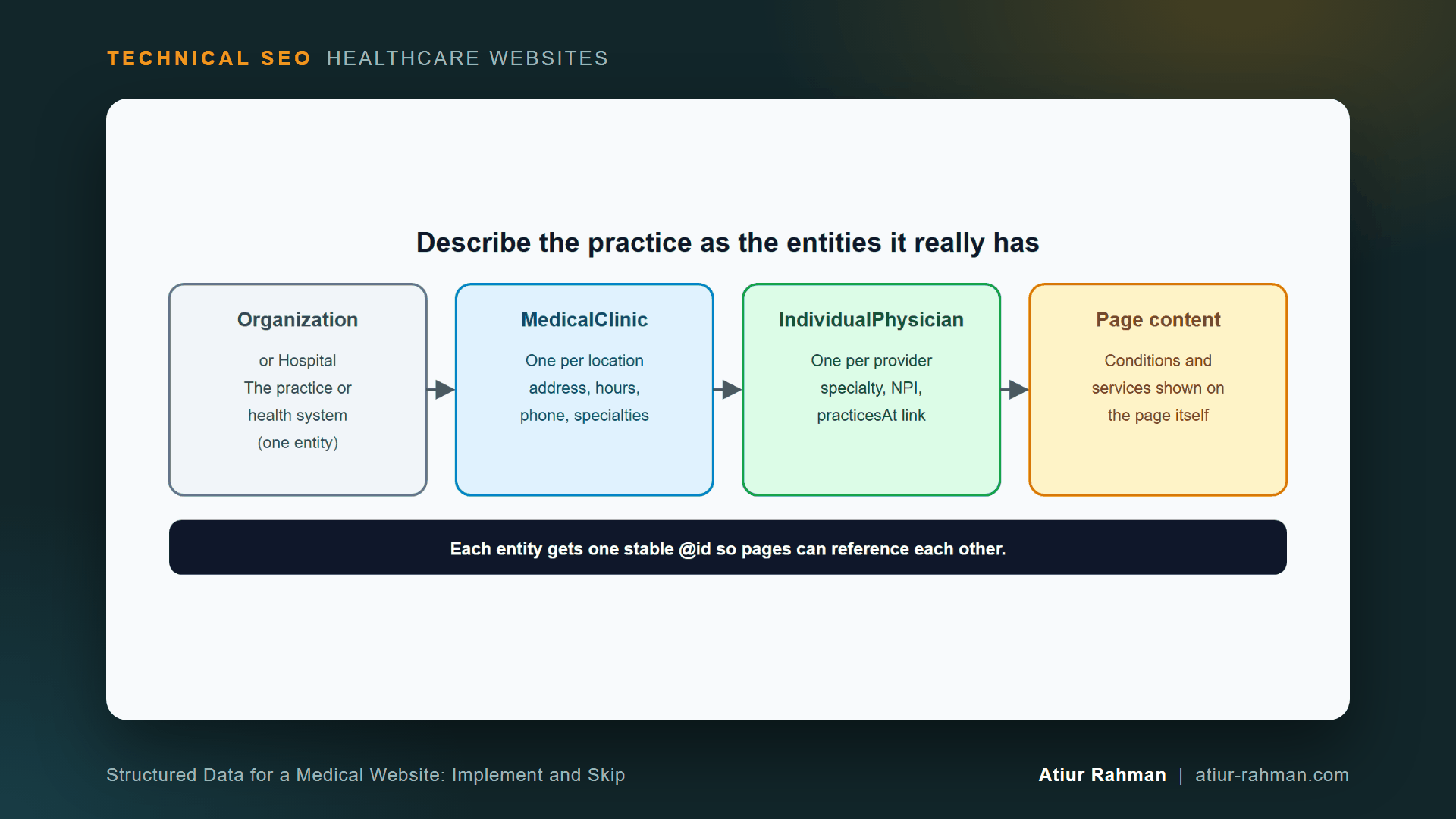
Give each entity one stable @id and reference it from the others. A provider page points to the clinic where the provider practices, and the clinic points to the parent organization. Search engines then read one connected set of facts, not isolated blocks.
What JSON-LD Do I Put on the Home Page?
Mark up the practice once, with its name, logo and official profiles, and give it the @id that every location and provider links to. Google’s Organization documentation covers the supported properties.
{
  "@context": "https://schema.org",
  "@type": "MedicalOrganization",
  "@id": "https://www.yourclinic.com/#organization",
  "name": "Lakeside Medical Group",
  "url": "https://www.yourclinic.com/",
  "logo": "https://www.yourclinic.com/images/logo.png",
  "telephone": "+1-512-555-0100",
  "sameAs": [
    "https://www.facebook.com/example-lakeside-medical",
    "https://www.linkedin.com/company/example-lakeside-medical"
  ]
}
List only profiles you actually own and that appear on or link from the site.
What JSON-LD Do I Put on a Location Page?
Mark up the clinic with its address, hours, phone and specialties, and link it to the parent organization. This template uses placeholder data. Replace every value with facts that appear on the page.
{
  "@context": "https://schema.org",
  "@graph": [
    {
      "@type": "MedicalClinic",
      "@id": "https://www.yourclinic.com/locations/downtown/#clinic",
      "name": "Lakeside Medical Group - Downtown",
      "url": "https://www.yourclinic.com/locations/downtown/",
      "telephone": "+1-512-555-0142",
      "image": "https://www.yourclinic.com/images/downtown-front.jpg",
      "address": {
        "@type": "PostalAddress",
        "streetAddress": "100 Example Street, Suite 200",
        "addressLocality": "Austin",
        "addressRegion": "TX",
        "postalCode": "78701",
        "addressCountry": "US"
      },
      "geo": {
        "@type": "GeoCoordinates",
        "latitude": 30.2672,
        "longitude": -97.7431
      },
      "openingHoursSpecification": [
        {
          "@type": "OpeningHoursSpecification",
          "dayOfWeek": ["Monday", "Tuesday", "Wednesday", "Thursday", "Friday"],
          "opens": "08:00",
          "closes": "17:00"
        }
      ],
      "medicalSpecialty": ["https://schema.org/Cardiovascular", "https://schema.org/Pediatric"],
      "isAcceptingNewPatients": true,
      "parentOrganization": { "@id": "https://www.yourclinic.com/#organization" }
    },
    {
      "@type": "BreadcrumbList",
      "itemListElement": [
        { "@type": "ListItem", "position": 1, "name": "Locations", "item": "https://www.yourclinic.com/locations/" },
        { "@type": "ListItem", "position": 2, "name": "Downtown", "item": "https://www.yourclinic.com/locations/downtown/" }
      ]
    }
  ]
}
Place it in a script tag in the page head:
<script type="application/ld+json">
  { ...the JSON above... }
</script>
The coordinates, phone and address above are fictional. The specialties use schema.org’s MedicalSpecialty values such as Cardiovascular and Pediatric. Set isAcceptingNewPatients only when the page says so and your scheduling team keeps it current.
What JSON-LD Do I Put on a Provider Page?
Mark up the provider with name, specialty, practice location and credentials that the page displays. Link the provider to their clinic with practicesAt.
{
  "@context": "https://schema.org",
  "@type": "IndividualPhysician",
  "@id": "https://www.yourclinic.com/providers/dr-maria-lee/#physician",
  "name": "Maria Lee, MD",
  "url": "https://www.yourclinic.com/providers/dr-maria-lee/",
  "image": "https://www.yourclinic.com/images/providers/maria-lee.jpg",
  "description": "Board-certified cardiologist treating heart rhythm disorders and high blood pressure.",
  "medicalSpecialty": "https://schema.org/Cardiovascular",
  "practicesAt": { "@id": "https://www.yourclinic.com/locations/downtown/#clinic" },
  "hospitalAffiliation": {
    "@type": "Hospital",
    "name": "Example Regional Hospital"
  },
  "usNPI": "1234567890",
  "isAcceptingNewPatients": true,
  "sameAs": [
    "https://www.linkedin.com/in/example-maria-lee"
  ]
}
The NPI above is a placeholder. Use usNPI only when the provider’s public profile shows it, and copy the number from the provider’s credentialing record, not from memory. practicesAt, hospitalAffiliation and usNPI are documented properties of the physician type.
Every value must appear on the page. A credential that exists in the JSON and nowhere in the visible bio breaks Google’s visibility rule.
What About Conditions and Treatments?
Describe them in visible text first. Add MedicalCondition markup on a dedicated condition page only when that page covers the condition in depth. Do not mark up a long list of conditions on a provider page to look relevant. That pattern misleads, and nobody benefits from it.
What Healthcare Schema Do I Skip?
Skip FAQ markup for rich results, review stars from your own site, hidden markup and invented claims.
Does FAQPage Markup Still Produce Rich Results?
No. Google’s FAQ documentation states that the FAQ rich result feature is no longer shown in Google Search, and the search gallery no longer lists it. Writing an FAQ section for patients still helps them. Adding FAQPage markup for a visible rich result no longer applies. I leave it out of production templates.
Can I Mark Up Patient Reviews From My Own Website?
No, not for star ratings. Google says that when the entity being reviewed controls the reviews about itself, pages using LocalBusiness or any other Organization type are ineligible for the star review feature, per its review snippet documentation. That covers reviews embedded through a third-party widget too. Marking them up anyway invites a manual action.
Can I Add Structured Data for Information Patients Cannot See?
No. Google’s guidelines prohibit marking up content that is not visible to readers, even when the information is accurate. A hidden credential, a hidden specialty and a hidden rating all fail the same rule.
How Do I Validate Healthcare Schema Before and After Launch?
Test the code in two validators, then confirm Google reads it live. Use all three, because each catches different problems.
- Rich Results Test: paste the code or URL into Google’s Rich Results Test. It shows which eligible features the page qualifies for.
- Schema Markup Validator: paste it into the Schema Markup Validator. It checks syntax and property names against the full schema.org vocabulary, including medical types that Google’s feature tests do not cover.
- URL Inspection: after launch, inspect the live URL in Search Console’s URL Inspection tool to confirm Google found the markup.
Before any of that, check the JSON parses. A missing comma silently kills the whole block.
python -c "import json,sys; json.load(open(sys.argv[1])); print('valid JSON')" provider.json
What Pushback Do I Get on Schema Work?
Marketing: “Add review stars. Competitors show them.” Competitor stars usually come from independent review platforms. Own-site reviews are ineligible, and chasing stars risks a manual action. Invest in your Google Business Profile reviews instead.
Developer: “The SEO plugin outputs schema automatically.” Plugins can emit several overlapping blocks: a generic Organization, a LocalBusiness and a Person, with conflicting values. Run the Schema Markup Validator on a sample page from each template and delete duplicates, so each entity appears once.
What Do I Do This Week?
- ☐ Export the structured data from your home page, one location page and one provider page.
- ☐ Remove duplicate or conflicting blocks, and any
FAQPageor own-site review markup. - ☐ Add
MedicalClinicto each location andIndividualPhysicianto each provider, using the templates. - ☐ Give every entity a stable
@idand link provider to clinic to organization. - ☐ Confirm every marked-up value appears visibly on the page.
- ☐ Validate in the Rich Results Test and the Schema Markup Validator, then inspect the live URL.
Reusable asset: the three JSON-LD templates above work as a starting kit for a clinic site. Replace every placeholder with facts that appear on the page.
Related reads in this hub:
- Why Did Google Pick the Wrong Canonical URL for My Clinic Locations?
- Why Does Search Console Flag My Doctor Bio Pages as Soft 404, and How Do I Fix Them?
Frequently Asked Questions
Does Schema Markup Improve My Medical Website’s Rankings?
Google does not say so. Its documentation describes structured data as a way to become eligible for rich results, with no ranking promise. Schema’s value is clarity: it tells search engines which clinic, which provider and which address belong together.
Is JSON-LD Better Than Microdata for a Clinic Site?
Yes for most sites. Google recommends JSON-LD because it is the easiest to implement and maintain at scale. The code sits in one script block, apart from your HTML, so a design change does not break it.
Do I Need Schema on Every Page?
No. Put Organization once, MedicalClinic on location pages, IndividualPhysician on provider pages, BreadcrumbList on inner pages and an article type on guides. Pages with nothing to describe, such as a privacy policy, need none.
Can I Mark Up Conditions Such as Diabetes or Hypertension?
Only on pages that cover the condition in depth, using MedicalCondition or MedicalWebPage. Marking up a long list of conditions on unrelated pages to look relevant misleads, and Google’s guidelines prohibit misleading markup.
How Often Do I Update Schema?
Update it whenever the visible facts change: hours, phone number, address, provider roster and new-patient status. Stale markup that disagrees with the page breaks the rule that markup must match what visitors see. Tie schema fields to the same data source as the page.
Does Healthcare Schema Help in AI Search Answers?
Google makes no such claim. Accurate markup removes ambiguity about who a provider is and where they practice, which helps any system that reads the page. Treat it as clean data hygiene, not an AI ranking lever.
Facing unexplained indexation drops or broken booking funnels on your clinic website? Book a 30-minute technical consultation with Atiur.
Part of the Technical SEO for Healthcare Websites series. More guides are on the blog. Related case study: US medical billing company: from zero presence to recognized brand.
References
- Google Search Central, Introduction to structured data
- Google Search Central, General structured data guidelines
- Google Search Central, Structured data search gallery
- Google Search Central, Local business structured data
- Google Search Central, Organization structured data
- Google Search Central, Breadcrumb structured data
- Google Search Central, Review snippet
- Google Search Central, FAQ structured data
- Google Rich Results Test, search.google.com/test/rich-results
- Schema Markup Validator, validator.schema.org
- Schema.org, MedicalClinic, IndividualPhysician, Physician, MedicalWebPage, MedicalCondition