

Your “Find a Doctor” page shows the first 20 providers and a “Load More” button. Patients love it. In Google, the first 20 doctors rank, and the other 180 do not exist. You search for a physician on page eight by name and get nothing back.
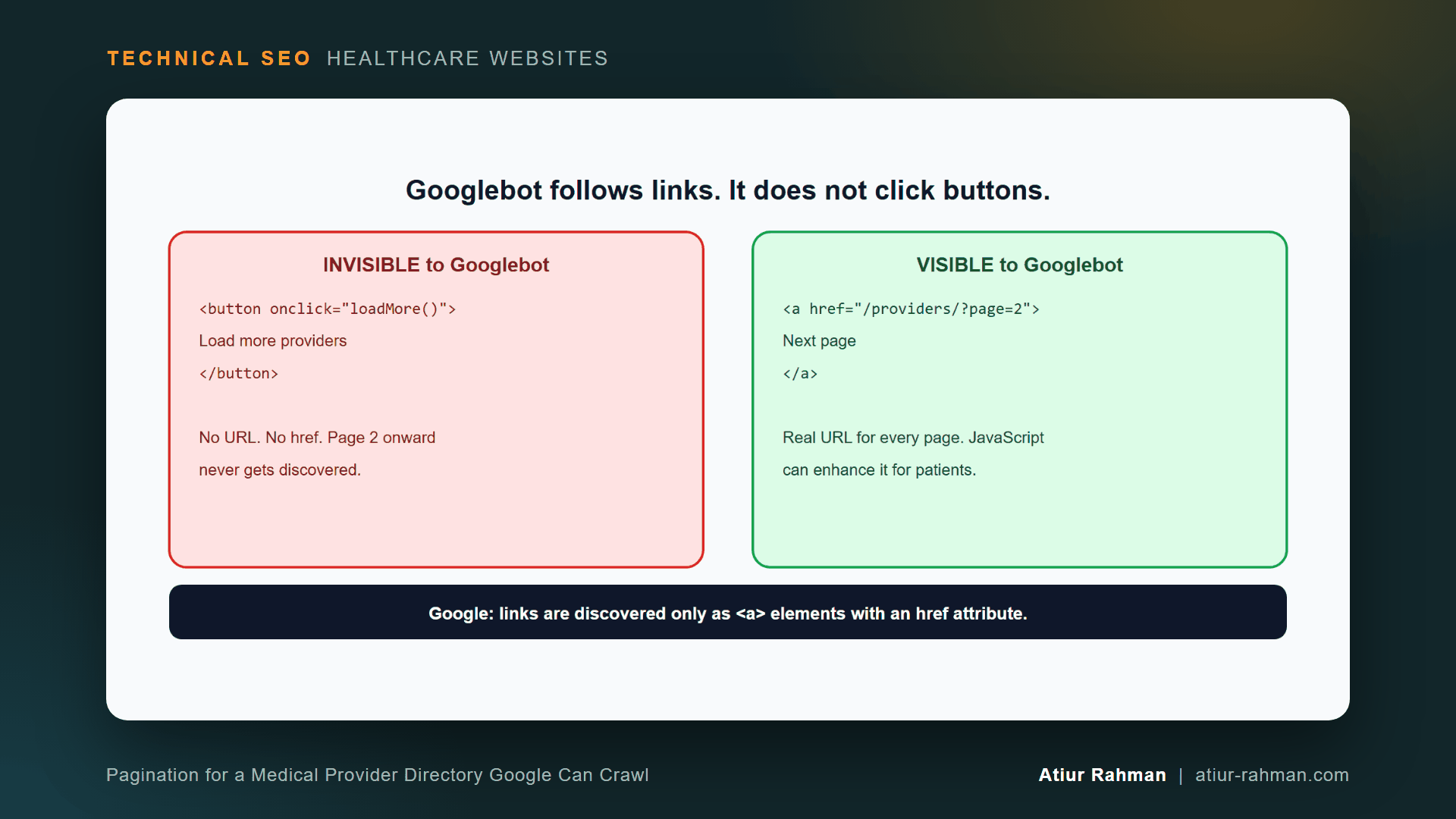
The cause is not the content. It is the button. Googlebot does not click buttons, so everything behind “Load More” sits in a part of your site the crawler never reaches. The same problem hits infinite scroll, numbered pages that run on JavaScript alone, and any directory that loads doctors through a script.
I fix this on provider directories, news archives and review lists, and the repair follows five rules. In the next ten minutes you will learn why Google dropped the old pagination tags, how to build a directory that works for patients and crawlers, and how to test the result with two commands.
Does Google Still Use rel=”next” and rel=”prev” for Pagination?
No. Google’s pagination guidance states that Google no longer uses these tags, although other search engines may still use them. Sequential links and clean URLs now do the work.
Google lays out these rules in its pagination and incremental page loading guide. It also states the link requirement in its JavaScript SEO basics: Google discovers links only when they are <a> elements with an href attribute.
What Are the Five Rules for Crawlable Pagination?
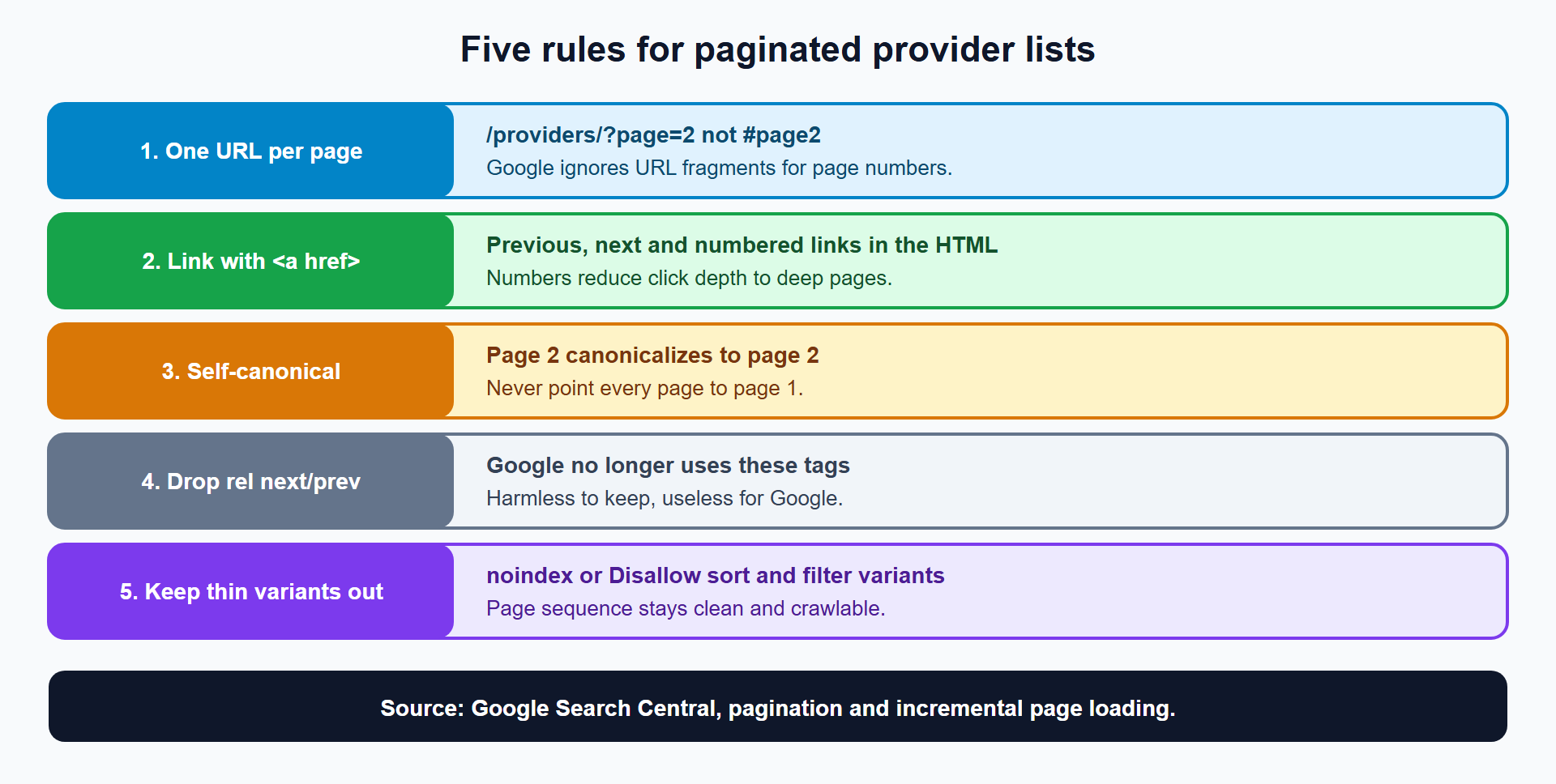
- Give every page its own URL.
/providers/?page=2, not/providers/#page2. Google’s guide says it ignores URL fragments used as page numbers. - Link pages with anchors. Previous, next and numbered links sit in the HTML as
<a href>elements. - Give each page a self-referencing canonical. Google says not to use the first page of a paginated sequence as the canonical for the rest. Each page gets its own canonical URL.
- Skip
rel="next"andrel="prev". They do no harm and do no work for Google. - Keep unwanted variants out. Use
noindexor arobots.txtrule on sort-order and filter variants, as Google’s guide describes, so the main page sequence stays clean. I cover filters in How Does Filtered Search Waste Googlebot Crawl Budget on Medical Provider Directories and Catalogs?.
How Do I Build a Crawlable Provider Directory?
Render each page of results on the server at its own URL, and put numbered and sequential links in the HTML. Here is the markup for page 3 of a directory:
<head>
  <title>Cardiologists in Austin, TX: Page 3 | Lakeside Medical Group</title>
  <link rel="canonical" href="https://www.yourclinic.com/cardiologists/austin/?page=3">
</head>
<body>
  <!-- 20 provider cards, each linking to a real profile URL -->
  <nav aria-label="Provider results pages">
    <a href="/cardiologists/austin/?page=2">Previous</a>
    <a href="/cardiologists/austin/">1</a>
    <a href="/cardiologists/austin/?page=2">2</a>
    <a href="/cardiologists/austin/?page=3" aria-current="page">3</a>
    <a href="/cardiologists/austin/?page=4">4</a>
    <a href="/cardiologists/austin/?page=5">5</a>
    <a href="/cardiologists/austin/?page=4">Next</a>
  </nav>
</body>
Three details matter:
- Page 1 uses the clean URL.
/cardiologists/austin/and?page=1must not both exist. Redirect?page=1to the clean URL. - Numbered links shorten the click path. A list that offers only “Next” puts page 20 twenty clicks deep. Numbered links give Googlebot a shorter route.
- Each page has a unique title. “Page 3” in the title separates it from page 2 in results and reports.
How Do I Keep a Load More Button and Still Let Google Crawl?
Build the button as a real link, then upgrade it with JavaScript for patients. If JavaScript fails or Googlebot ignores it, the link still works.
<ul id="provider-list">
  <!-- first 20 providers -->
</ul>
<a id="load-more" href="/cardiologists/austin/?page=2">Load more providers</a>
// Progressive enhancement: the link works without JavaScript
const link = document.getElementById("load-more");
if (link) {
  link.addEventListener("click", async (event) => {
    event.preventDefault();
    const response = await fetch(link.href);
    const html = await response.text();
    const doc = new DOMParser().parseFromString(html, "text/html");
    document.getElementById("provider-list")
      .append(...doc.querySelectorAll("#provider-list > li"));
    const next = doc.getElementById("load-more");
    if (next) {
      link.href = new URL(next.getAttribute("href"), response.url).href;
    } else {
      link.remove();
    }
    history.replaceState(null, "", response.url);
  });
}
The server returns a full page for every ?page=N, so each URL stands alone. The script only appends what the next page already holds. A patient gets the smooth button. A crawler gets a plain link to page 2, and page 2 links to page 3.
Google’s guide notes that “Load more” and infinite scroll are generally implemented with JavaScript, and that is the reason this pattern keeps the underlying URLs real. The same approach covers infinite scroll: load chunks as the patient scrolls, and keep a plain paginated URL behind every chunk.
Do I Noindex Page 2 and Beyond?
No. Deep pages hold the only crawl path to providers further down the list, and Google’s guidance reserves noindex for unwanted variants such as filter and sort combinations. Keep the page sequence indexable and let Google decide what to show.
How Do I Test Pagination on My Own Directory?
Check the raw HTML for anchor links, then check your log for deep-page visits. Two commands cover it.
# 1. Do pagination links exist as real anchors in the raw HTML?
curl -s "https://www.yourclinic.com/cardiologists/austin/" | grep -oE '<a [^>]*href="[^"]*page=[0-9]+"[^>]*>' | head

# 2. Does each page carry its own canonical?
curl -s "https://www.yourclinic.com/cardiologists/austin/?page=3" | grep -i 'rel="canonical"'
The first command prints the anchors. Empty output means the links appear only after JavaScript runs, and Googlebot’s first pass sees none. The second prints the page’s canonical, which must name page 3, not page 1.
Then look at Googlebot’s deep-page visits in your server log. The log method appears in How Do I Read My Medical Practice’s Server Log File to See What Googlebot Is Doing?.
# Googlebot hits per page number
grep -oE 'page=[0-9]+' googlebot.log | sort -t= -k2 -n | uniq -c
A sharp fall-off after page 2 or 3 shows that Googlebot stops following the sequence. Search Console’s URL Inspection tool confirms what Google renders for any one page.
What About Directories That Are Too Deep Even With Pagination?
Add category and hub pages so deep providers have more than one path. A list of 400 cardiologists split into 20 pages still puts the last page far from the home page. Specialty pages, location pages and an alphabetical index each give those providers a shorter route.
Home → /specialties/cardiology/ → /cardiologists/austin/ → provider
Home → /locations/austin/       → /cardiologists/austin/ → provider
Internal links from specialty and location hubs to curated lists such as /cardiologists/austin/ cut crawl depth and match real patient searches.
What Pushback Do I Get From Developers and Marketing?
Expect a UX defense and a request to index everything.
Developer: “Infinite scroll tested better with patients.” Keep it. Back every scroll chunk with a real paginated URL, as shown above. Patients see the same experience, and the crawl path exists underneath.
Marketing: “Merge everything into one View All page.” A single page with 400 providers loads slowly and breaks the mobile experience. Paginate at a sensible size and strengthen the hub pages instead.
What Do I Do This Week?
- ☐ Open your provider directory and try it with JavaScript disabled.
- ☐ Run the
curlanchor check on page 1. - ☐ Confirm each page has a unique URL and a self-referencing canonical.
- ☐ Replace button-only “Load More” with a real link plus JavaScript enhancement.
- ☐ Redirect
?page=1to the clean URL. - ☐ Check the log for Googlebot visits to deep pages.
- ☐ Add specialty and location hub links to the lists.
Reusable asset: the pagination markup and the Load More script above make a ready-to-hand-off blueprint. Give them to your developer as the spec.
Related reads in this hub:
Frequently Asked Questions
Does Google Use rel=”next” and rel=”prev” Anymore?
No. Google’s pagination guide says it no longer uses these tags, although other search engines may. Keeping them does no harm. Crawlable links and self-referencing canonicals are what Google needs.
Do I Point Page 2’s Canonical to Page 1?
No. Google says not to use the first page of a paginated sequence as the canonical page. Give each page its own canonical URL. A canonical to page 1 asks Google to ignore the providers on pages 2 and beyond.
Can I Use a Hash in the URL for Page Numbers?
No. Google ignores URL fragment identifiers, so #page2 creates no new URL for Google. Use a query parameter such as ?page=2 or a path such as /page/2/.
Does Infinite Scroll Hurt SEO?
It hurts when the content loads only through scrolling with no URLs behind it. Infinite scroll backed by real paginated URLs and anchor links works for both patients and Googlebot.
How Many Providers Per Page?
Choose the number that loads fast on a phone and keeps the sequence short. Twenty to fifty cards per page is a common range. Google gives no number, so test load speed with the Core Web Vitals triage steps and pick the highest count that stays fast.
Do Paginated Pages Count as Duplicate Content?
No. Each page lists different providers. Google treats a paginated series as separate pages when each has its own URL and canonical. Duplicate problems come from filter and sort variants, which noindex or robots.txt handle.
Facing unexplained indexation drops or broken booking funnels on your clinic website? Book a 30-minute technical consultation with Atiur.
Part of the Technical SEO for Healthcare Websites series. More guides are on the blog. Related case study: Fixing the Faceted Navigation That Was Eating a Pharmacy Catalog’s Crawl Budget.
References
- Google Search Central, Pagination and incremental page loading
- Google Search Central, JavaScript SEO basics
- Google Search Console Help, URL Inspection tool