

Your “Find a Doctor” page lets patients filter by specialty, insurance, language, gender and location. Patients love it. Googlebot loves it too, and that is the problem. Every filter combination is a new URL, and the crawler follows all of them.
You may have seen the symptoms without a name for them. New provider pages take weeks to appear in Google. Search Console lists thousands of “Crawled, currently not indexed” URLs with question marks in them. Your server log shows Googlebot busy on pages no patient ever searches for.
This pattern is called faceted navigation, and it is the most common crawl trap on medical directories and supply catalogs. I audit these filter systems with a four-step triage before I edit a single line of robots.txt, because a blunt block either leaves the problem untouched or hides pages that bring in appointments. In the next ten minutes you will see how the math works, how to measure the damage and which pages deserve to stay.
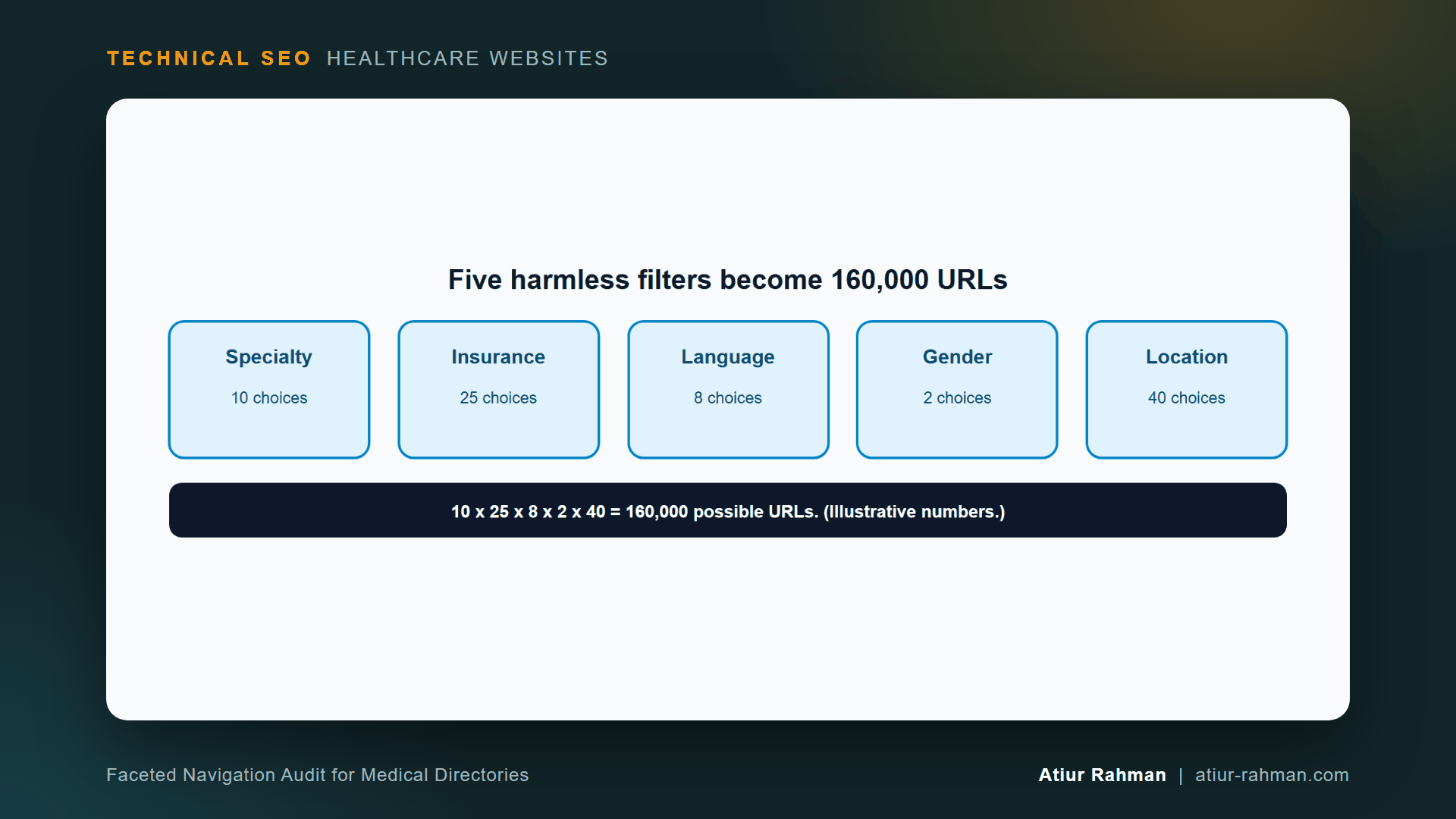
What Is Faceted Navigation on a Medical Website?
Faceted navigation is a filter system that builds a new URL for each combination of choices. On a clinic site it appears in provider directories, location finders, service lists and online pharmacy or medical supply catalogs.
The numbers above are illustrative, and your own filter counts decide your own total. The principle holds on every directory I audit: URL count grows by multiplication while real content grows by addition.
Google describes the same trap in its faceted navigation guidance, and its crawl budget guide states the cost: when Google spends too much time on low-value URLs, its crawlers can miss the rest of your site. For why a small site rarely has this problem and a directory can, read Does My Medical Practice Website Actually Have a Crawl Budget Problem?.
Why Do Patient Filters Create So Many Duplicate Pages?
A filter changes the list of results, not the content of the page template. A page filtered to “Cardiology + Aetna + Spanish” shows a subset of the same providers as “Cardiology + Aetna.” Search engines see near-identical pages with different URLs. Most have no search demand and no unique value.
How Do I Measure the Damage Before Changing Anything?
Count the share of Googlebot’s requests that hit parameter URLs. Your server log answers this in two commands.
First pull a Googlebot-only log, as shown in How Do I Read My Medical Practice’s Server Log File to See What Googlebot Is Doing?. Then measure:
# Share of Googlebot requests that carry a query string
awk '{t++; if($7 ~ /?/) q++} END{printf "%.1f%% of Googlebot requests hit parameter URLsn", 100*q/t}' googlebot.log

# Which parameter patterns take the most requests
awk '$7 ~ /?/ {print $7}' googlebot.log | sed -E 's/=[^&]*/=*/g' | sort | uniq -c | sort -rn | head -10
Example output (format only; your numbers differ):
61.4% of Googlebot requests hit parameter URLs
  9120 /find-a-doctor/?specialty=*&insurance=*
  6740 /find-a-doctor/?specialty=*&insurance=*&language=*
  3011 /find-a-doctor/?specialty=*&location=*&gender=*
When more than a small share of requests go to parameter URLs and your real provider pages get few visits, you have a faceted navigation problem. When parameter URLs take almost nothing, leave the system alone.
Next, check Search Console’s Indexing → Pages report. Filter the “Crawled, currently not indexed” and “Discovered, currently not indexed” lists for URLs containing ?. A large block of filter URLs there confirms the log.
What Is the 4-Step Faceted Navigation Triage?
Measure, choose what earns a page, block the rest, then clean the edges. Run the steps in this order.
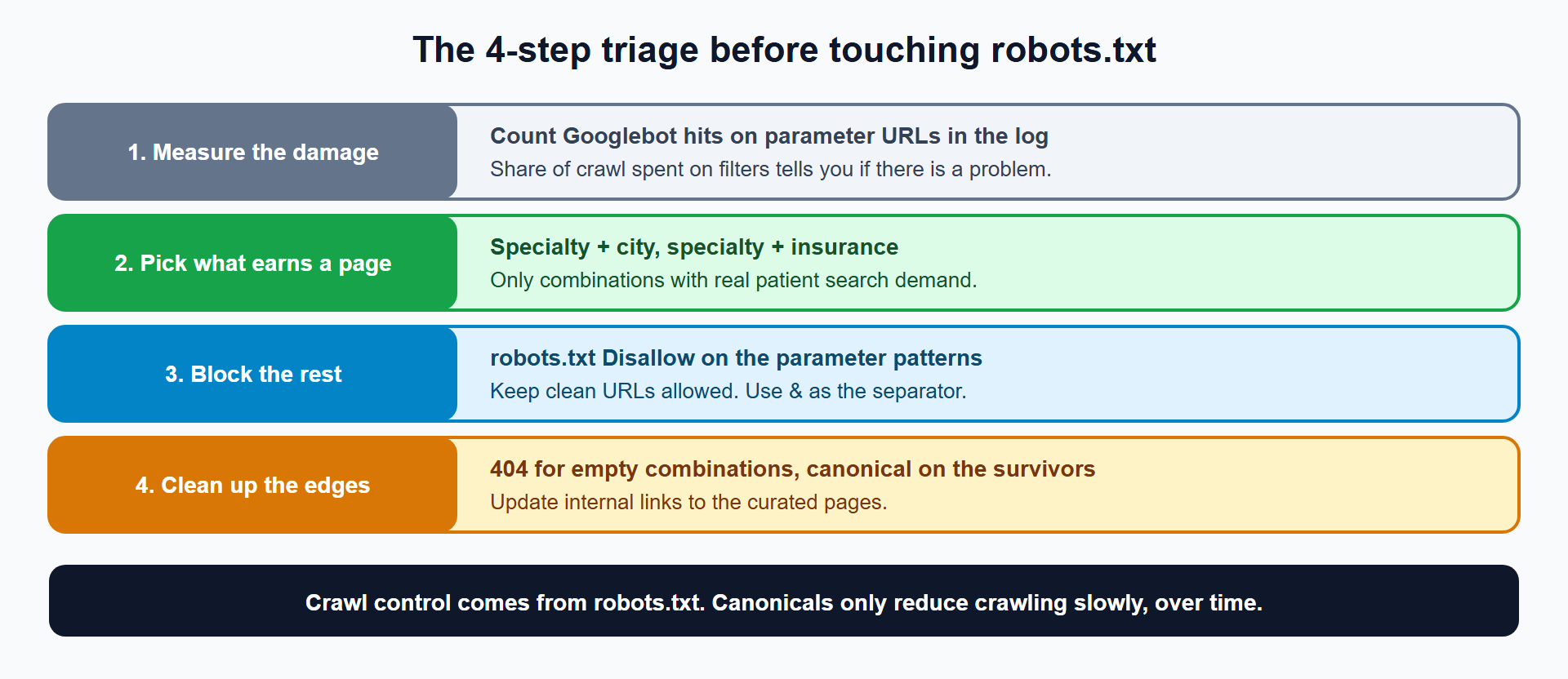
robots.txt. Original diagram by Atiur Rahman.Step 1: Measure the Damage
You did this above. Record the parameter share, the top three patterns and the number of filter URLs sitting in “not indexed” states. This is your baseline for the before-and-after comparison.
Step 2: Which Filter Combinations Deserve Their Own Indexable Page?
Only combinations that patients search for deserve an indexable page. Specialty plus city is the strongest candidate: “cardiologist in Austin” is a real search. Specialty plus insurance is the second: “pediatrician that accepts Blue Cross.” Specialty plus language plus gender plus insurance is not a search anyone runs.
Build the list from data:
- Pull search queries from Search Console’s Performance report.
- Check volume for each candidate combination in a keyword tool.
- Keep combinations with real demand and enough providers to fill a useful page.
Give each survivor a clean, static, human-readable URL and unique page copy:
/cardiologists/austin/
/pediatricians/accepting-blue-cross/
The survivors become real landing pages with their own title, introduction and provider list. They are curated pages, not filter outputs.
Step 3: How Do I Block the Rest in robots.txt?
Disallow the parameter patterns and keep the clean landing pages allowed. Google’s faceted navigation guidance lists robots.txt Disallow as its first recommended method, because it stops the crawl directly.
User-agent: *
Disallow: /find-a-doctor/*?
Allow: /find-a-doctor/$
The first rule blocks any filtered URL under the directory. The second keeps the unfiltered directory page crawlable. Google documents the * wildcard and $ end marker in the robots.txt specification, and notes that on conflicting rules it applies the least restrictive one, so test every rule.
Two details from Google’s guidance save trouble:
- Use the standard
&separator between parameters. Commas, semicolons and brackets break pattern matching, and rules fail silently. - Fragments (
#) are not supported for crawling and indexing, so a hash-based filter creates no new crawlable URLs. That approach has no SEO effect, positive or negative.
One warning applies. A Disallow blocks crawling and does not remove URLs already indexed. Before blocking, check the indexed filter URLs. If many are indexed, apply noindex on them first, wait for removal, then add the block. I explain the order in How Do I Choose Between robots.txt, noindex and Canonical Tags on a Medical Website?.
Step 4: How Do I Clean Up the Edges?
Return a real 404 for impossible filter combinations, point canonical tags on any surviving filtered pages to the clean version, and update internal links to the curated landing pages. Google advises returning an HTTP 404 when a filter combination returns no results, including empty, duplicate and nonsensical combinations.
<!-- On a filtered page that must stay reachable -->
<link rel="canonical" href="https://www.yourclinic.com/cardiologists/austin/">
Treat the canonical as a slow-acting hint. Google’s guidance says it decreases crawl volume of non-canonical versions only over time. Do not rely on it as your main crawl control.
What Does This Look Like on a Medical Product Catalog?
The same math applies to pharmacy and medical supply catalogs, with different filters. A catalog with 12 brands, 6 sizes, 8 colors and 5 price bands creates 12 × 6 × 8 × 5 = 2,880 combinations per category before sorting options. Add “sort by” and “items per page” and the count multiplies again.
The triage is identical: measure, curate the combinations with demand (brand plus product type, for example), block the rest, 404 the impossible. Sorting parameters carry no search value at all, so they go into Disallow first.
What Pushback Do I Get From Developers and Marketing?
Expect a defense of the filters and a request to index everything.
Developer: “The filters are a UX feature. Blocking them breaks the product.” Blocking crawling does not change what patients see. Filters keep working for people. Only Googlebot stops following them.
Marketing: “Every combination is a long-tail keyword. Index them all.” Some combinations are real searches, and Step 2 keeps those. The rest are near-duplicate thin pages that dilute your site and starve the pages that earn appointments. Show the log: if Googlebot spends most requests on filters, patients searching for a provider lose to the crawl trap.
Both sides agree once the curated landing pages exist. Marketing gets pages built for real queries, and engineering keeps its filters.
What Do I Do This Week?
- ☐ Pull 30 days of Googlebot logs and compute the parameter-URL share.
- ☐ List the top three parameter patterns by request count.
- ☐ Export “not indexed” URLs from Search Console and count those with
?. - ☐ List filter combinations with real search demand, and design clean URLs for them.
- ☐ Add
Disallowrules for the remaining patterns, afternoindexcleanup of any indexed ones. - ☐ Return 404 for empty filter results. Re-measure the parameter share after 14 days.
Reusable asset: the four-step triage and the log commands above make a complete audit worksheet. Record your before and after numbers beside each step.
Related reads in this hub:
- Does My Medical Practice Website Actually Have a Crawl Budget Problem?
- How Do I Read My Medical Practice’s Server Log File to See What Googlebot Is Doing?
Frequently Asked Questions
Do I Block Filter URLs in robots.txt or Use noindex?
Use robots.txt to stop crawl waste on URLs that were never indexed, and use noindex first on filter URLs that Google already indexed. Blocking an indexed URL hides its noindex tag from Googlebot. Clean the index, then block.
How Many Filter Combinations Is Too Many?
No fixed number applies. The test is the log: when parameter URLs take a large share of Googlebot requests and your provider pages get little attention, the count is too high. A small directory with two filters rarely has the problem.
Does a Find-a-Doctor Filter Hurt My Local Rankings?
The effect is indirect. Crawl waste delays discovery of new provider and location pages, and thousands of near-duplicate URLs add noise to your site. The curated landing pages from Step 2 help local visibility because they match real patient queries.
Can I Fix Faceted Navigation With Canonical Tags Alone?
Canonicals help, but slowly and unreliably, because Google treats them as a hint. Google’s guidance lists robots.txt as the effective method and canonical as the secondary one. Combine them: block patterns you never want crawled, canonical the pages that must stay reachable.
What About JavaScript Filters That Do Not Change the URL?
They create no crawlable URLs, so they cause no crawl waste. If the filter changes results through JavaScript while the URL stays the same, Googlebot sees one page. The tradeoff is that you also build no indexable filtered landing pages, so create the curated ones from Step 2 separately.
Do Pagination and Faceted Navigation Cause the Same Problem?
They overlap but differ. Pagination splits one list across numbered pages. Faceted navigation creates new lists from filter choices. Both multiply URLs, and a filtered list can also paginate. Handle each rule set separately.
Facing unexplained indexation drops or broken booking funnels on your clinic website? Book a 30-minute technical consultation with Atiur.
Part of the Technical SEO for Healthcare Websites series. More guides are on the blog. Related case study: Fixing the Faceted Navigation That Was Eating a Pharmacy Catalog’s Crawl Budget.
References
- Google Search Central, Faceted navigation best practices
- Google Search Central, Managing crawl budget for large sites
- Google Search Central, Robots.txt specification