

Which name goes on your Google listing: the practice, the doctor or both?
It sounds like a small question. It decides whether you end up with one clean profile or with a duplicate, a suspension notice and reviews split across two pages. Google has written rules for it, and they’re clearer than most agency guides admit.
Most setup guides walk through the editor field by field. This one starts where the damage happens. A medical profile fails in four predictable ways, and each failure traces to a rule in Google’s guidelines. So the sections below follow the failures, and each one ends with the rule that prevents it. I run Local SEO for medical practices and clinic groups, and I use this map to audit a profile before I touch a single field.
How Does a Medical Profile End Up Duplicated, Split or Suspended?
It fails in four ways: the wrong profile type for a person or address, an address Google rejects, a name with extra words in it, and content the guidelines ban. Each one has a cause you can read in Google’s own rules, and each one is cheaper to prevent than to repair.
| Failure | What causes it | The rule that prevents it |
|---|---|---|
| Duplicate or split profiles | Two profiles for one location, or one doctor with several profiles | One page per location across all accounts, and one practitioner profile per doctor, never one per specialty |
| An ineligible address | A P.O. box, a virtual office, a shared suite with no signage | A precise street address with permanent, fixed signage and staff on site |
| A rejected name | Taglines, keywords, specialties or a location tacked onto the name | The real-world name from the signage, with nothing extra |
| Flagged content | Links or prices in the description, medicines in Products, requests for personal data | Description, Products and posts follow Google’s content limits |
The first row is where I find reviews stranded on a second page. The last row is where healthcare adds its own risk, because content that is fine for a restaurant can expose a patient.
Which Profile Does Each Person and Address Get?
Every real address gets one location profile, and every public-facing doctor reachable at that address during stated hours can also get a practitioner profile. Support staff get none, and nobody gets two.
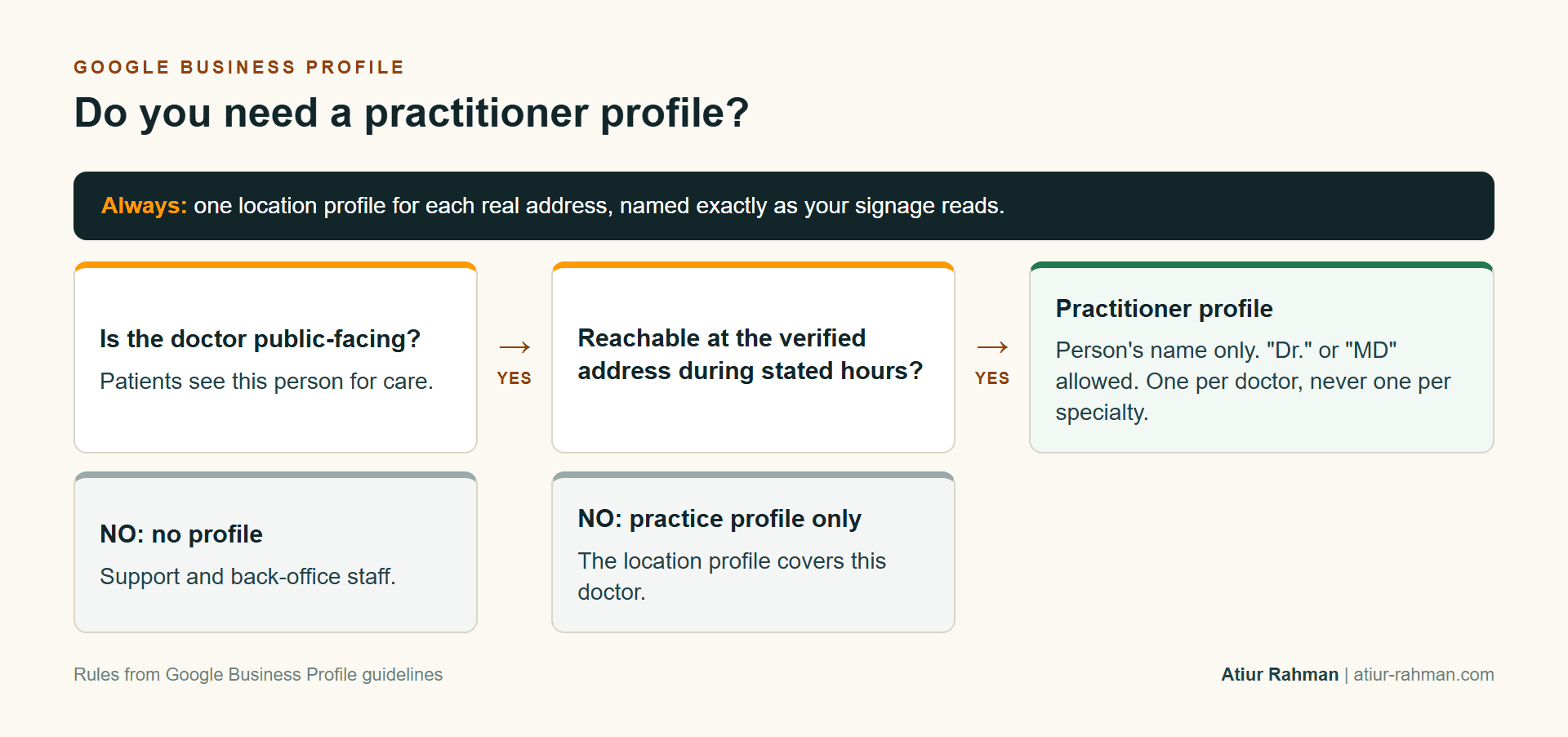
The location profile represents the office under the practice’s name. A practitioner profile represents the person and uses only that person’s name, and Google allows a title or degree such as “Dr.” or “MD” there. When a solo practitioner works inside a branded organization, the format is the brand, a colon and the practitioner’s name. A hospital department qualifies only when it operates as a distinct, public-facing entity with its own name, category and usually its own entrance. An internal section of a clinic doesn’t.
The decision rests on two questions, in order: is the doctor public-facing, and can patients reach them at the verified address during stated hours? A physician who reads imaging remotely, or who visits the site once a month with no set hours, fails the second question and stays on the practice profile.
What Makes an Address Ineligible, and What Do You Do When Yours Is?
An address is ineligible when it isn’t a real, staffed place patients can visit. Google rejects P.O. boxes and remote mailboxes, and it doesn’t accept a virtual office. A co-working suite qualifies only when it has clear signage, receives patients during business hours and uses the practice’s own staff.
The practical fix depends on the cause:
- A P.O. box or mailbox. The street address goes on Address Line 1 and the suite or box on Address Line 2. If no real street address exists, the practice has no eligible listing yet.
- Shared space with no signage. Permanent signage with the business name at the address solves most of these cases, because Google requires it.
- A pin in the wrong place. The address can be right and the pin wrong. I open the profile in Maps and zoom to the entrance, because a pin on the wrong side of a medical park throws off the distance measurement.
- A clinic treated as a service-area business. Patients come to a clinic, so the address stays visible. Hiding it belongs to businesses that travel to customers.
What Name Does Google Accept for a Doctor, a Group and a Department?
It accepts the real-world name that appears on your signage, website and stationery, in the same form everywhere. It rejects any word added to improve search visibility.
| Listing | Accepted | Rejected |
|---|---|---|
| Practice location | The practice’s name as on the sign | “Springfield Orthopedic Surgeon Knee Replacement”, taglines, hours, a phone number, “near” a landmark, ® or ™ symbols |
| Practitioner | The person’s name, with “Dr.” or “MD” if used on the profile | The practice’s marketing name or a specialty in the name field |
| Solo practitioner in a brand | Brand name, colon, practitioner name | Two separate profiles for the same person |
| Hospital department | A name distinct from the hospital and other departments | The hospital’s name alone |
Google states that unnecessary information in the name can lead to suspension. I treat that sentence as the first thing to audit, because keyword-heavy names are common in medical listings, and they are a risk sitting in plain sight.
What Content Gets a Medical Profile Flagged?
Content gets flagged when it breaks Google’s content limits or exposes a patient. The first group covers any business, and the second is healthcare’s own.
The description allows no links, promotions, prices or sales offers. It says what the practice is, what it treats and whom it serves. The Products section blocks pharmaceuticals, unapproved supplements and health or medical devices, so treatments belong in Services, written in the words patients use. Google also bars soliciting personal or confidential information anywhere on the profile. Appointment-only practices leave hours blank, and practices with set walk-in times enter those times.
The healthcare risk sits in photos and posts. A photo of an identifiable patient needs the patient’s written authorization, and a staff phone snapshot taken in a treatment room fails that test. Staff photos need the person’s consent. Posts stick to office news, new providers and seasonal hours, and they carry no patient story, however well it reads. The HIPAA review guide covers the review side of the same exposure.
Categories and services decide relevance, and they sit in a different article: the Map Pack guide shows how to choose them by reading the three practices that already rank. The short rule applies here too: Google wants the fewest, most specific categories that describe what the business is.
What Do You Do the Day a Suspension or Duplicate Appears?
You read the notice, fix the cause it names and ask for reinstatement once. Google’s notice tells owners to submit for reinstatement when the profile is compliant, so submitting before the fix wastes an attempt.
The runbook I use has four parts:
- Read. The notice names the cause. I match it to the failure table above.
- Document. Photos of the signage, the license and a utility bill or lease showing the address go into one folder.
- Fix, then ask. The name, address or content gets corrected first, and the request goes in once.
- No replacement profile. Creating a second profile for the same business while an appeal is open adds a duplicate to the problem.
Duplicates need a different cleanup. I search the phone number and the address in Maps, list every profile that appears, keep the oldest verified one and ask Google to remove or merge the rest through the Business Profile help flow. I log each change with the date, so a later problem has a trail to follow. Google says more than one profile for the same location causes display problems on Maps and Search, and Google’s Business Profile guidelines list the rest.
Frequently Asked Questions
Can two doctors share one Google profile?
Not as practitioners. The practice has a location profile, and each public-facing doctor can have an individual profile that uses only that person’s name. Shared profiles split reviews and blur the entity Google sees.
Can I put “Dr.” in my profile name?
Yes, on a practitioner profile. Google allows titles and degrees such as “Dr.” or “MD” there. The practice profile carries the practice’s real name and nothing extra.
Does an appointment-only practice show hours?
No. Google’s guidelines tell businesses that operate only by appointment to leave hours blank. If patients walk in during set times, those times go in.
What if my practice is inside a hospital?
A department needs a name and category that differ from the hospital’s and from other departments, and it has to operate as a distinct, public-facing entity. If it doesn’t, the hospital’s profile covers it.
Do photos and posts help my ranking?
Google lists photos among its tips for a stronger profile and doesn’t call them a ranking factor. They help patients choose, and they carry the HIPAA limits above.
Want a profile that survives an audit? Book a strategy call.
References
- Google Business Profile Help, Business Profile guidelines
- Google Business Profile Help, Local ranking tips
- Schema.org, MedicalClinic and Physician