

You opened Search Console, found “Soft 404” in the Page indexing report and saw your doctors’ names in the URL list. The pages load fine in your browser. Each shows a photo, a name and a line that says “Bio coming soon.” Nothing looks broken.
That is exactly why the flag confuses people. A soft 404 is not a crash. It is a page that behaves like an error page while telling the world it is healthy. Google reads the empty content, ignores the cheerful status code and drops the page.
For a medical group, those pages are not filler. Provider profiles are some of the highest-intent pages on the site, because patients search for a doctor by name before they book. In the next ten minutes you will learn why Google flags these pages, how to confirm it with one command and which of four fixes fits each provider.
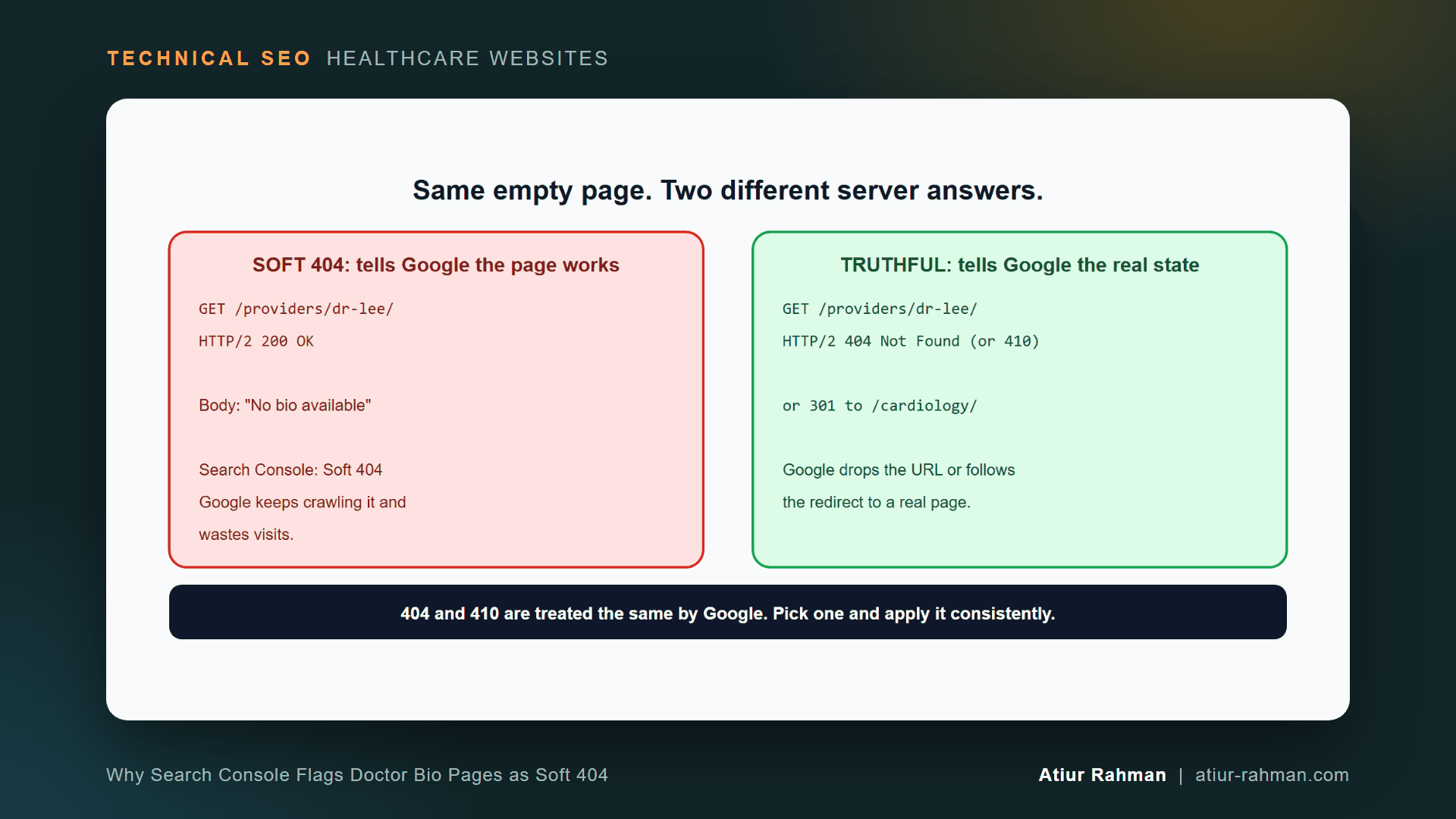
What Is a Soft 404 on a Doctor Profile Page?
A soft 404 is a page that returns HTTP 200 OK while its content reads like an error or an empty page. Google treats it as a missing page and removes it from search results.
Google defines the term in its HTTP status codes guidance, and the status appears in the Page indexing report. A soft 404 also wastes crawl time. Google’s crawl budget guide says a 404 is a strong signal not to crawl a URL again, while soft 404 pages continue to be crawled and waste budget.
Why Do Provider Pages Turn Into Soft 404s?
Provider pages turn into soft 404s because of how the template handles missing data. I see four causes on healthcare sites:
- Placeholder bios. The EHR or directory feed creates a page for every provider, including those with no biography yet.
- Departed providers. A physician leaves the practice, the profile loses its content, and the URL still returns
200. - Dynamic templates with no 404 rule. The template renders for any slug. A request for
/providers/anything/returns an empty profile with200instead of an error. - Thin pages in bulk. Hundreds of profiles share the same few lines of text, so Google reads each as empty.
How Do I Confirm a Doctor Page Is a Soft 404?
Confirm it with the URL Inspection tool, then with curl. Search Console names the status, and the command shows the mismatch between the status code and the content.
In Search Console, open Indexing → Pages, find the “Soft 404” row and export the URLs. Inspect one with the URL Inspection tool. Then check the raw response:
curl -s -o /dev/null -w "status: %{http_code}  bytes: %{size_download}n"
  https://www.yourclinic.com/providers/dr-lee/

curl -s https://www.yourclinic.com/providers/dr-lee/ | grep -iE "no bio available|coming soon|profile unavailable"
A 200 status with a placeholder phrase in the body confirms the mismatch. A tiny byte count on a 200 supports it.
How Do I Audit Every Provider Page at Once?
Loop through your provider URLs and flag each page that returns 200 with placeholder text. Save your URLs, one per line, in urls.txt, then run:
tmp=$(mktemp)
while read -r url; do
  out=$(curl -s -o "$tmp" -w "%{http_code} %{size_download}" "$url")
  flag=""
  grep -qiE "no bio available|coming soon|profile unavailable" "$tmp" && flag="PLACEHOLDER"
  echo "$out $flag $url"
done < urls.txt
rm -f "$tmp"
Example output (format only):
200 41820  https://www.yourclinic.com/providers/dr-lee/
200 5230 PLACEHOLDER https://www.yourclinic.com/providers/dr-patel/
404 9120  https://www.yourclinic.com/providers/missing/
Sort the results. Every PLACEHOLDER row is a soft 404 candidate. Change the search phrases to match your template’s exact wording. In a spreadsheet or crawler such as Screaming Frog, the same check is a custom search for those phrases across all 200 pages.
What Status Code Does Each Provider Page Return?
Return a status that matches the page’s real state: 200 for a full bio, an enriched or noindex page for a thin one, a 301 for a departed provider with a close match, and 404 or 410 when nothing replaces it.
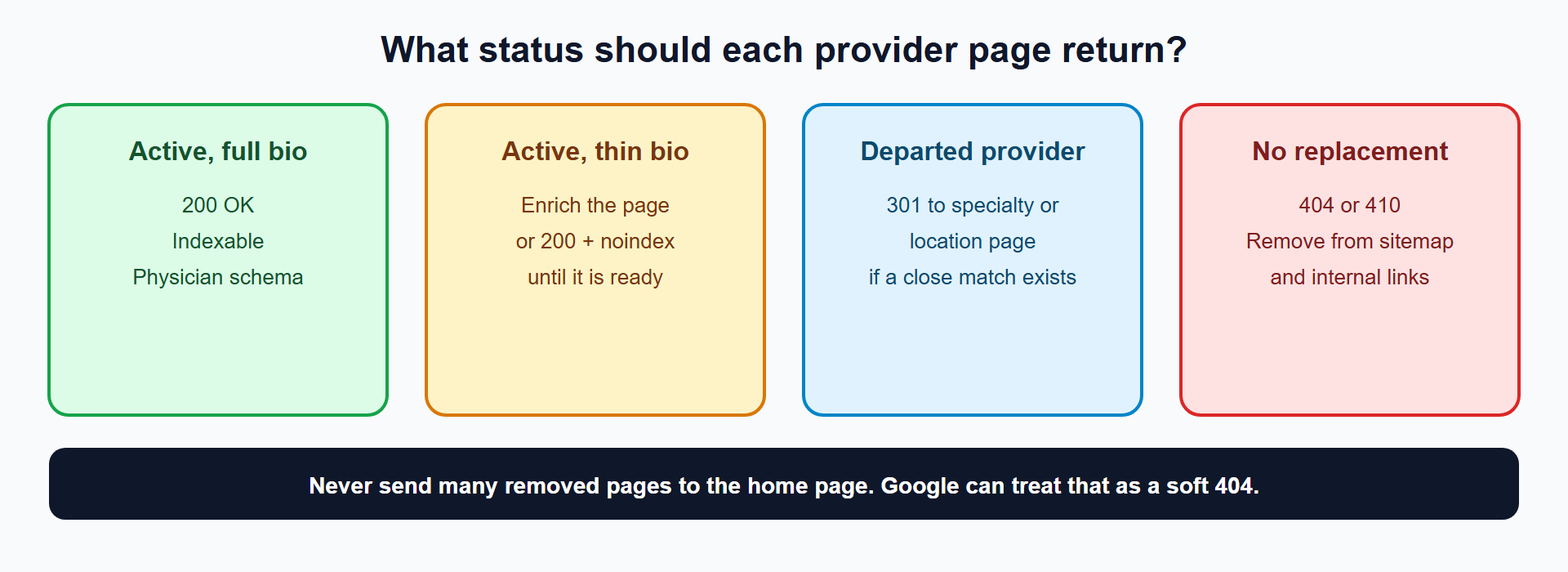
| Provider situation | Status to return | Also do |
|---|---|---|
| Active provider, full bio | 200 | Add Physician schema |
| Active provider, thin bio | 200 + enrich the page, or 200 + noindex until ready | Keep out of the sitemap while noindex |
| Departed provider, close replacement exists | 301 | Redirect to the specialty or location page |
| Departed provider, no replacement | 404 or 410 | Remove from sitemap and internal links |
| URL that never existed | 404 | Add a template rule so unknown slugs return 404 |
How Do I Make a Thin Bio Page Worth Indexing?
Add the facts patients and Google both look for, in structured form. Google has no magic word count. A page that answers who this provider is, what they treat, where they practice and how to book is useful at any length.
A complete provider page holds:
- Full name, credentials and specialty
- Conditions and procedures treated
- Locations and the days at each
- Insurance accepted, languages spoken and a booking link
- Education, board certification and a short professional statement in the provider’s own words
Mark these facts up with the Physician type, and use MedicalClinic for the practice. Schema describes the page accurately. It does not replace the visible content.
Do I Use noindex on Thin Provider Pages?
Yes, for pages that will get real content soon. noindex keeps the thin page out of search while it stays live for patients who reach it from your site. Add the tag and remove the URL from your XML sitemap.
<meta name="robots" content="noindex">
Remove noindex the day the bio is complete. I explain why noindex needs crawl access in How Do I Choose Between robots.txt, noindex and Canonical Tags on a Medical Website?.
What Do I Do With a Departed Provider’s Page?
Redirect it to the closest useful page when one exists, otherwise return 404 or 410. Google treats 404 and 410 the same way, per its status code documentation, so choose one and apply it consistently.
Redirect a departed cardiologist to the cardiology department page or the location page, not to the home page. Google’s site move guidance warns against redirecting many old URLs to one irrelevant destination, because it can be treated as a soft 404. The redirect documentation explains permanent redirects, and Google calls a 301 a strong signal to process the redirect target.
How Do I Make Unknown Provider URLs Return a Real 404?
Add a rule in the template: if the provider record does not exist, send a 404 status before any HTML renders. In WordPress:
// In the provider template, before output
if ( ! have_posts() ) {
    status_header( 404 );
    nocache_headers();
    include( get_query_template( '404' ) );
    exit;
}
Test with a made-up slug and confirm the response with curl -I.
What Pushback Do I Get When I Fix Provider Pages?
Marketing and operations raise reasonable objections.
Marketing: “Dr. Patel returns next month. Do not remove her page.” Use 200 with noindex and keep the page out of the sitemap until her bio is ready. Nothing is lost, and nothing flags.
Operations: “We cannot write 120 bios.” Do not write 120 essays. Fill the structured fields first: specialty, conditions, locations, insurance, languages and credentials. Most of that data already sits in the credentialing file, and it produces a complete page without a long narrative.
What Do I Do This Week?
- ☐ Export the Soft 404 URLs from Search Console.
- ☐ Run the audit loop across all provider URLs.
- ☐ Sort every flagged page into one of the four states.
- ☐ Add
noindexto thin pages that are coming soon, and take them out of the sitemap. - ☐ Redirect departed providers to a close match, or return
404. - ☐ Add a template rule so unknown slugs return
404. - ☐ Use URL Inspection to request a re-crawl, then re-check the report in two weeks.
Reusable asset: the placeholder phrases and the audit loop above work as a crawler custom search. Paste the phrases into your crawler’s custom search setup.
Related reads in this hub:
- What Does Technical SEO Control on a Medical Website (and What Can’t It Fix)?
- How Do I Build a Redirect Map Before a Medical Website Redesign or CMS Migration?
Frequently Asked Questions
What Is the Difference Between a Soft 404 and a Real 404?
A real 404 returns the 404 status code, and the server says the page does not exist. A soft 404 returns 200 and shows error-like or empty content. Google trusts the content over the status code in the second case and reports the page as a soft 404.
Will Soft 404s Hurt the Rest of My Clinic Website?
They waste crawl time and clutter your reports, and they do not penalize other pages. Google’s crawl budget guide notes that soft 404 pages keep getting crawled. The larger cost is the lost provider pages, which patients search for by name.
Do I Use 404 or 410 for a Doctor Who Left the Practice?
Either works. Google’s documentation treats 404 and 410 the same for indexing removal and crawl frequency. Use 404 as the default and 410 only when you want to state that the removal is deliberate.
How Long Until a Fixed Page Leaves the Soft 404 Report?
Until Googlebot re-crawls the page. Request indexing in URL Inspection for the key provider pages, and expect the Page indexing report to update over the following days to weeks as Google revisits the rest.
Does Adding More Words Fix a Soft 404?
Not by itself. Google flags emptiness of useful content, not low word counts. A short page that answers who, what, where and how to book passes. A long page of filler repeated across profiles does not.
Can an Old Provider Page Keep Ranking After I Redirect It?
The redirect passes the page’s signals to the target in time, and Google calls a 301 a strong signal. The old URL leaves search results once Google processes the redirect. Keep the redirect for at least a year.
Facing unexplained indexation drops or broken booking funnels on your clinic website? Book a 30-minute technical consultation with Atiur.
Part of the Technical SEO for Healthcare Websites series. More guides are on the blog. Related case study: Telehealth platform: 88% organic traffic recovery after YMYL core update.
References
- Google Search Central, HTTP status codes, and network and DNS errors
- Google Search Central, Managing crawl budget for large sites
- Google Search Central, Redirects and Google Search
- Google Search Console Help, Page indexing report
- Google Search Console Help, URL Inspection tool
- Schema.org, Physician and MedicalClinic