

Someone told you to “fix your crawl budget.” The warning came from an agency pitch, a plugin alert or a blog post with a scary chart. You run a clinic with a few hundred pages, and you cannot tell whether this is a real problem or a sales line.
Both answers exist. Most single-location practices have no crawl budget problem at all, and spending money on one wastes the budget you do have. A multi-location group with a provider directory, an appointment calendar and an old CMS can have a serious one. The difference is arithmetic, and you can run it in five minutes.
I run the same calculation on every healthcare site before I recommend any crawl work. In the next ten minutes you will learn what crawl budget means, the formula that shows whether you have a deficit, how to get your numbers from a server log and what to fix when the answer is yes.
What Is Crawl Budget on a Medical Website?
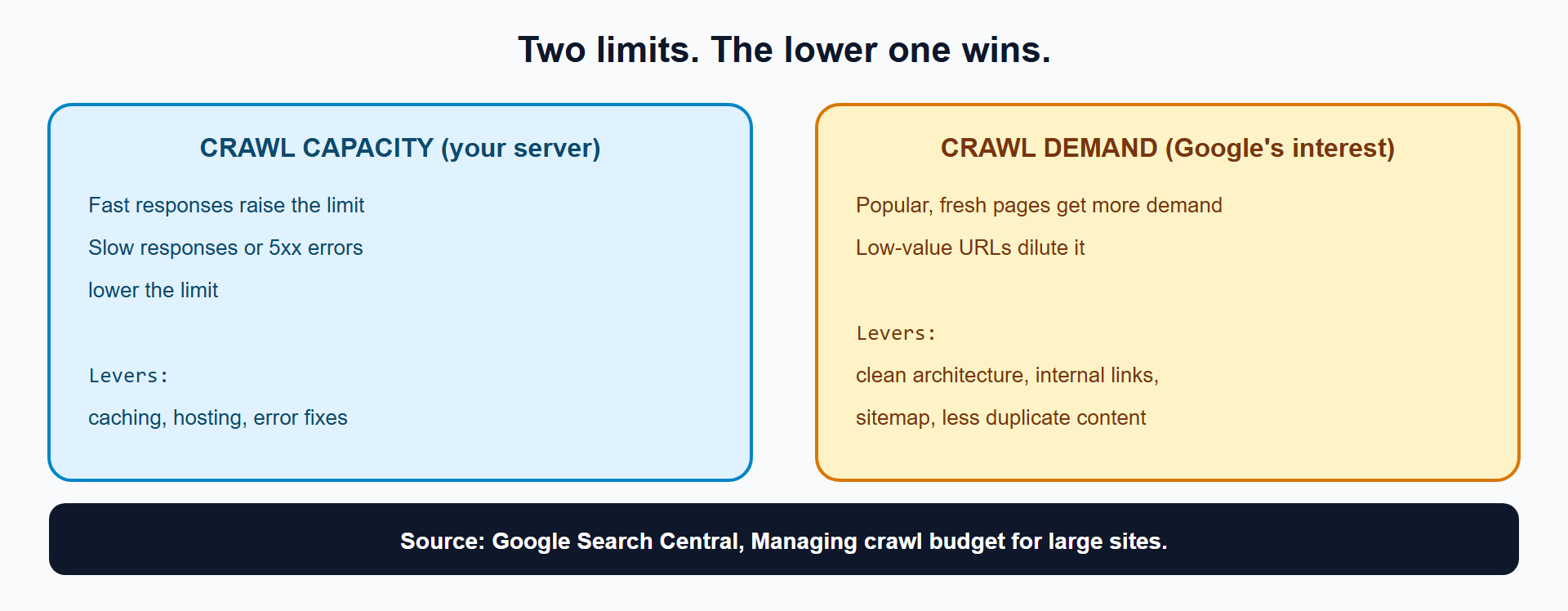
Crawl budget is the number of URLs Googlebot fetches from your site in a given period. It comes from two limits: how much your server can handle (crawl capacity) and how much Google wants to crawl (crawl demand).
Google’s crawl budget guide states that if a site slows down or returns server errors, the limit goes down and Google crawls less. It also warns that when Google spends too much time on low-value URLs, its crawlers can miss the rest of the site.
Does a Small Clinic Website Need to Worry About Crawl Budget?
No, in most cases. Google’s guide names its audience: sites with more than 1 million unique pages that change about weekly, and sites with more than 10,000 unique pages that change daily. A single-location practice with 200 pages falls far below both. Google can crawl it in a day.
Google’s own Crawl Stats help page says the same thing from another angle: it calls the report advanced and notes that sites with under 1,000 pages typically do not need it.
Which Medical Websites Do Have a Crawl Budget Problem?
Directories, catalogs and multi-location groups with URL multipliers have the problem, and a page count under 10,000 does not protect them. Three patterns create it:
- Filter systems. A provider directory can turn a few hundred providers into 160,000 filter URLs, as I show in How Does Filtered Search Waste Googlebot Crawl Budget on Medical Provider Directories and Catalogs?.
- Calendars and search. An appointment calendar that links to every date, or internal search results, builds endless URL trails.
- Slow or failing servers. Capacity drops when responses lag or errors appear, and a small site on weak hosting can show crawl delays even with few pages.
The question is not “how big is my site.” The question is “how many URLs can Googlebot find, and how many are worth fetching.”
How Do I Calculate Whether My Site Has a Crawl Budget Deficit?
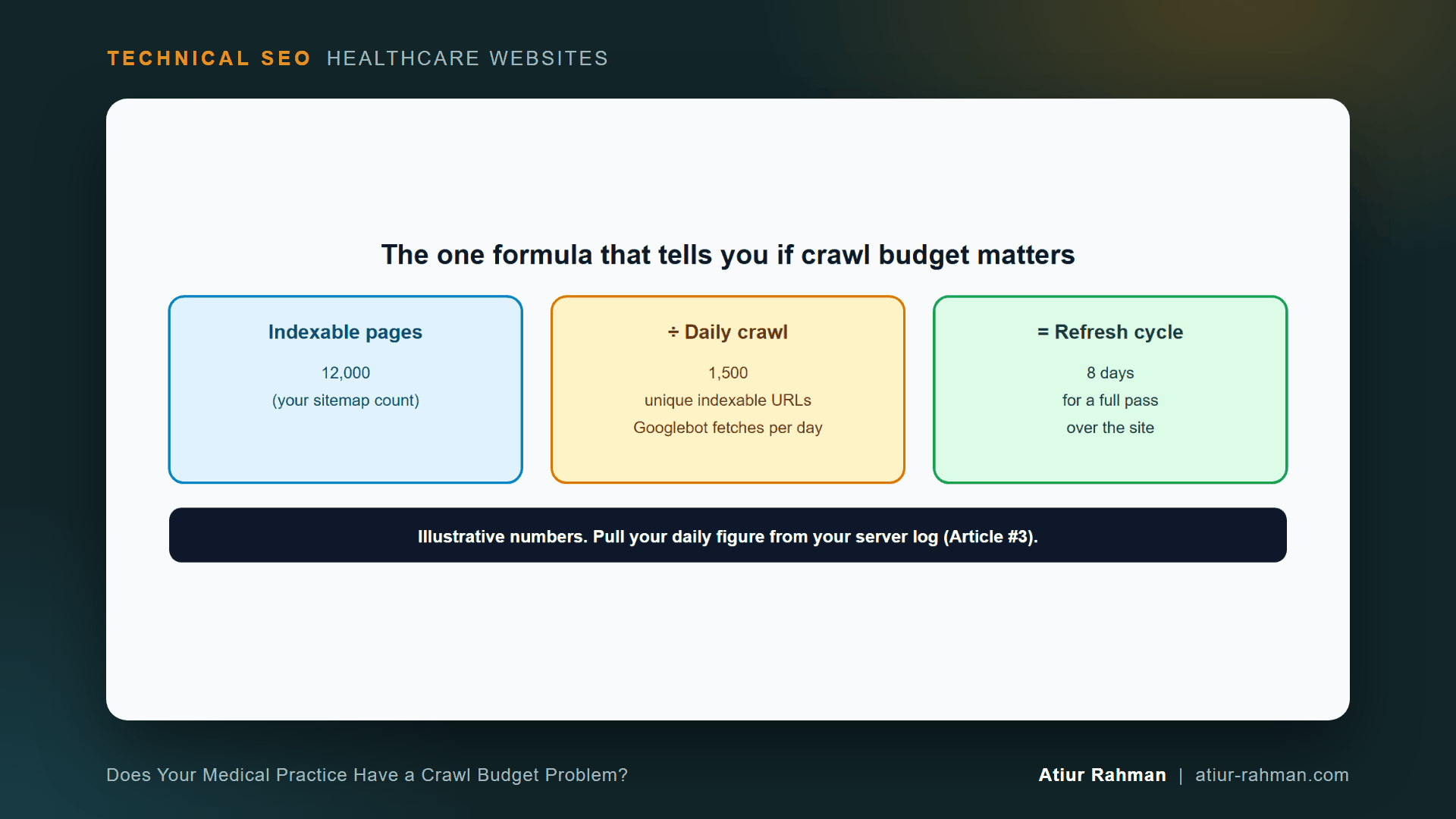
Divide your indexable pages by the number of unique indexable URLs Googlebot fetches per day. The result is your refresh cycle: the days Googlebot needs to see every page once.
Refresh cycle (days) = Total indexable pages ÷ Unique indexable URLs crawled per day
Example (illustrative numbers):
12,000 indexable pages ÷ 1,500 unique indexable URLs per day = 8 days
An 8-day cycle means a page you edit today is re-read within about a week. Compare that number with how often you change content. A provider directory that updates weekly, with an 8-day cycle, runs behind. A site that updates monthly, with a 3-day cycle, runs fine.
How Do I Get the Daily Crawl Number From My Server Log?
Count unique URLs per day that Googlebot fetched with a 200 status and without a query string. Pull a Googlebot-only log first, using the steps in How Do I Read My Medical Practice’s Server Log File to See What Googlebot Is Doing?.
awk '$9==200 && $7 !~ /?/ {d=substr($4,2,11); k=d" "$7; if(!(k in s)){s[k]=1; c[d]++}} END{for(d in c) print d, c[d]}' googlebot.log | sort
Example output from a tiny sample log (format only):
07/Oct/2026 2
08/Oct/2026 1
Each line gives the date and the count of distinct URLs fetched that day. Average the counts across 30 days for a stable figure. Divide your indexable page count by that average.
The command counts unique URLs, not raw requests. Googlebot can fetch the same URL ten times, and unique counts show real coverage.
How Do I Measure How Much Crawl Is Wasted?
Measure the share of Googlebot requests that hit URLs with query strings, and the share that return errors.
# Share of Googlebot requests on parameter URLs
awk '{t++; if($7 ~ /?/) q++} END{printf "%.1f%%n", 100*q/t}' googlebot.log

# Status code mix
awk '{print $9}' googlebot.log | sort | uniq -c | sort -rn
A high parameter share, a growing 404 count or any run of 5xx responses points to waste. Google’s guide says a 404 is a strong signal not to crawl a URL again, while soft 404 pages keep getting crawled. Clearing soft 404s therefore returns crawl time to real pages. I cover that fix in Why Does Search Console Flag My Doctor Bio Pages as Soft 404, and How Do I Fix Them?.
What Does a Slow Server Do to Crawl Capacity?
A slower server lowers the crawl limit. Google’s guide says that when latency rises or responses become longer, or when the site returns server errors, the limit goes down and Google crawls less. A faster response fits more fetches into the same connection time.
Add a response-time field to your log, as shown in the log article, and track the average for provider and location pages. Caching and hosting fixes raise capacity directly.
How Do I Read the Result and Decide What to Fix?
Match your refresh cycle against your update frequency, then fix the largest source of waste first.
| What you see | What it means | First fix |
|---|---|---|
| Refresh cycle shorter than your update cycle, low waste | No deficit | Leave crawl alone |
| Long cycle, high parameter share | Filters or calendars absorb the crawl | Curate and block parameter URLs |
Long cycle, many 404 or soft 404 hits | Dead URLs keep getting visited | Redirect, enrich or return true 404 |
Long cycle, slow responses or 5xx | Capacity limit is low | Caching, hosting, error fixes |
| New provider pages take weeks to appear | Demand or discovery problem | Internal links, sitemap, page quality |
What Raises Crawl Demand?
Useful, linked, fresh pages raise it. Google decides demand per crawler, from factors unique to each. In practice, I strengthen internal links to important pages, keep the XML sitemap clean and limited to indexable URLs, and cut duplicate content so Googlebot does not split its attention.
A sitemap helps discovery, and Google’s sitemap overview explains its role. Do not list URLs you block or mark noindex.
What Pushback Do I Get When I Say “You Do Not Have a Crawl Budget Problem”?
Both outcomes draw an objection.
Marketing, after a clean result: “Then why are our new pages slow to index?” Crawl budget is one cause, and the least common one for small sites. Check page quality, internal links and the “Discovered, currently not indexed” reasons in Search Console next.
Developer, after a bad result: “Bot hits do not cost us anything.” Excess crawling on a weak server pushes response times up, and Google responds by lowering the limit. The cost shows up as slower patient pages and slower discovery of new ones. Show the response-time column next to the crawl volume.
What Do I Do This Week?
- ☐ Count your indexable pages from the XML sitemap and a crawl.
- ☐ Pull 30 days of Googlebot logs and compute the average unique indexable URLs per day.
- ☐ Divide to get your refresh cycle.
- ☐ Compute the parameter share and the
404and5xxcounts. - ☐ Compare the refresh cycle with how often your content changes.
- ☐ Fix the largest waste source first, then re-measure after 14 days.
Reusable asset: the formula and log commands above work as your own crawl budget estimator. Copy them into a spreadsheet with your page count and daily crawl.
Related reads in this hub:
- How Does Filtered Search Waste Googlebot Crawl Budget on Medical Provider Directories and Catalogs?
- What Does Technical SEO Control on a Medical Website (and What Can’t It Fix)?
Frequently Asked Questions
How Many Pages Before Crawl Budget Matters?
Google’s guide targets sites with over 1 million unique pages that change about weekly, and over 10,000 unique pages that change daily. A site below those lines can still waste crawl through filters and calendars, so check your log before assuming safety.
Can I Ask Google to Crawl My Site More?
No setting raises it directly. You raise crawl capacity by speeding up and stabilizing your server, and you raise demand by publishing useful, well-linked pages. Google’s Search Console offers a request-indexing option for individual URLs, which helps for a few important pages.
Does Blocking URLs in robots.txt Increase My Crawl Budget?
It frees crawl time that Googlebot spent on those URLs, and Google’s faceted navigation guidance recommends robots.txt as the effective way to stop crawling of filter URLs. The freed time flows to other URLs only when demand exists for them.
Does Crawl Stats in Search Console Show My Budget?
It shows what Google did: total requests, response codes, file types, purpose and average response time. Google’s Crawl Stats help describes the report as aimed at advanced users and available for root-level properties. Combine it with your own log for URL-level detail.
Do Soft 404s Eat My Crawl Budget?
Yes. Google’s guide says soft 404 pages continue to be crawled and waste budget, while a real 404 signals Google not to crawl the URL again. Convert soft 404s to real 404 responses or give them real content.
What Is a Good Refresh Cycle for a Clinic Website?
Shorter than the time between meaningful content changes. A site that updates provider and service information weekly needs a cycle under a week. A brochure site that changes quarterly tolerates a month. The goal is that Google never lags behind your edits.
Facing unexplained indexation drops or broken booking funnels on your clinic website? Book a 30-minute technical consultation with Atiur.
Part of the Technical SEO for Healthcare Websites series. More guides are on the blog. Related case study: Fixing the Faceted Navigation That Was Eating a Pharmacy Catalog’s Crawl Budget.
References
- Google Search Central, Managing crawl budget for large sites
- Google Search Central, Faceted navigation best practices
- Google Search Central, Sitemaps overview
- Google Search Console Help, Crawl Stats report