

You pulled a month of server logs, opened them and saw 500,000 lines of text. A command-line grep handled the first questions. Now you want the second round of log file analysis: which folder gets the most Googlebot visits, which days spiked, which 404 URLs repeat. Spreadsheets choke past a million rows, and paid log analyzers charge a monthly licence.
You do not need either. Google gives anyone a free BigQuery sandbox, and a log file is just a table waiting for SQL. For a first audit on a medical site, five queries answer most of what a paid tool shows.
I run these queries on healthcare logs when the command-line answers raise bigger questions. In the next ten minutes you will load a log into BigQuery with no credit card, build a Googlebot view and run five queries that expose crawl waste, error clusters and the folders Google ignores.
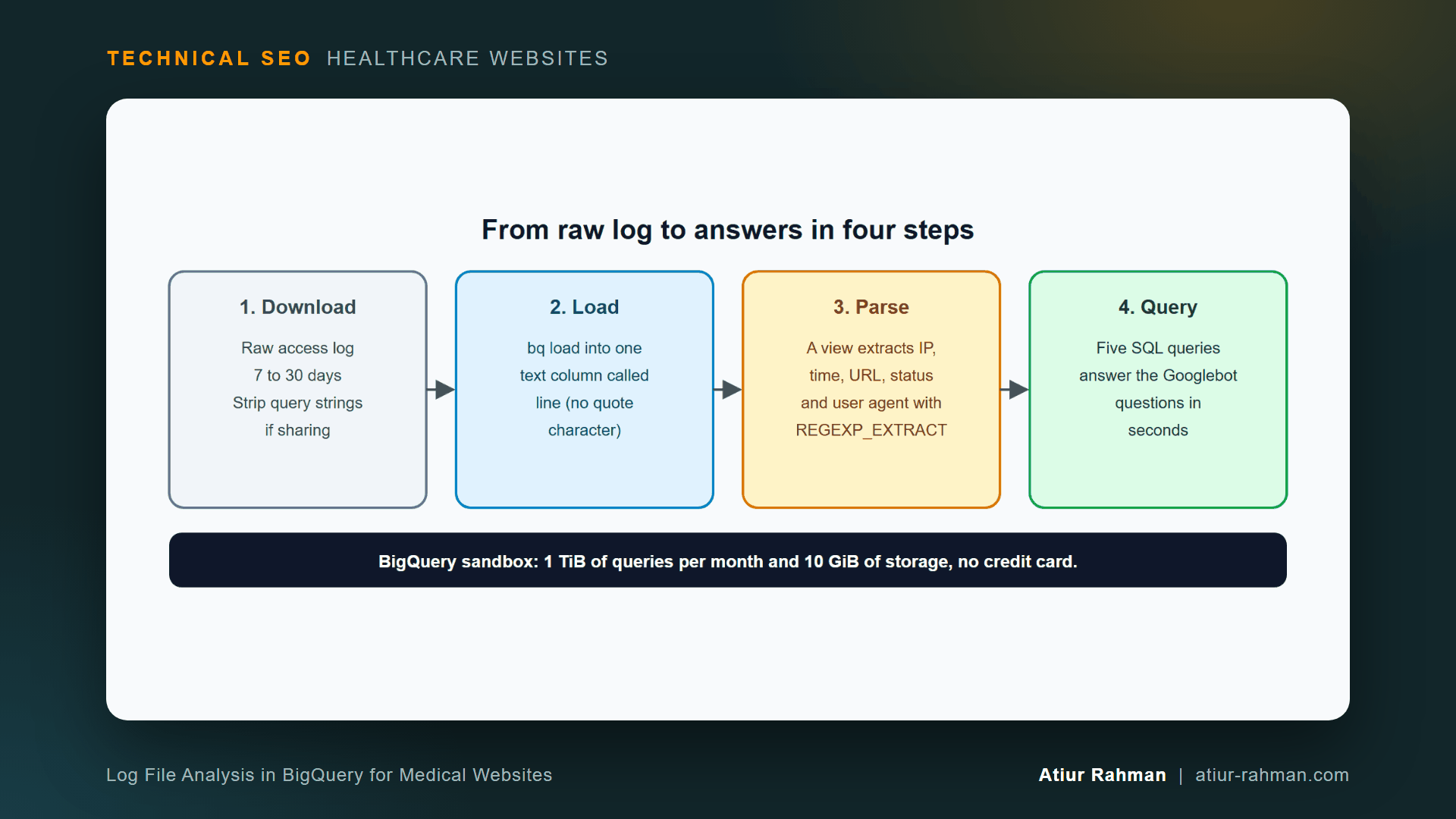
Is Log File Analysis in BigQuery Free?
Yes. The BigQuery sandbox needs no credit card and no billing account, and it includes 1 TiB of query processing per month plus 10 GiB of storage.
Those limits fit this job. You load a log file once, query it, and drop it. You need no inserts or updates after the load.
What Does a Log File Need Before I Upload It?
Remove personal data first. Query strings can carry names, emails and appointment details, so redact the parameter values and keep the parameter names. The names are what the analysis needs.
sed -E 's/=[^& "]*/=X/g' access.log > access-clean.log
A line before and after:
BEFORE: "GET /book/?name=Jane+Doe&email=jane@x.com&date=2026-10-12 HTTP/1.1"
AFTER:  "GET /book/?name=X&email=X&date=X HTTP/1.1"
This redacts the value after every equals sign, including those in the referrer field. Delete the raw file when you finish. The privacy reasoning appears in How Do I Read My Medical Practice’s Server Log File to See What Googlebot Is Doing?.
How Do I Load a Server Log Into BigQuery?
Load each log line into a single text column called line, then parse it with SQL. This avoids fighting with the quotes and spaces inside log lines.
- Open the BigQuery sandbox and create a project.
- Open Cloud Shell, or install the
bqtool, and run:
bq mk --dataset YOUR_PROJECT:seo_logs

bq load --source_format=CSV --field_delimiter=$'t' --quote=''
  --schema=line:STRING
  seo_logs.raw_logs ./access-clean.log
The tab delimiter never appears in a log line, so each whole line lands in one cell. The empty --quote='' flag turns off quote handling, which Google’s CSV loading documentation describes: to indicate no quote character, use an empty string. Decompress .gz logs first.
Confirm the load:
SELECT COUNT(*) AS lines FROM `YOUR_PROJECT.seo_logs.raw_logs`;
How Do I Turn Raw Log Lines Into Googlebot Columns?
Create a view that pulls out the IP, timestamp, URL, status and user agent for every line that mentions Googlebot. Every query below runs against this view.
CREATE OR REPLACE VIEW `YOUR_PROJECT.seo_logs.googlebot` AS
SELECT
  REGEXP_EXTRACT(line, r'^(S+)') AS ip,
  PARSE_TIMESTAMP('%d/%b/%Y:%H:%M:%S %z', REGEXP_EXTRACT(line, r'[([^]]+)]')) AS ts,
  REGEXP_EXTRACT(line, r'"(?:GET|POST|HEAD) (S+)') AS url,
  SAFE_CAST(REGEXP_EXTRACT(line, r'" (d{3}) ') AS INT64) AS status,
  REGEXP_EXTRACT(line, r'"([^"]*)"$') AS user_agent
FROM `YOUR_PROJECT.seo_logs.raw_logs`
WHERE LOWER(line) LIKE '%googlebot%';
The view matches the Apache and Nginx combined format. The regular expressions use BigQuery’s REGEXP_EXTRACT and PARSE_TIMESTAMP functions.
One caution applies. A user-agent filter catches anything that claims to be Googlebot, fakes included. Verify the top IPs with the reverse DNS method from the log article before you draw conclusions, or match them against Google’s Googlebot IP ranges.
Which Five SQL Queries Answer the First Googlebot Audit?
Status mix, daily crawl, directory share, 404 hunt and parameter share cover the first audit. Run them in this order.
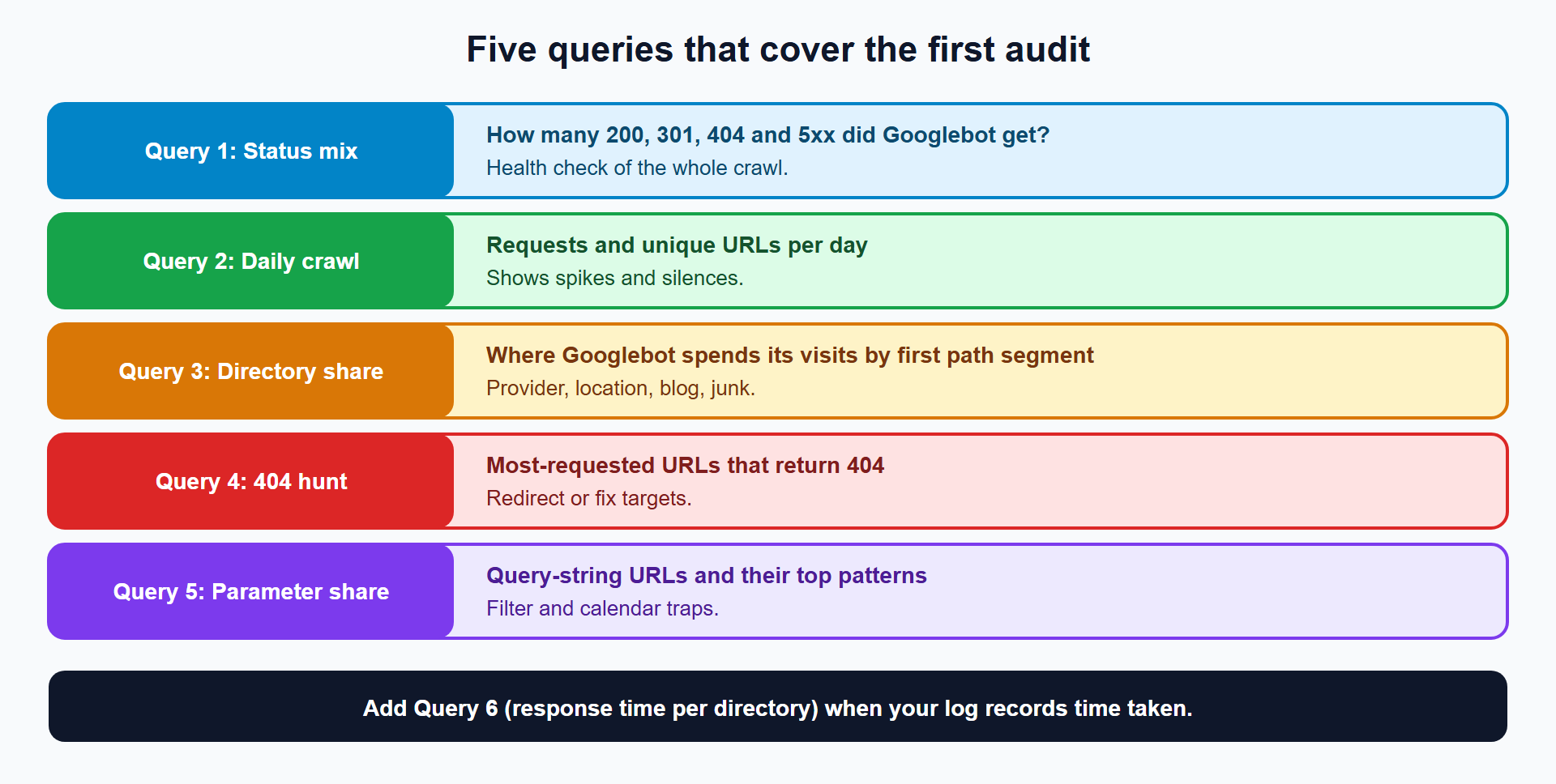
Query 1: Which Status Codes Is Googlebot Getting?
SELECT
  status,
  COUNT(*) AS hits,
  ROUND(100 * COUNT(*) / SUM(COUNT(*)) OVER (), 1) AS pct
FROM `YOUR_PROJECT.seo_logs.googlebot`
GROUP BY status
ORDER BY hits DESC;
Example result (synthetic sample log, format only):
| status | hits | pct |
|---|---|---|
| 200 | 184 | 83.3 |
| 404 | 26 | 11.8 |
| 500 | 11 | 5.0 |
A healthy site returns mostly 200. A large 404 share points to dead URLs, and any 5xx share means Googlebot hit a failing server. Google states that 5xx and 429 errors prompt its crawlers to temporarily slow down, per its status code guidance.
Query 2: How Many Requests and Unique URLs Does Googlebot Fetch Each Day?
SELECT
  DATE(ts) AS day,
  COUNT(*) AS requests,
  COUNT(DISTINCT url) AS unique_urls
FROM `YOUR_PROJECT.seo_logs.googlebot`
GROUP BY day
ORDER BY day;
Watch for a day that drops toward zero. A firewall change, a security plugin or an outage creates that shape. The unique-URL column feeds the refresh-cycle formula in Does My Medical Practice Website Actually Have a Crawl Budget Problem?.
Query 3: Which Folders Get the Most Googlebot Attention?
SELECT
  REGEXP_EXTRACT(url, r'^(/[^/?]*)') AS dir,
  COUNT(*) AS hits,
  ROUND(100 * COUNT(*) / SUM(COUNT(*)) OVER (), 1) AS pct
FROM `YOUR_PROJECT.seo_logs.googlebot`
GROUP BY dir
ORDER BY hits DESC;
Example result (synthetic sample):
| dir | hits | pct |
|---|---|---|
| /providers | 46 | 20.8 |
| /find-a-doctor | 45 | 20.4 |
| /blog | 30 | 13.6 |
| /old | 28 | 12.7 |
| /wp-login.php | 21 | 9.5 |
Compare the list to the pages that earn appointments. When /find-a-doctor, /old and /wp-login.php outrank /locations, Googlebot spends visits in the wrong rooms.
Query 4: Which URLs Return 404 to Googlebot Most Often?
SELECT url, COUNT(*) AS hits
FROM `YOUR_PROJECT.seo_logs.googlebot`
WHERE status = 404
GROUP BY url
ORDER BY hits DESC
LIMIT 20;
The top rows are your redirect targets. Retired provider bios, old service pages and mistyped links show up here first. The fix pattern is in How Do I Build a Redirect Map Before a Medical Website Redesign or CMS Migration?.
Query 5: How Much Crawl Goes to Filter and Calendar URLs?
-- Share of Googlebot requests that carry a query string
SELECT ROUND(100 * COUNTIF(url LIKE '%?%') / COUNT(*), 1) AS parameter_pct
FROM `YOUR_PROJECT.seo_logs.googlebot`;

-- Which parameter patterns take the requests
SELECT
  REGEXP_REPLACE(url, r'=[^&]*', '=*') AS pattern,
  COUNT(*) AS hits
FROM `YOUR_PROJECT.seo_logs.googlebot`
WHERE url LIKE '%?%'
GROUP BY pattern
ORDER BY hits DESC
LIMIT 10;
Example result (synthetic sample):
| pattern | hits |
|---|---|
| /find-a-doctor/?specialty=&insurance= | 25 |
| /find-a-doctor/?specialty=&insurance=&language=* | 20 |
| /book/?date=* | 19 |
| /?s=* | 12 |
A directory filter, an appointment calendar and internal search appear in one result. These are the crawl traps from How Does Filtered Search Waste Googlebot Crawl Budget on Medical Provider Directories and Catalogs?.
Query 6 (Optional): Which Folders Respond Slowest to Googlebot?
Add a response-time field to your log format first, as shown in the log file article. With Apache’s %D appended, the last field holds microseconds. Change the user-agent line in the view to match the new ending:
REGEXP_EXTRACT(line, r'"([^"]*)" d+$') AS user_agent,
SAFE_CAST(REGEXP_EXTRACT(line, r' (d+)$') AS INT64) / 1000 AS ms
Then average per folder:
SELECT
  REGEXP_EXTRACT(url, r'^(/[^/?]*)') AS dir,
  ROUND(AVG(ms), 1) AS avg_ms,
  COUNT(*) AS hits
FROM `YOUR_PROJECT.seo_logs.googlebot`
GROUP BY dir
ORDER BY avg_ms DESC;
A slow folder points to a slow database query or a missing cache. Google’s crawl budget guide says that when response times lengthen, the crawl limit goes down and Google crawls less.
How Did I Verify These Queries?
I ran the extraction patterns and aggregations on a 300-line synthetic access log, using DuckDB equivalents of each BigQuery function. The results above come from that sample, so the numbers show format only. The BigQuery syntax follows Google’s function documentation. Run each query on a small slice of your own data first, then on the full table.
What Do I Do With the Results?
Match each finding to a fix and an owner.
| Finding | Fix | Owner |
|---|---|---|
High 404 count on old provider URLs | 301 to a close page, or a true 404 | Developer + technical SEO |
5xx rows on certain days | Host, cache and plugin checks | Developer / host |
Large /find-a-doctor and ?date= share | Curate and block parameter patterns | Technical SEO |
/wp-login.php and ?s= high in the top list | Disallow low-value paths | Technical SEO |
| Daily requests drop to near zero | Firewall, robots.txt and outage checks | Developer + host |
| Providers or locations folders get few hits | Internal links and sitemap review | Technical SEO |
What Pushback Do I Get About Log Analysis?
Developer: “Why upload production logs to a Google project?” Fair question. Redact parameter values before upload, delete the table after the audit, and keep the project private. Sandbox tables also expire after 60 days on their own. If policy forbids any cloud upload, run the same logic with the command-line method from the log article.
Marketing: “Search Console already has Crawl Stats.” It summarizes Google’s own requests. The log shows every URL and every status, which is where waste hides. Use both.
What Do I Do This Week?
- ☐ Download 30 days of raw access logs and redact parameter values.
- ☐ Create a BigQuery sandbox project and load the log into
seo_logs.raw_logs. - ☐ Create the
googlebotview. - ☐ Run Queries 1 to 5 and save the results.
- ☐ Verify the top Googlebot IPs by reverse DNS.
- ☐ Fix the largest waste source first and re-run the same queries after 14 days.
Reusable asset: the view and the five queries above make a complete SQL snippet pack. Save them in your BigQuery project.
Related reads in this hub:
- How Do I Read My Medical Practice’s Server Log File to See What Googlebot Is Doing?
- Does My Medical Practice Website Actually Have a Crawl Budget Problem?
Frequently Asked Questions
Is the BigQuery Sandbox Really Free?
Yes, within its limits. Google’s sandbox needs no credit card or billing account, and grants 1 TiB of query processing per month and 10 GiB of storage. Tables expire after 60 days. Stay inside those limits and the audit costs nothing.
Can I Analyze Logs in Google Sheets Instead?
For small logs, yes. Sheets caps out far below a month of logs from a busy site. Filter to Googlebot with grep first, and import that smaller file. BigQuery handles the full log without the limit.
Does BigQuery Work With Nginx Logs?
Yes. The default Nginx access log uses the same combined format as Apache, and the view above parses it unchanged. A custom Nginx format needs a matching adjustment to the regular expressions.
How Do I Know the Requests Are Really From Googlebot?
Match the IP, not the user agent. Run a reverse DNS lookup and confirm the name ends in googlebot.com or google.com, or compare the IP to Google’s published range file. Google documents both methods in its Verifying Googlebot guide.
Why Do My Queries Return Empty Columns?
The regular expressions did not match your log format. Open one raw line with SELECT line FROM ... LIMIT 5 and compare it with the pattern. Lines with a trailing response-time field need the Query 6 adjustment.
How Often Do I Run This Analysis?
Run it after any migration, redesign, hosting change or sudden traffic drop, and monthly otherwise. Keep the SQL saved, so a repeat takes ten minutes.
Facing unexplained indexation drops or broken booking funnels on your clinic website? Book a 30-minute technical consultation with Atiur.
Part of the Technical SEO for Healthcare Websites series. More guides are on the blog. Related case study: Fixing the Faceted Navigation That Was Eating a Pharmacy Catalog’s Crawl Budget.
References
- Google Cloud, BigQuery sandbox
- Google Cloud, Loading CSV data from Cloud Storage
- Google Cloud, BigQuery string functions and timestamp functions
- Google Search Central, Verifying Googlebot
- Google Search Central, Googlebot IP ranges
- Google Search Central, HTTP status codes, network and DNS errors
- Google Search Central, Managing crawl budget for large sites