

Your engineering team wants to rebuild the clinic website as a single-page React app. The demo is fast and the animations are smooth. Marketing asks one question: “Will Google see our doctors?” Nobody in the room can answer it with confidence.
That question decides whether a provider directory with 300 profiles earns patient appointments or sits half-indexed for weeks. The framework your team picks is rarely the problem. The place where the HTML gets built is. Build it in the browser and Google has to wait its turn. Build it on the server, or ahead of time, and the page arrives complete.
I sit in these architecture discussions with healthcare engineering teams, and the useful move is to choose a rendering strategy by page type, not by site. In the next ten minutes you will learn what each strategy does, which one fits each part of a medical website and the questions a CTO answers before approving a build.
What Is the Difference Between SSR, CSR, SSG and ISR?
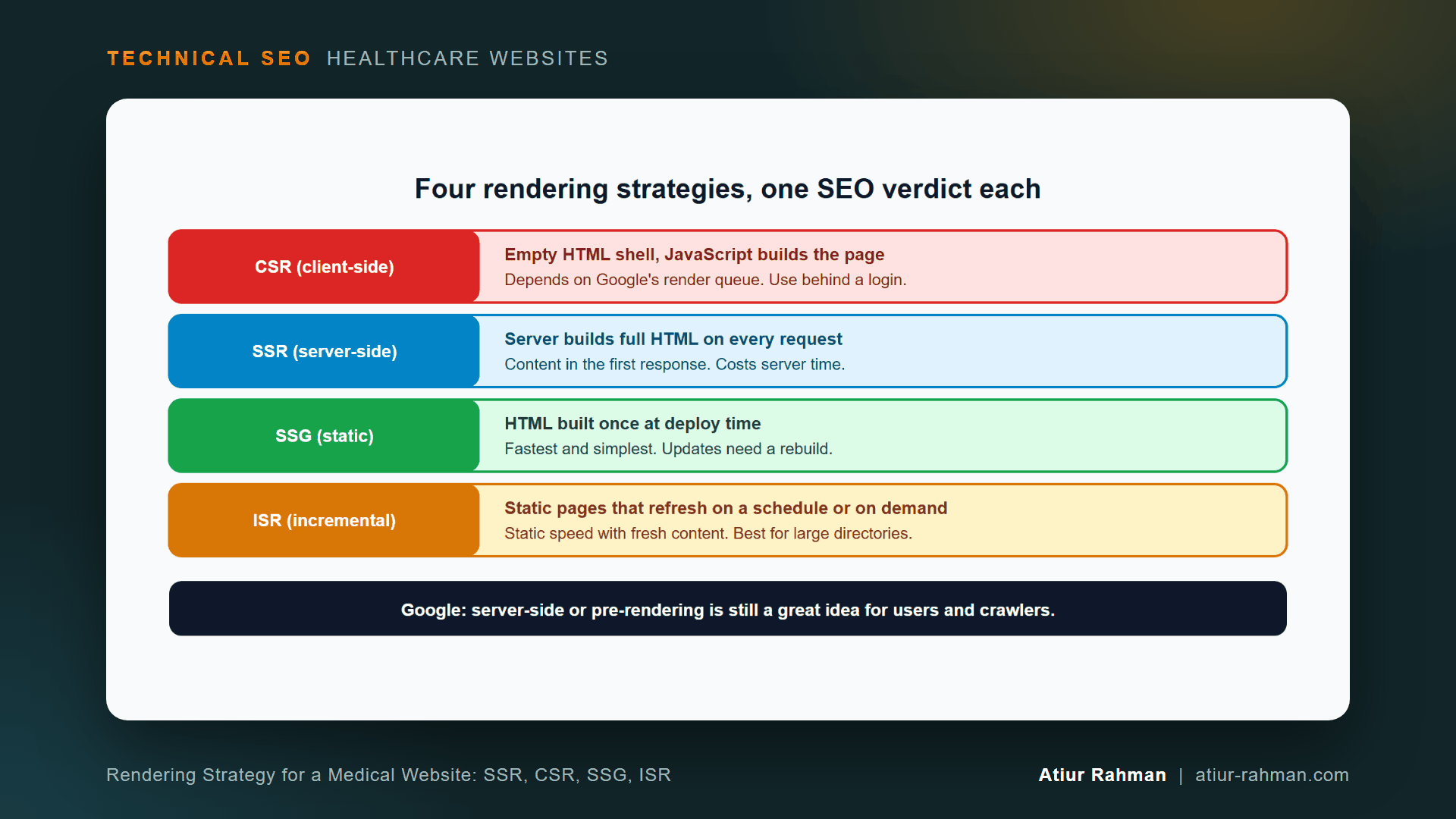
The four strategies differ in where and when the HTML gets built. CSR builds it in the visitor’s browser, SSR builds it on the server for each request, SSG builds it once at deploy time and ISR rebuilds static pages on a schedule or on demand.
Google states the preference directly in its JavaScript SEO basics: server-side or pre-rendering is still a great idea because it makes a website faster for users and crawlers. The same page explains the process. Google crawls, queues the page for rendering, then renders it in headless Chromium, and a page may stay on the queue for a few seconds or longer.
| Strategy | When the HTML is built | SEO position | Cost |
|---|---|---|---|
| CSR (client-side rendering) | In the visitor’s browser | Depends on Google’s render queue | Cheap to host, risky for ranking pages |
| SSR (server-side rendering) | On the server, every request | Content in the first response | Server time on every request |
| SSG (static site generation) | Once, at build time | Content in the first response, fastest delivery | Rebuild needed to update |
| ISR (incremental static regeneration) | At build, then refreshed on a timer or on demand | Content in the first response, stays fresh | Slightly more complex setup |
Why Does Client-Side Rendering Slow Indexing for Clinic Pages?
With CSR, the first HTML response holds almost no content. Googlebot sees an empty shell, then queues the page for rendering. Your doctor’s name, specialties and booking link exist only after JavaScript runs. Any failure during that run, a blocked script or a slow API call, leaves Google with an empty page. I walk through the two-stage queue in Why Do My React Pages Take Weeks to Index?.
Is Dynamic Rendering a Fix for a CSR Site?
No. Google’s documentation says dynamic rendering was a workaround and not a long-term solution for problems with JavaScript-generated content, and it recommends server-side rendering, static rendering or hydration instead. Its dynamic rendering page adds that the approach creates additional complexity and resource requirements.
Which Rendering Strategy Fits Each Page on a Medical Website?
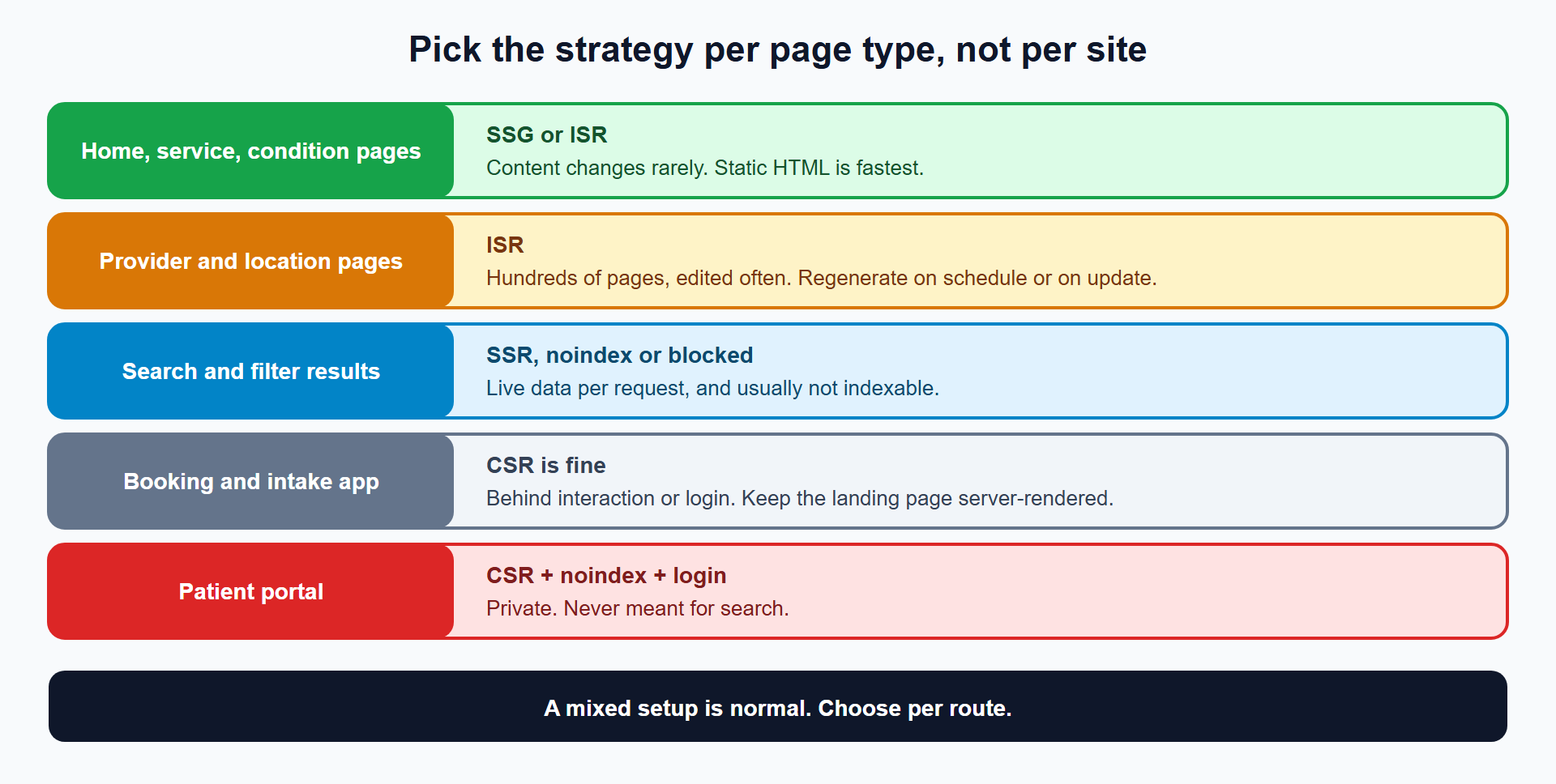
Match the strategy to how often the page changes and whether it must rank. A mixed setup is normal, and most healthcare sites need three of the four.
| Page type | Must rank? | Strategy | Reason |
|---|---|---|---|
| Home, service and condition pages | Yes | SSG or ISR | Content changes rarely, and static HTML loads fastest |
| Provider and location pages | Yes | ISR | Hundreds of pages, edited often |
| Blog and guides | Yes | SSG or ISR | Stable between edits |
| Provider search and filter results | Rarely | SSR, with noindex or a robots.txt block on variants | Live data per request |
| Booking and intake app | No | CSR is fine | Interactive, behind a click or login |
| Patient portal | No | CSR, noindex, login | Private by design |
The landing page for booking still belongs in the server-rendered group. A patient finds /book/ through search, so keep the page’s headline, location list and phone number in the HTML, and let the scheduling widget load client-side beneath it.
How Do I Set Up ISR for a Provider Directory?
Generate the provider pages at build time, then let them regenerate on a schedule or when a record changes. This pattern comes from the Next.js ISR guide, adapted to provider pages.
// app/providers/[slug]/page.jsx

// Invalidate the cache at most once an hour
export const revalidate = 3600

export async function generateStaticParams() {
  const providers = await fetch('https://api.yourclinic.com/providers').then((res) => res.json())
  return providers.map((p) => ({ slug: p.slug }))
}

export default async function Page({ params }) {
  const { slug } = await params
  const provider = await fetch(`https://api.yourclinic.com/providers/${slug}`).then((res) => res.json())
  return (
    <main>
      <h1>{provider.name}</h1>
      <p>{provider.specialty}</p>
      <a href={`/book/?provider=${provider.slug}`}>Book an appointment</a>
    </main>
  )
}
The Next.js guide describes how it works. Next.js prerenders each page at build. After the revalidation window passes, the next request still returns the cached page, and a fresh version generates in the background. A request for a page that does not exist returns a 404, a detail that matters for the soft 404 problem in Why Does Search Console Flag My Doctor Bio Pages as Soft 404, and How Do I Fix Them?.
The guide recommends a high revalidation time, such as an hour instead of a second, and on-demand revalidation when you need precision. For a roster that changes daily, trigger regeneration when a provider record changes:
'use server'
import { revalidatePath } from 'next/cache'

export async function onProviderUpdated(slug) {
  revalidatePath(`/providers/${slug}`)
}
This example uses the App Router as documented for Next.js 16. Other frameworks, such as Nuxt, Astro, SvelteKit and Gatsby, offer equivalents under different names. The principle holds in all of them: deliver HTML, refresh it behind the scenes.
How Do I Check What Google Gets From My Rendered Pages?
Compare the raw HTML response with what the browser shows. Any content missing from the raw response depends on JavaScript.
# Is the provider's name in the raw HTML, before any JavaScript runs?
curl -s https://www.yourclinic.com/providers/dr-maria-lee/ | grep -c "Maria Lee"

# Are navigation links real anchors with href attributes?
curl -s https://www.yourclinic.com/ | grep -oE '<a [^>]*href="/[^"]*"' | head
A count of 0 in the first command means the page’s key content appears only after JavaScript runs. Empty output from the second means menu links are scripted, and Google’s link requirement is that links are <a> elements with an href.
Then inspect the live URL in Search Console’s URL Inspection tool and compare the rendered HTML with the raw response. The full diagnostic routine is in How Do I Diagnose JavaScript SEO Breakdowns on a Medical Website?.
What Pushback Do I Get From Engineering and Marketing?
Both sides have a case, and the compromise is a hybrid.
Engineering: “CSR ships features faster, and our team knows React.” Keep React. Modern frameworks render React on the server or at build time, so the developer experience stays and the HTML arrives complete. The decision concerns where React runs, not whether it runs.
Engineering: “SSR adds server cost and complexity.” It does, for every request. Use SSG and ISR for the pages that change slowly, which covers most of a clinic site, and keep SSR for the few pages that need live data.
Marketing: “Make everything instantly updatable.” Instant updates need SSR or very short revalidation windows. A provider’s bio changing within the hour rarely matters. Set revalidation by how fast each page really needs to refresh.
What Questions Does a CTO Answer Before Approving the Build?
Answer these six, in writing, before a single route gets built.
- Which routes must rank? List them. Those routes get SSG, ISR or SSR.
- How often does each ranking route change? The answer sets the revalidation window.
- Where does the HTML get built for each route? Name it: build, server or browser.
- Are all navigation and pagination links real
<a href>elements? Test withcurl. - What returns a
404for a record that does not exist? Check unknown slugs. - Which routes are private? Mark them
noindexand put them behind login.
If a ranking route answers “browser” to question 3, change the plan before building.
What Do I Do This Week?
- ☐ List every route type on the site and mark which must rank.
- ☐ For each, record where the HTML is built today.
- ☐ Run the
curlcontent check on one provider page, one location page and one service page. - ☐ Move any ranking route that builds in the browser to SSG, ISR or SSR.
- ☐ Set revalidation windows by how often each page changes.
- ☐ Confirm unknown slugs return
404.
Reusable asset: the page-type table and the six questions above make a one-page architecture decision sheet. Bring it to your next planning meeting.
Related reads in this hub:
Frequently Asked Questions
Can Googlebot Render JavaScript?
Yes. Google renders pages with headless Chromium after the initial crawl. The page waits in a queue that can take a few seconds or longer, per Google’s JavaScript SEO basics. Rendering works, and it adds a delay and a failure risk that server-delivered HTML avoids.
Is Server-Side Rendering Always Better for SEO Than Client-Side Rendering?
For pages that must rank, yes. SSR puts content in the first response, so Google reads it without waiting for the render queue. For private or interactive pages that never need to rank, CSR is fine and cheaper.
What Is the Difference Between SSG and ISR?
SSG builds every page once per deployment, and an update needs a rebuild. ISR serves the static page and regenerates it in the background after a set time or when you trigger it. ISR suits directories with hundreds of frequently edited pages.
Does a Single-Page App Hurt SEO?
A single-page app that renders only in the browser puts every page behind the render queue and a JavaScript failure risk. A single-page app that renders on the server or at build time delivers complete HTML, and then SEO impact is small.
Do I Need Next.js for Good SEO?
No. Any stack that delivers complete HTML works, including WordPress, which renders on the server by default. A rebuild only matters when the current site renders in the browser.
Does Hydration Hurt SEO?
Hydration adds interactivity to HTML that already arrived, so the content is present before it runs. Google lists hydration alongside server-side and static rendering as a better path than dynamic rendering.
Facing unexplained indexation drops or broken booking funnels on your clinic website? Book a 30-minute technical consultation with Atiur.
Part of the Technical SEO for Healthcare Websites series. More guides are on the blog. Related case study: Telehealth platform: 88% organic traffic recovery after YMYL core update.
References
- Google Search Central, JavaScript SEO basics
- Google Search Central, Dynamic rendering as a workaround
- Google Search Console Help, URL Inspection tool
- Next.js, Incremental Static Regeneration guide